Online meetings have become a regular part of working life. Teams discuss projects through video calls, freelancers speak with clients remotely, students attend online sessions, and businesses handle customer conversations across different locations. While these tools make communication easier, they also create a few familiar problems: background noise, missed information, unclear audio, and the never-ending task of writing meeting notes.
This is where AI productivity software can make a difference.
Krisp is an AI-powered voice and meeting productivity platform designed to improve the way people communicate online and manage conversations. It combines features such as background noise cancellation, meeting transcription, AI-generated notes, action items, and accent conversion. The platform also offers voice AI solutions for call centres and developers.
Rather than focusing only on recording meetings, Krisp aims to make conversations clearer and the information shared during them easier to use afterwards. This can be helpful when a team needs to remember decisions, follow up on tasks, or review a discussion without listening to an entire recording again.
In this guide, we explore what Krisp offers, how its main features work, who may benefit from it, and what users should consider before choosing a plan.
What Is Krisp?

Krisp is an AI-powered voice technology platform developed to improve audio communication and make conversations more productive. Its tools are designed for individuals, remote teams, businesses, call centres, and developers working with voice-based applications.
The platform is best known for its AI noise cancellation technology, which helps reduce unwanted sounds during online calls. Over time, its product offering has expanded to include an AI Meeting Assistant, transcription, automated meeting notes, accent conversion, and other voice AI capabilities.
Krisp currently presents three main product areas:
AI Meeting Assistant: Helps individuals and teams record or transcribe meetings, generate summaries, organise notes, and capture action items.
Call Center AI: Provides voice-related tools for customer service teams and business process outsourcing operations.
Krisp for Developers: Offers voice AI models and APIs that developers can integrate into their own applications and voice-based products.
This wider approach makes Krisp more than a simple noise-cancellation application. It is designed to support different stages of voice communication, from improving audio during a conversation to organising information after the call.
How Does Krisp Work?
Krisp uses artificial intelligence to process voice and audio information. Its tools can help separate speech from unwanted background sounds, convert spoken conversations into written text, and organise meeting information into more useful formats.
For an individual user, the process may begin with installing the application and connecting it to a preferred conferencing platform. Once configured, Krisp can work alongside supported calling applications to improve audio and capture meeting information.
A typical workflow looks like this:
Install Krisp and sign in to your account.
Connect your microphone and speaker settings through the Krisp application.
Select the relevant noise cancellation and meeting assistant options.
Join a supported online meeting or use the available recording and transcription features.
Review the transcript, AI notes, key decisions, and action items after the conversation.
The exact setup depends on the operating system, selected features, and meeting application. Users should check the latest compatibility and setup instructions before installation.
Key Features of Krisp
Krisp brings several voice and productivity tools together in one platform. Each feature addresses a different communication challenge, making it useful for people who spend a large part of their day speaking with colleagues, clients, or customers.
1. AI Noise Cancellation
Background noise can make even a short online meeting difficult. Sounds such as traffic, fans, keyboard typing, nearby conversations, and household activity can distract participants and interrupt communication.
Krisp's AI noise cancellation technology is designed to reduce unwanted background sounds during calls. It can help improve the clarity of the user's microphone audio and reduce distracting noise coming from other participants, depending on the supported setup.
This can be especially useful for:
Remote employees working from shared spaces.
Freelancers attending client meetings from home.
Online teachers and students.
Customer support professionals.
Business teams working across different locations.
Clear audio can make conversations easier to follow and reduce the need to repeat information. However, noise cancellation is not a substitute for a good microphone or a quiet environment. Audio quality can still depend on the device, internet connection, room conditions, and the type of background sound.
2. AI Meeting Assistant
Taking notes while participating in a discussion can be difficult. People may miss important details because they are busy writing, switching between applications, or trying to keep up with several speakers.
Krisp's AI Meeting Assistant is designed to make this process easier. It can capture meeting information, generate transcripts, and organise important discussion points into notes.
Depending on the selected mode and available plan, users can work with transcription-only, audio recording, or video recording options.
This feature can be useful for:
Project planning meetings.
Client discussions.
Team updates.
Online interviews.
Business consultations.
Remote training sessions.
Instead of relying entirely on handwritten notes, users can review the captured information afterwards and focus more closely on the conversation itself.
3. AI Meeting Notes and Summaries

Long meetings often contain useful information mixed with general discussion. Going through every minute of a recording to find one decision or important update can take unnecessary time.
Krisp's AI note-taking tools are designed to turn conversations into structured meeting summaries. These notes can highlight key discussion points, decisions, and follow-up tasks.
For example, after a project meeting, a summary may help a team identify:
What was discussed.
Which decisions were made.
What tasks need to be completed.
Who is responsible for the next steps.
Which topics require another discussion.
This can make it easier to share meeting outcomes with colleagues who were unable to attend.
AI-generated notes should still be reviewed before they are shared or treated as an official record. Names, figures, deadlines, and technical terms may sometimes need correction.
4. Meeting Transcription
Transcription converts spoken conversations into written text. It can be useful when people need to search for information, review a discussion, or prepare a written record of a meeting.
Krisp supports AI-powered transcription for online and in-person conversations, as well as uploaded audio and video recordings through supported workflows.
Its transcription features can include:
Written transcripts of conversations.
Speaker identification.
Timestamps.
Searchable meeting records.
Transcription in multiple languages.
Summaries and action items based on recorded discussions.
These capabilities can support interviews, webinars, lectures, business meetings, and other voice-based activities.
For multilingual teams, transcription can also make it easier to review conversations across different languages. The accuracy of a transcript may vary depending on speaking speed, audio quality, accents, background noise, and specialist vocabulary.
5. AI Accent Conversion
Communication becomes more complicated when people speak with different accents or have difficulty understanding one another during calls.
Krisp offers AI Accent Conversion, a feature designed to make spoken communication easier to understand by adjusting accent characteristics in real time.
The purpose is not to change the speaker's identity or replace their natural voice. Instead, the technology aims to reduce accent-related communication barriers while maintaining the speaker's voice characteristics.
This may be useful for international teams, customer service operations, remote professionals, and businesses communicating with customers across different regions.
It is important to remember that accent conversion does not guarantee perfect understanding. Language differences, pronunciation, specialist terminology, and communication habits can still affect a conversation.
6. AI Chat and Meeting Search
A meeting transcript can contain a large amount of information, and finding one particular detail may take time.
Krisp includes AI Chat functionality that allows users to ask questions about captured meeting information. Rather than manually searching through an entire transcript, users can ask for relevant details or clarification based on the available meeting content.
For example, someone might want to identify a decision made during a project discussion or review the next steps agreed upon during a client call.
Searchable meeting records and organised notes can also help teams revisit previous conversations without starting from scratch.
The usefulness of these tools depends on the quality and availability of the captured meeting information. Important answers should always be checked against the original discussion when accuracy matters.
7. Integrations With Productivity Tools
Most professionals already use several applications to manage their work. Adding another tool is only helpful when it fits into existing routines.
Krisp provides integrations with selected communication, scheduling, CRM, and productivity platforms. Its website highlights connections with tools such as Google Calendar, Zoom, Slack, HubSpot, Salesforce, and Zapier, alongside other supported services.
These integrations can help users connect meeting information with their wider workflow.
For example:
Calendar integration can help organise upcoming meetings.
Slack sharing can make it easier to distribute notes with colleagues.
CRM integrations can support customer conversation records.
Productivity integrations can help teams manage follow-up activities.
The exact integrations and available functions can vary by plan. Users should review the current integration list before choosing a subscription.
Krisp for Businesses and Call Centres
Krisp is not limited to individuals who attend regular video meetings. Its product range also includes solutions for call centres and business process outsourcing teams.
Customer service professionals handle conversations throughout the day. Background noise, communication barriers, inconsistent call quality, and documentation requirements can all affect the customer experience.
Krisp's Call Center AI offering is designed to address some of these challenges through voice-focused tools.
Noise Cancellation for Customer Conversations
Call centre agents may work in busy environments where several conversations happen at once. Noise cancellation can help reduce distracting sounds and make calls clearer.
Accent Conversion and Voice Translation
Accent conversion and voice translation tools are intended to support communication between agents and customers who speak differently. These features may help reduce some language-related difficulties during customer interactions.
Agent Assistance
AI-powered agent assistance can support customer service teams by providing relevant information or guidance during conversations, depending on the available product and configuration.
Speech Analytics
Speech analytics can help businesses review customer interactions, identify patterns, and evaluate selected aspects of call quality.
Voice Security
Voice security features are designed to support businesses in identifying potential risks during voice interactions. Organisations should review the specific capabilities and deployment requirements before relying on these tools for security decisions.
For companies considering voice AI, implementation should include staff training, data protection reviews, and clear policies for recording and processing customer conversations.
How to Get Started With Krisp
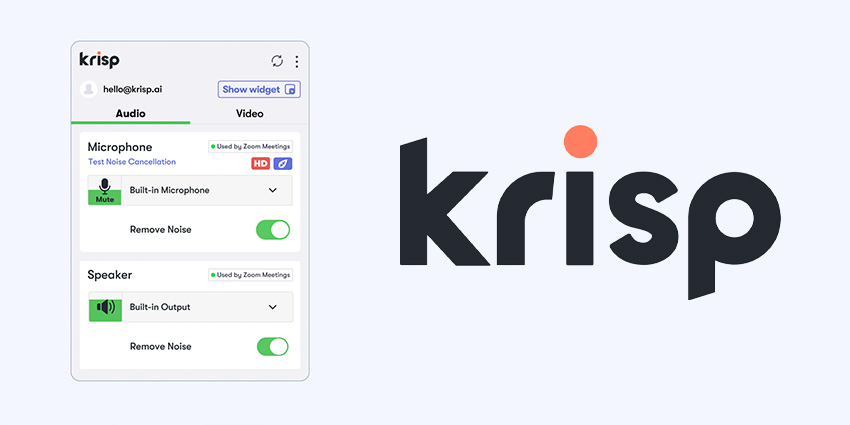
Getting started with Krisp is relatively straightforward, although the steps may differ depending on the product and operating system.
Step 1: Visit the Official Website
Go to the official Krisp website and explore the product section that matches your needs. Individual users may want the AI Meeting Assistant, while businesses and developers may need different solutions.
Step 2: Create an Account
Choose the available sign-up option and follow the instructions. Review the account terms and any trial conditions before proceeding.
Step 3: Download and Install the Application
Download the appropriate version for your supported device and complete the installation process. Check the system requirements if you are unsure whether your computer is compatible.
Step 4: Configure Audio Settings
Open Krisp and select the relevant microphone and speaker options. In your conferencing application, choose the Krisp audio devices where required.
Step 5: Enable the Features You Need
Turn on noise cancellation, meeting transcription, or other available tools according to your workflow.
Step 6: Review Your Meeting Notes
After a meeting, open the available transcript or summary. Check important details and correct anything that may have been captured incorrectly before sharing it with others.
Krisp Pricing and Plans: What Should You Know?
Krisp offers different pricing options designed for individuals, teams, and larger organisations. The available plans and included features can change, so checking the official pricing page is important before subscribing.
Its published plan structure includes the following options:
Plan | Designed for | General focus |
|---|---|---|
Free Trial | New users | Testing premium features |
Core | Individuals and small teams | Meeting notes, transcription, noise cancellation, and integrations |
Advanced | Teams with additional requirements | Advanced controls, integrations, and collaboration features |
Enterprise | Larger organisations | Organisation-wide administration, security, and custom requirements |
The Free Trial is intended to help users explore the product before committing to a paid plan. Paid plans may differ in storage, accent conversion limits, integrations, administrative controls, and other features.
Before purchasing, consider:
Whether the plan includes the features you actually need.
How many users require access.
Storage limits and recording requirements.
Whether your preferred integrations are supported.
Monthly versus annual billing.
Cancellation and renewal conditions.
Whether enterprise security requirements are covered.
A lower-priced plan may be enough for an individual who mainly wants cleaner audio and meeting notes. A larger team may need advanced administration, collaboration, or compliance-related options.
Benefits of Using Krisp
Krisp brings several voice-related tools together, which can make it useful for people who regularly communicate through calls and meetings.
Better Audio Clarity
Noise cancellation can reduce unwanted background sounds and help make conversations easier to follow.
Less Manual Note-Taking
Automated transcripts and meeting summaries can reduce the amount of information users need to write down during a discussion.
Easier Meeting Follow-Ups
Action items and structured notes can help teams remember decisions and identify what needs to happen next.
Support for Remote Work
People working from home, shared offices, or different locations can use voice-focused tools to improve their communication experience.
Useful for Global Teams
Multilingual transcription and accent-related features can support communication across international teams, although they do not remove every language barrier.
Multiple Business Applications
The platform serves individuals, teams, call centres, and developers, giving it a wider range of potential uses than a basic audio utility.
Privacy and Security: What Users Should Review

Meeting recordings and transcripts can contain sensitive information, including business plans, customer details, financial discussions, and internal decisions.
Before using any AI meeting tool, it is important to understand how that information is handled.
Krisp provides information about its security practices and privacy approach through its official trust and policy resources. However, organisations should assess the specific plan and configuration they intend to use rather than assuming every security feature is included by default.
A few practical precautions can help:
Inform participants when a meeting is being recorded or transcribed.
Follow applicable recording and privacy laws.
Avoid capturing confidential discussions without proper authorisation.
Review who can access meeting recordings and transcripts.
Use appropriate account security controls.
Check data retention and deletion options.
Review organisational policies before connecting business applications.
For companies handling regulated or sensitive information, a formal security and compliance review should be part of the purchasing process.
Krisp vs. Traditional Meeting Tools
Traditional video conferencing applications focus mainly on connecting participants and providing features such as video calls, screen sharing, chat, and basic recording.
Krisp takes a different approach by focusing on the quality and usefulness of voice communication. It adds tools for audio improvement, transcription, meeting summaries, and voice processing.
The two types of software can complement one another rather than always replacing one another.
For example, a team may continue using its preferred video conferencing platform while using Krisp to improve audio and organise meeting information.
Before adopting an additional tool, however, it is worth checking whether the existing conferencing platform already provides the features the team needs. This can help avoid paying for overlapping functionality.
Final Thoughts
Krisp is an AI-powered productivity and voice technology platform built around a practical workplace problem: making conversations clearer and easier to manage.
Its noise cancellation technology can help reduce distractions during calls, while its AI Meeting Assistant brings together transcription, meeting notes, summaries, and action items. Accent conversion, integrations, call centre tools, and developer-focused voice AI solutions extend its usefulness beyond ordinary video meetings.
For remote workers, freelancers, sales teams, and businesses that spend a significant amount of time communicating online, these features may help create a more organised meeting workflow. However, users should review plan limitations, compatibility, privacy requirements, and the accuracy of AI-generated information before relying on the platform.
Ultimately, Krisp is worth considering if clearer calls and better meeting documentation are regular needs in your work. The best way to decide is to compare its current features with your daily workflow and try the available trial before choosing a paid subscription.
FAQ's
Krisp improves online meetings with AI noise cancellation, transcription, and automated meeting notes.
Yes, Krisp supports popular meeting platforms, including Zoom, Google Meet, and Microsoft Teams.
Yes, Krisp can generate meeting transcripts, summaries, and action items using AI.
Krisp offers free access with certain limits, along with paid plans that provide additional features.
Krisp provides security and privacy controls, but users should review its policies before recording sensitive conversations.
Sources and review notes
References used to check facts, freshness, and reader-safe recommendations in this guide.
This article is based on information available from Krisp’s official website and help documentation.
- 1
- 2
Discussion
0 comments
No comments yet
Discussion will appear here once it loads.