Online meetings have become a regular part of work for remote employees, freelancers, students, business owners and professionals. However, background noise, unclear audio, long discussions and the need to take meeting notes can make virtual communication difficult.
This is where Krisp comes in. It is an AI-powered platform designed to improve audio quality and make online meetings more productive. It offers features such as AI noise cancellation, meeting transcription, audio and video recording, automatic meeting summaries and action items.
Whether someone works from home, attends regular client calls or manages a remote team, Krisp provides tools that can help simplify everyday communication.
In this Krisp review, we will explore its features, pricing, benefits, how it works, and whether it is worth considering in 2026.
What Is Krisp?
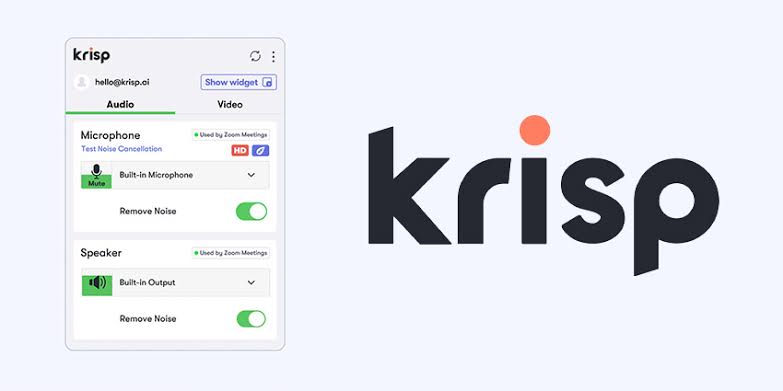
Krisp is an AI-powered voice productivity platform that helps users improve communication during online meetings and phone calls. Its main purpose is to reduce unwanted background sounds and make conversations easier to understand.
The platform goes beyond noise cancellation by offering an AI Meeting Assistant that can record conversations, generate transcripts, prepare meeting summaries and identify important action items.
Krisp works with popular communication platforms, including Zoom, Google Meet, Microsoft Teams and Slack Huddles. This allows users to improve their meeting experience without completely changing their existing communication setup.
Krisp also offers solutions for call centres and developers who want to integrate voice AI capabilities into their own applications.
Official website: https://krisp.ai/
Key Features of Krisp
Krisp offers several AI-powered features designed to improve online communication and meeting productivity. Here are some of its main features.
1. AI Noise Cancellation
One of the main features of Krisp is AI noise cancellation. It helps remove unwanted background sounds during online calls, allowing participants to hear conversations more clearly.
It can reduce common distractions such as keyboard typing, traffic, fans, household sounds and other environmental noise.
This feature can be particularly useful for people working from home, attending meetings from shared spaces or making professional calls in busy environments.
2. AI Meeting Notes
Krisp can automatically generate meeting notes using AI. Instead of writing down every important point during a discussion, users can review automatically prepared notes after the meeting.
The AI Meeting Assistant can organise conversations into useful information, including key discussion points, summaries and action items.
This can help professionals remember important decisions and follow up on tasks more efficiently.
3. Meeting Transcription
Krisp provides meeting transcription that converts spoken conversations into written text.
Users can review what was discussed during a meeting without listening to the entire recording again. This can be helpful for interviews, team discussions, client meetings and online training sessions.
Its transcription feature supports multiple languages, including English, Hindi, Spanish, French, German and other languages.
4. Audio and Video Recording
Krisp allows users to record meetings and revisit important discussions whenever needed.
Depending on the selected recording mode, users can choose transcription-only, audio recording or screen recording options.
This can be useful when someone needs to review a presentation, revisit instructions or check specific details discussed during a meeting.
5. AI Chat
The AI Chat feature allows users to ask questions about their recorded meetings and transcripts.
For example, users can look for important discussion points, clarify decisions or find specific information from a previous conversation.
This makes it easier to retrieve meeting information without manually searching through lengthy transcripts.
6. AI Accent Conversion
Krisp also offers AI Accent Conversion, which is designed to make spoken communication easier to understand.
It can adjust certain accent characteristics in real time while aiming to preserve the speaker's natural voice and communication style.
This feature can be useful for international teams, customer support professionals and people who regularly communicate with clients across different regions.
7. Meeting Integrations
Krisp works with different communication and productivity tools, helping users include it in their existing workflows.
Its integrations include platforms and services such as Zoom, Google Meet, Microsoft Teams, Slack, HubSpot, Salesforce, Notion and Zapier.
The availability of individual integrations may depend on the selected plan and setup.
Krisp Pricing in 2026
Krisp offers different pricing options depending on the user's requirements. Individuals and small teams can choose between its Core and Advanced plans, while larger organisations can explore Enterprise pricing.
The following prices are listed on the official website in US dollars.
Plan | Monthly Billing | Annual Billing |
|---|---|---|
Free Trial | $0 | $0 |
Core | $16/user/month | $8/user/month |
Advanced | $30/user/month | $15/user/month |
Enterprise | Custom pricing | Custom pricing |
Free Trial
Krisp provides a 7-day free trial that allows users to explore premium features without paying upfront. The trial includes access to features such as noise cancellation, transcription, recording and AI meeting notes.
Core Plan
The Core plan is designed for individuals and small teams that need AI meeting assistance and noise cancellation.
Its features include:
Unlimited AI Note Taker
Meeting transcription and recording
AI-generated notes and action items
Unlimited noise cancellation
AI Chat
Multilingual transcripts
Mobile app access
Integrations with supported productivity tools
Advanced Plan
The Advanced plan is suitable for teams that need additional controls and advanced collaboration features.
It includes Core features along with:
Advanced accent conversion
Manager view
Company deal grouping
Meeting trimming and commenting
Advanced integrations
Salesforce integration
Additional storage
Advanced team management controls
Enterprise Plan
The Enterprise plan is designed for larger organisations that require additional security, administration and deployment options.
Its features include:
Single sign-on (SSO) and SCIM
Advanced security controls
Private transcription and recordings
Organisation-wide management
Dedicated account management
Usage analytics
Custom storage options
Pricing note: Prices and plan features may change. Annual billing offers lower advertised monthly rates than monthly billing. Check the official Krisp pricing page for the latest details before purchasing.
Benefits of Using Krisp
Krisp offers several practical benefits for people who regularly participate in online meetings.
Better Audio Quality
Background noise can make online conversations difficult to follow. Krisp helps reduce unwanted sounds, improving the overall clarity of calls.
Improved Meeting Productivity
Automatic transcription and AI-generated notes reduce the need to write everything manually. Users can pay more attention to discussions instead of constantly taking notes.
Time-Saving Features
Meeting summaries and AI Chat make it easier to find important information without reviewing an entire recording.
Flexible Working Environment
Users can attend calls from different environments without worrying as much about common background distractions.
Useful for Remote Teams
Remote teams can use meeting transcripts, summaries and action items to keep track of discussions and maintain better communication.
Supports Different Workflows
Krisp works with several popular communication and productivity applications, making it easier to incorporate into existing work routines.
How Does Krisp Work?
Krisp uses artificial intelligence and audio processing technology to identify unwanted sounds and improve voice communication.
For noise cancellation, the software processes incoming or outgoing audio and helps separate the speaker's voice from distracting background sounds.
For meeting assistance, Krisp captures meeting audio or video according to the selected recording mode. Its AI features then process the conversation to create transcripts, summaries and action items.
This combination of audio enhancement and meeting productivity tools makes Krisp useful for different professional situations.
How to Use Krisp: Step-by-Step Guide
Getting started with Krisp is relatively straightforward. Users can follow these steps to set up the platform and begin using its features.
How to Get Started with Krisp
Follow these simple steps to set up Krisp, enable AI noise cancellation and make your online meetings more productive.
Visit the Official Website
Open the Krisp official website using your preferred browser to explore its features and get started.
Create an Account
Click the sign-up option and register using an available account method, such as your email address, Google account or Microsoft account.
Download the Krisp Application
After creating your account, download the desktop application from your Krisp account dashboard. Follow the installation instructions for your supported device.
Set Up Noise Cancellation
Open the Krisp application and enable noise cancellation for your microphone and speaker. Select Krisp Microphone and Krisp Speaker as your audio devices.
Connect Your Meeting Platform
Open your preferred communication application, such as Zoom, Google Meet or Microsoft Teams. Check the audio settings to ensure that the Krisp devices are selected correctly.
Enable AI Meeting Assistant
Turn on the AI Note Taker feature and select your preferred recording mode, such as transcription-only, audio recording or video recording.
Start Your Meeting
Join your online meeting and use the available Krisp features. After the meeting, access the generated transcript, recording, AI notes and action items through your Krisp account.
Note: Some setup options and features may vary depending on the operating system, application and subscription plan. Check the official Krisp documentation for the latest instructions.
Pros and Cons of Krisp
Before choosing any AI meeting tool, it is useful to understand its advantages and limitations.
Pros | Cons |
|---|---|
AI-powered background noise cancellation | Advanced features require a paid plan |
Automatic meeting transcription | Transcription accuracy can vary |
AI-generated meeting summaries | Requires initial setup and permissions |
Supports popular meeting applications | Some integrations are plan-dependent |
Audio and video recording options | Recording requires attention to participant consent |
AI Chat for meeting information | May be more than some basic users need |
Who Should Use Krisp?
Krisp can be useful for different types of users depending on their communication and productivity requirements.
Remote Employees: People working from home can use noise cancellation to reduce background distractions during team meetings.
Freelancers: Freelancers who regularly communicate with clients can improve call quality and use meeting summaries to track project discussions.
Students: Students attending online classes, webinars and virtual training sessions can benefit from clearer audio and meeting transcripts.
Business Professionals: Managers and professionals can use AI-generated notes and action items to organise meetings and follow-up tasks.
Customer Support Teams: Customer service representatives can use voice enhancement features to improve communication with customers.
Content Creators: People recording voice-based content or participating in online interviews can use noise cancellation to reduce unwanted sounds.
Is Krisp Safe to Use?
Krisp provides security and privacy information for users and organisations that handle meeting recordings and transcripts.
According to its official pricing information, the platform uses encryption to protect data and lists security and compliance standards, including SOC 2 Type II and GDPR. Enterprise customers can also access additional security options.
However, users should understand that meeting recording and transcription involve processing potentially sensitive conversations.
Before recording a meeting, it is important to follow applicable privacy requirements and inform participants when necessary. Users should also review Krisp's privacy policy, data retention information and account settings before sharing confidential discussions.
For more information, visit the Krisp official website.
Krisp Alternatives
Although Krisp offers several useful AI-powered communication features, users may want to compare it with other tools before choosing a platform.
Some alternatives include:
Otter.ai: Offers meeting transcription, summaries and AI-powered conversation assistance.
Fireflies.ai: Helps record, transcribe and organise online meeting conversations.
Zoom: Provides video conferencing and built-in meeting productivity features.
Microsoft Teams: Supports online meetings, team communication and collaboration.
Each platform has different features, pricing structures and integration options. The right choice depends on whether the main requirement is noise cancellation, transcription, meeting management or team collaboration.
Conclusion
Krisp is more than a basic noise cancellation application. It combines AI-powered audio enhancement with meeting transcription, recording, summaries and productivity features.
Its noise cancellation tools can help reduce common background distractions, while the AI Meeting Assistant can make it easier to review conversations and manage follow-up tasks.
The platform is particularly useful for remote employees, freelancers, business professionals and teams that attend frequent online meetings.
However, users who only need occasional noise reduction may not require all its advanced meeting features. Comparing the available plans and trying the free trial can help determine whether the platform meets their needs.
FAQ'S
Krisp is used for AI-powered noise cancellation, meeting transcription, audio and video recording, AI meeting summaries and other voice productivity features.
Krisp offers a 7-day free trial of its premium features. Continued access to paid features requires a suitable subscription.
Yes. Krisp works with popular meeting applications, including Zoom, Google Meet, Microsoft Teams and Slack Huddles.
Yes. Its AI noise cancellation feature helps reduce unwanted background sounds, including traffic, keyboard typing, fans and household noise.
Yes. Krisp can convert recorded meeting conversations into written transcripts. It supports multiple languages, including Hindi and English.
Who should use Technology & Gadgets
Krisp Review: Features, Pricing, Benefits & How It Works is built for readers who want a faster way to finish everyday web tasks. The main goal is shorter workflows, clearer outputs, and reusable tool habits, so the guide focuses on practical choices instead of broad theory.
Use it when you need one of these outcomes:
- testing a task before choosing a heavier app
- saving time on a repeated browser workflow
- combining a guide with a related AltFTool utility
How to get a better result
- Read the core use case and decide what output you need.
- Open the related AltFTool utility and test it with a small sample.
- Review the result, adjust settings, and repeat only if needed.
- Continue with related tools or guides for the next step in the workflow.
Start small, check the first output, and only then repeat the workflow with the full file, text, media, or game session. That gives you a quick quality check before you spend more time.
Quality checks before you trust the output
- the input is clean before running the tool
- the output matches the format you need
- private details are removed before sharing or downloading
Do not overcomplicate a simple task. Start with the smallest sample that proves the workflow, then scale up once the output looks right.
Continue your workflow
If you want to try the workflow now, open the related AltFTool tool area. For more reading, continue through the Technology & Gadgets archive or the AltFTool tools directory.
This creates a cleaner path from explanation to action: read the guide, test the tool, compare the output, and move into the next related AltFTool resource only when it helps the task.
Sources and review notes
References used to check facts, freshness, and reader-safe recommendations in this guide.
Information has been compiled using Krisp's official website, pricing information and product documentation.
- 1Krisp https://krisp.ai/
krisp.ai
- 2AltFTool https://www.altftool.com/
altftool.com
Discussion
0 comments
No comments yet
Discussion will appear here once it loads.