
Mobile phones have become an essential part of everyday life. People use them for communication, online shopping, banking, entertainment, navigation, work, and education. As smartphone usage continues to grow, mobile plans have also become more varied, offering different data allowances, calling benefits, subscriptions, international services, and additional features.
However, having more options does not always mean getting better value. Many mobile users pay for data allowances they never fully use, subscriptions they have forgotten about, and premium features that add little value to their daily routines. Over time, these unnecessary expenses can increase monthly bills without providing any meaningful benefit.
The problem is not always that mobile plans are expensive. Sometimes, the real issue is choosing a plan that does not match actual usage.
For example, someone who mainly uses Wi-Fi at home and work may not need a large monthly mobile data allowance. Similarly, a person who rarely makes international calls may not benefit from paying extra for an international calling package.
The smarter approach is to understand personal mobile habits, identify unnecessary services, and choose a plan based on real requirements rather than attractive promotional offers.
This guide explains how users can avoid paying for mobile data and features they rarely use, compare mobile plans more effectively, and make better decisions without sacrificing the services they genuinely need.
Why Do People Pay for Mobile Services They Rarely Use?
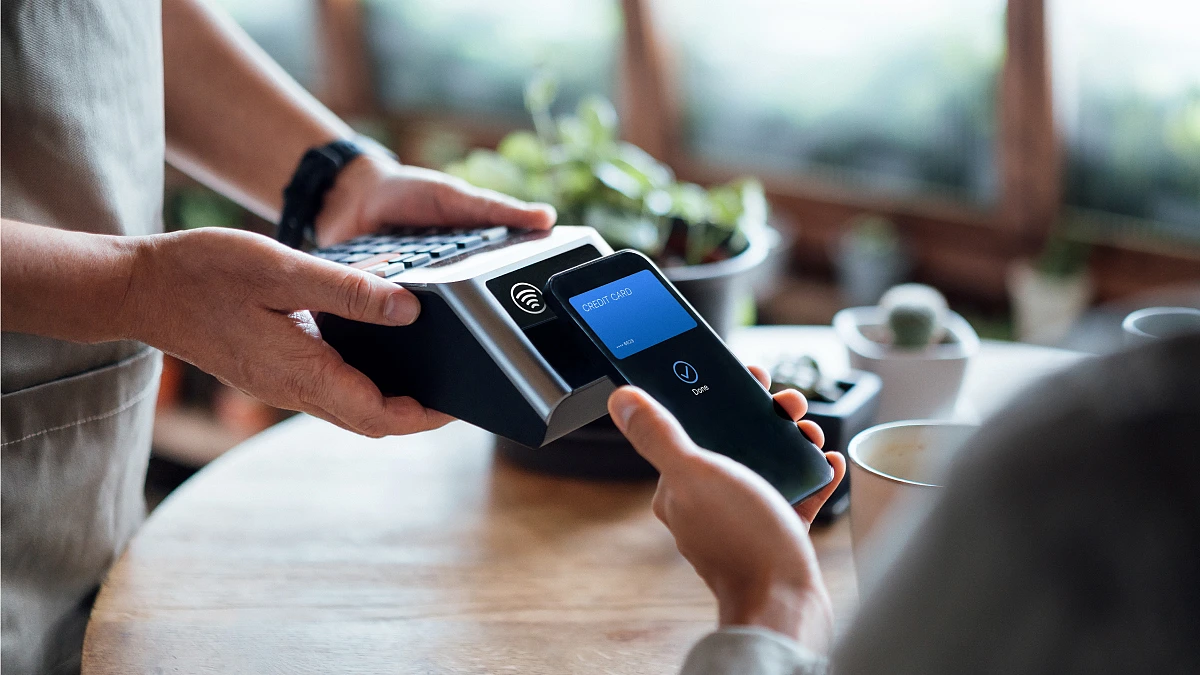
Many mobile users select their plans based on convenience, advertising, or recommendations rather than carefully reviewing their requirements.
Telecom companies often promote packages with large data allowances, unlimited entertainment benefits, premium subscriptions, and additional services. Although these offers can be useful for certain customers, they may not provide equal value to everyone.
Several common habits contribute to unnecessary mobile spending.
1. Choosing Plans With More Data Than Necessary
One of the most common mistakes is selecting a mobile plan with a large data allowance without checking how much data is actually consumed.
For example, someone who regularly connects to home or office Wi-Fi might use only a small portion of their monthly mobile data. However, they may continue paying for a premium package simply because it appears to offer better value.
Unused data does not always carry over to the following month. Depending on the provider and plan conditions, the remaining allowance may expire.
Instead of automatically choosing the largest package, users should understand their average monthly consumption.
2. Paying for Unused Entertainment Subscriptions
Some mobile packages include access to video streaming platforms, music applications, gaming services, or digital entertainment subscriptions.
These benefits can be attractive, particularly when advertised as free additions to a mobile recharge or monthly contract.
However, users should consider whether they actually watch, listen to, or use these services.
If someone already has separate subscriptions or rarely uses the included platforms, the additional benefits may not justify a more expensive plan.
3. Ignoring Automatic Renewals
Subscriptions and add-on services can sometimes renew automatically.
Users may sign up for a promotional offer, free trial, premium feature, or additional data package and forget to cancel it later.
Even relatively small recurring charges can become significant when several services remain active for months.
Reviewing recurring payments regularly can help prevent this type of unnecessary spending.
4. Paying for Features That Do Not Match Daily Needs
Mobile providers offer different features depending on the market and package.
These may include international roaming, international calling, premium voicemail, additional security services, cloud storage, device protection, and entertainment benefits.
Although these services are useful for some people, others may rarely need them.
A customer who never travels internationally, for example, may not need a plan with expensive roaming benefits.
The important thing is to distinguish between features that sound attractive and services that genuinely support everyday activities.
How to Understand Your Actual Mobile Data Usage
Before changing a mobile plan, users should understand how much data they consume and which applications use the most.
Making decisions without reviewing usage can lead to choosing a package that is either unnecessarily expensive or too limited.
Check Your Monthly Data Consumption
Most smartphones include built-in tools that display mobile data usage.
On Android devices, users can generally find this information under Settings, followed by Network and Internet or Connections, depending on the manufacturer.
On iPhones, mobile data consumption can be reviewed under Settings and Cellular or Mobile Data.
These sections usually show how much mobile data has been consumed and which applications are responsible for the usage.
It is also useful to compare usage across several months rather than relying on a single week.
For example, a person might discover that their mobile data consumption remains between 4 GB and 6 GB monthly, even though their current package provides 20 GB.
That difference can indicate an opportunity to move to a smaller plan.
Identify Applications That Consume the Most Data
Identify Applications That Consume the Most Data
Not every app uses mobile data in the same way. Meet five usual suspects. Tap Open case file to see why they eat data and how to catch them.
"Know your suspects, keep your data."
🧰 Click to open your Detective Toolkit
Step 1 · Investigate
- Open your phone's settings and find the mobile data or data usage section.
- Look at the app list and spot the ones using the most data.
- Match each one with the five suspects above.
Step 2 · Quick wins
- Switch off video autoplay.
- Back up photos and videos on Wi-Fi only.
- Lower video quality while on mobile data.
- Save big updates and downloads for Wi-Fi.
Not every application uses mobile data in the same way.
Video streaming, social media, online gaming, video calls, cloud backups, and large downloads can consume significant amounts of data.
Review Background Data Usage
Some applications continue using mobile data even when users are not actively opening them.
Background activity may include refreshing content, synchronising files, downloading updates, or checking notifications.
Users can review application-level data settings and restrict background mobile data where appropriate.
However, they should avoid disabling important services without understanding the consequences. For example, restricting background activity may delay email updates, messaging notifications, or cloud synchronisation.
The objective is to reduce unnecessary consumption without affecting essential functions.
Practical Ways to Reduce Mobile Data Expenses
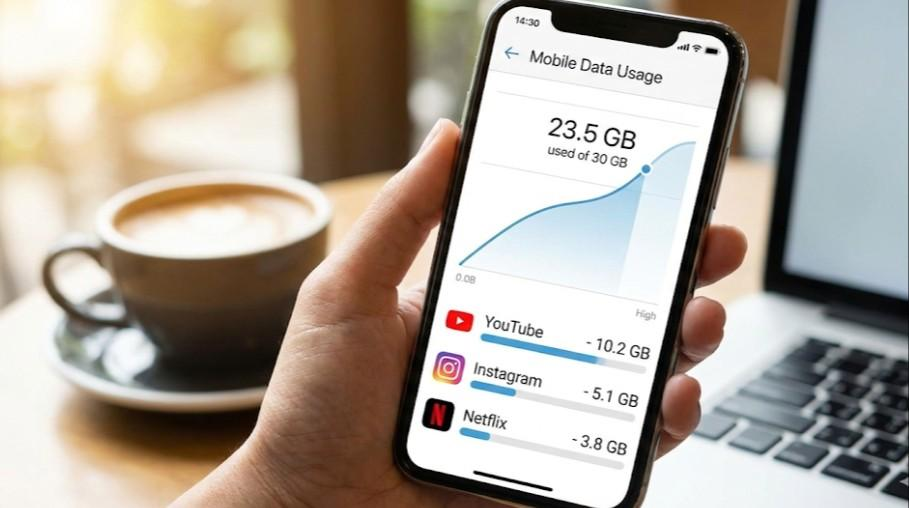
Reducing mobile expenses does not necessarily require changing providers or giving up useful services. Small adjustments to everyday smartphone habits can make a noticeable difference.
1. Use Wi-Fi Whenever It Is Convenient
One of the easiest ways to reduce mobile data consumption is to connect to reliable Wi-Fi networks.
Home, office, educational institutions, and other trusted locations may offer internet access that reduces the need to use cellular data.
Large downloads, application updates, operating system updates, and cloud backups can often be scheduled for Wi-Fi connections.
However, users should be careful when connecting to unfamiliar public networks, particularly when accessing banking accounts or entering sensitive information.
A secure, trusted Wi-Fi connection can help users preserve their mobile data allowance for situations where cellular connectivity is actually needed.
2. Enable Data Saver Settings
Most modern smartphones offer data-saving features that help reduce unnecessary internet consumption.
Depending on the device, these settings may limit background activity, restrict automatic downloads, or reduce the amount of data used by certain applications.
Android devices generally include a Data Saver feature, while iPhones provide Low Data Mode.
These options are particularly useful for people who frequently reach their monthly data limits.
3. Reduce Video Streaming Quality
Streaming video is one of the activities that can consume a large amount of mobile data.
Watching videos at the highest available resolution may not always be necessary, particularly when viewing content on a small smartphone screen.
Users can select lower streaming quality when connected to mobile networks and reserve higher resolutions for Wi-Fi.
Many streaming applications also offer offline downloads, allowing users to save selected content in advance.
This approach can be helpful for people who regularly watch videos while travelling.
4. Disable Automatic Downloads and Updates
Applications frequently receive updates that improve performance, introduce new features, or address security problems.
However, automatically downloading every update through mobile data may increase consumption.
Users can adjust their application store settings to download updates over Wi-Fi whenever possible.
They can also review automatic media downloads in messaging applications, where photos, videos, and documents may otherwise consume data without requiring manual approval.
Security updates should not be ignored. The goal is to manage when and how updates download, not to avoid important updates altogether.
5. Download Content Before Travelling
People who regularly travel can reduce mobile data usage by preparing their devices in advance.
For example, they can download:
Music playlists.
Movies and television episodes.
Maps for offline navigation.
Important documents.
Travel information.
Educational materials.
Offline access can reduce the need for continuous internet connections during journeys.
It also helps when travelling through areas with unreliable mobile coverage.
How to Choose a Mobile Plan That Matches Your Needs
Selecting the right mobile plan is about finding a balance between price, coverage, data allowance, and useful features.
A cheaper package is not automatically better if it does not provide enough data or reliable connectivity. Similarly, an expensive plan may be unnecessary if most of its benefits remain unused.
Compare Your Usage With Available Plans
Before purchasing a new package, users should compare their average monthly data consumption with the allowances offered by different providers.
Consider the following example:
Monthly usage | Possible plan requirement |
|---|---|
2–3 GB | Basic data package |
4–6 GB | Moderate data package |
8–12 GB | Higher everyday usage |
15–25 GB | Heavy browsing and streaming |
25 GB or more | Very high data consumption |
These figures are illustrative, not universal recommendations. Actual requirements depend on video quality, application usage, Wi-Fi availability, and individual habits.
The best plan is one that comfortably supports regular usage without requiring users to pay for a large amount of unused data.
Compare the Total Cost, Not Just the Advertised Price
Mobile providers sometimes advertise attractive introductory prices or promotional benefits.
However, the actual cost may include additional charges, taxes, activation fees, add-ons, or price increases after a promotional period.
Before choosing a package, users should examine:
Monthly or recharge cost.
Data allowance.
Calling and messaging benefits.
Contract duration.
Additional service charges.
Subscription renewal conditions.
Cancellation requirements.
Price changes after promotional offers expire.
A package with a slightly higher advertised price may sometimes offer better value if it includes services the user genuinely needs.
Consider Prepaid and Postpaid Options
Prepaid and postpaid plans offer different ways to manage mobile expenses.
Prepaid plans allow customers to pay in advance for a selected validity period or service package. They can be useful for people who prefer controlling their spending and avoiding unexpected monthly bills.
Postpaid plans generally involve receiving services first and paying a bill later. They may offer family packages, additional data options, or bundled benefits.
Neither option is automatically cheaper. The right choice depends on individual usage, available offers, billing preferences, and provider conditions.
Mobile Features You Should Review Before Paying Extra
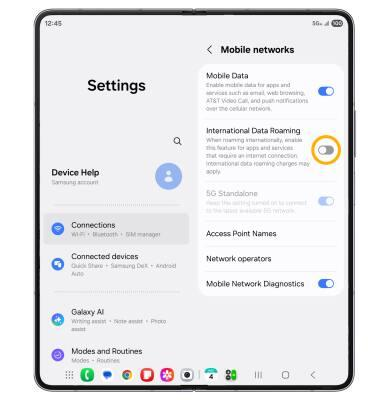
Mobile plans often include additional features that can make everyday smartphone use more convenient. However, users should check whether these services are worth their additional cost.
International Roaming
International roaming allows users to access mobile services while travelling outside their home country.
It can be extremely useful for frequent international travellers who need calls, messages, and mobile internet abroad.
However, people who rarely travel internationally may not need a plan with expensive roaming benefits.
Occasional travellers can compare destination-specific roaming packages, local SIM cards, and travel eSIM options before making a decision.
They should also check network compatibility, coverage, activation requirements, and roaming charges before travelling.
International Calling Packages
Some mobile packages include discounted or bundled international calling minutes.
These benefits may be useful for people who regularly communicate with family members, friends, or business contacts abroad.
However, someone who primarily uses internet-based calling applications may not need a separate international calling package.
Before paying extra, users should compare the cost of the package with their actual calling habits.
Premium Entertainment Subscriptions
Mobile plans sometimes include access to streaming, music, gaming, or digital content platforms.
These services may offer good value when customers regularly use them.
However, users should avoid paying for a more expensive mobile package just to receive subscriptions they rarely open.
It is also worth checking whether the subscription is genuinely included at no additional cost or whether it renews separately after a promotional period.
Device Protection and Insurance
Some mobile providers offer optional device protection or insurance services.
These services may cover certain types of accidental damage, theft, or repair expenses, depending on the policy.
However, coverage limits, exclusions, deductibles, and claim conditions can differ significantly.
Users should compare the protection offered with the actual cost and their existing device insurance arrangements before subscribing.
Cloud Storage and Backup Services
Additional cloud storage can be helpful for people who regularly save photos, videos, and important documents.
However, users may already have sufficient storage through existing accounts or other services.
Before paying for another storage package, they should review their current storage consumption and available alternatives.
How to Identify and Cancel Unnecessary Mobile Subscriptions
Unused subscriptions can quietly increase monthly expenses.
Some are connected directly to mobile accounts, while others are billed through application stores, digital wallets, or payment cards.
A regular subscription review can help users identify services they no longer need.
Review Your Active Subscriptions
Start by checking the subscription sections on your smartphone.
On Android devices, subscriptions purchased through Google Play can generally be reviewed through the Google Play account settings.
On Apple devices, users can check subscriptions through their Apple Account settings.
Users should also review their mobile provider's application or online account dashboard for additional services.
Not every recurring charge appears in the same place, so checking payment statements can provide a more complete picture.
Check Your Mobile Bills Carefully
Monthly mobile bills and prepaid transaction histories can reveal charges that may otherwise go unnoticed.
Look for:
Premium content subscriptions.
Additional data packs.
Entertainment add-ons.
International service charges.
Automatic renewals.
Device protection fees.
Unfamiliar recurring payments.
If a charge is unclear, contact the provider or relevant service before assuming it is unnecessary.
Cancel Services You No Longer Need
Once users identify unused services, they can review the cancellation process.
It is important to understand whether cancellation takes effect immediately or at the end of the current billing period.
Users should also save cancellation confirmations and check their next bill to ensure the recurring charge has stopped.
For services they might need occasionally, pausing a subscription may be a better option than maintaining it throughout the year.
How Mobile Data Management Apps Can Help
Mobile data management tools can make it easier to understand internet consumption and identify unusual usage patterns.
Some smartphones already provide these features, while third-party applications may offer additional tracking and reporting options.
Useful capabilities include:
Daily and monthly data tracking.
Application-level consumption reports.
Data usage alerts.
Mobile data limits.
Background activity monitoring.
Wi-Fi and cellular usage comparisons.
However, users should be careful when installing third-party data monitoring applications.
They should check app permissions, developer reputation, privacy policies, and reviews before sharing device information.
In many cases, built-in smartphone settings are sufficient for managing everyday data usage.
Common Mistakes to Avoid When Reducing Mobile Expenses
Saving money on mobile services is a sensible goal, but making changes without considering practical requirements can create problems.
Here are some mistakes users should avoid.
Choosing the Cheapest Plan Without Checking Coverage
A low-cost package may look attractive, but poor network coverage can make everyday communication difficult.
Users should check network availability in their homes, workplaces, and frequently visited locations before switching providers.
Reducing Data Allowances Too Aggressively
Selecting a package with insufficient data may result in additional charges or repeated top-ups.
It is better to review several months of usage and choose a slightly comfortable allowance rather than selecting an extremely small package.
Ignoring Hidden Charges
Some plans include additional fees, renewal conditions, or charges for services outside the standard package.
Reading the terms and conditions helps users understand the actual cost.
Cancelling Important Services
Not every additional feature is unnecessary.
For example, device security, cloud backups, or international roaming may be important depending on someone's personal or professional requirements.
Users should evaluate the usefulness of each service rather than cancelling everything that costs extra.
Forgetting About Network Quality
A mobile plan is not valuable simply because it provides a large data allowance.
Network speed, reliability, coverage, and customer support also influence the overall experience.
A Simple Monthly Mobile Expense Review
Users do not need to monitor every mobile activity every day. A short review once a month can help keep unnecessary spending under control.
The Future of More Flexible Mobile Plans
The mobile industry continues to evolve as customers expect greater flexibility, transparent pricing, and better control over their subscriptions.
Instead of relying entirely on traditional fixed packages, some providers are exploring more personalised plans, flexible data options, and digital account management features.
Several developments could influence how consumers manage mobile expenses in the coming years.
More Personalised Mobile Packages
Mobile services may increasingly offer packages based on individual consumption patterns.
For example, customers who mainly use messaging and browsing services may prefer smaller data allowances, while people who frequently stream videos may need larger packages.
More flexible options could help customers avoid paying for benefits that do not match their habits.
Greater Control Through Mobile Applications
Provider applications are becoming important tools for managing mobile accounts.
Customers can use them to monitor data consumption, review billing information, purchase add-ons, manage subscriptions, and explore alternative packages.
Clearer usage information can help people make decisions before unnecessary charges accumulate.
More Flexible Connectivity Options
Technologies such as eSIM and dual-SIM functionality give users additional options for managing connectivity.
For example, someone who travels regularly may use one SIM for their primary number and another for temporary data access.
This can provide flexibility, although users should compare pricing, coverage, device compatibility, and local regulations before choosing an alternative.
Growing Interest in Transparent Pricing
Consumers increasingly want to understand what they are paying for.
Clear information about data limits, subscription renewals, roaming costs, and additional fees can make it easier to compare mobile plans.
Providers that communicate these details transparently can help customers make more informed decisions.
Final Thoughts
Avoiding unnecessary mobile expenses does not mean giving up convenient smartphone features or limiting everyday connectivity. It means understanding which services provide genuine value and which ones simply increase the monthly bill.
Users can begin by reviewing their mobile data consumption, identifying applications that use the most internet, and checking whether their current plan matches their daily habits.
They should also examine recurring subscriptions, premium features, international services, and automatic renewals that may no longer be necessary.
A mobile plan should support the way someone actually uses their phone, not encourage them to pay for benefits they rarely need.
By comparing total costs, choosing suitable data allowances, using Wi-Fi strategically, and reviewing subscriptions regularly, consumers can make more informed mobile spending decisions.
Ultimately, the smartest mobile plan is not necessarily the one with the most data or the longest list of benefits. It is the one that delivers reliable service, useful features, and good value without unnecessary expenses.
FAQ's
You can reduce mobile data expenses by using Wi-Fi, limiting background data, lowering video quality, and choosing a plan that matches your usage.
You can check mobile data consumption through your smartphone's Settings under Mobile Data or Network Usage.
Avoiding unused features helps reduce monthly bills and ensures you only pay for services that provide genuine value.
Review your active subscriptions through your mobile provider, Google Play, or Apple Account settings and cancel services you no longer need.
Compare your average monthly data usage, network coverage, plan prices, calling benefits, and additional charges before selecting a package.
Sources and notes
Links the author listed for this post.
This article is based on general mobile data management practices, consumer-saving strategies, and guidance from trusted resources such as Android Help, Apple Support, and telecommunications provider documentation.


Discussion
0 comments