
If you spend any time working online, writing content, coding, or researching, you have probably used an AI assistant by now. What started as a fun novelty a few years ago has quickly turned into a daily work habit for millions of people. Among all the tools competing for your screen time, two names keep coming up: Claude AI and ChatGPT.
On the surface, they look very similar. You type a question or a prompt into a text box, and a few seconds later, you get a well-written response. Both can draft emails, explain complicated topics, write code, summarize PDFs, and help you brainstorm ideas when you are staring at a blank screen.
Yet, once you actually spend a few weeks working with both of them, you start noticing real differences. They think a little differently, write with different personalities, and come packed with different extra tools. If you are trying to decide which one deserves a permanent spot in your browser—or which one is worth paying $20 a month for—it helps to look past the hype and see how they perform in real life.
In this guide, we will break down how Claude AI and ChatGPT stack up across writing, coding, research, image creation, pricing, and everyday work so you can pick the right tool for your workflow.
Meet the Contenders: A Quick Introduction
Before diving into head-to-head tests, it helps to understand what each tool was built to do.
What Is Claude AI?
Developed by Anthropic, Claude AI has built a loyal following among writers, developers, and researchers. Instead of trying to be a flashy multimedia Swiss Army knife, Claude focuses heavily on reasoning, nuance, and working with large amounts of text.
If you upload a 50-page report or ask it to edit a long article without losing your original voice, Claude shines. Its tone feels remarkably natural—less like a customer service bot and more like a thoughtful colleague who actually read your instructions carefully. Features like Projects (to keep documents and chats organized) and Artifacts (a side-by-side workspace for viewing code, documents, and visual drafts) make it feel like a clean, focused digital desk.
What Is ChatGPT?
Built by OpenAI, ChatGPT is the tool that kicked off the modern AI wave—and it has evolved into an all-in-one productivity hub. While Claude leans into deep text and coding workflows, ChatGPT tries to give you every tool you might need under one roof.
Inside a single ChatGPT window, you can write an article, generate custom images, talk out loud using voice mode, analyze spreadsheets, build custom mini-apps (GPTs), and run multi-step web research. For people who hate jumping between five different apps to get a project done, ChatGPT’s versatility is hard to beat.
Claude AI vs ChatGPT: Side-by-Side Comparison
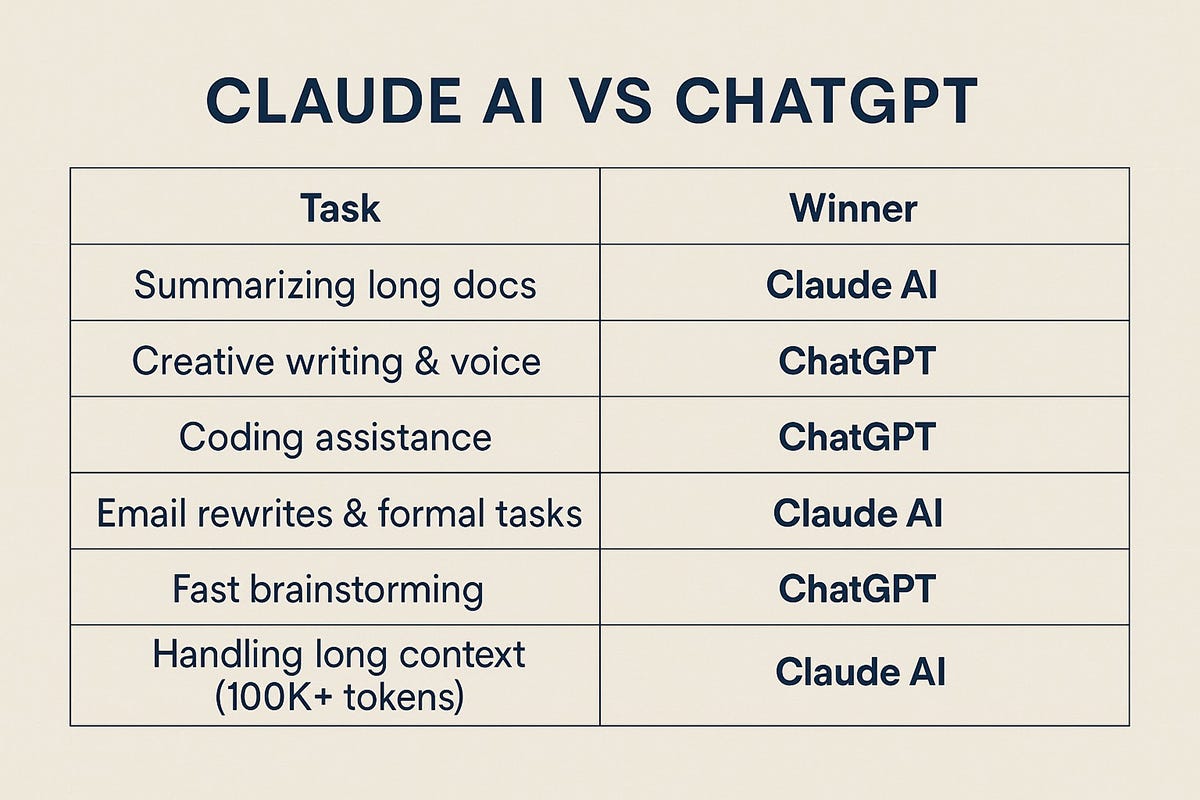
Here is a quick snapshot of how the two platforms compare right now:
Feature / Category | Claude AI (Anthropic) | ChatGPT (OpenAI) |
Free Version Available? | Yes (with usage limits) | Yes (with usage limits) |
Starting Paid Plan | $20/month (Pro) | $20/month (Plus) |
Writing & Tone | Natural, nuanced, great for long-form | Versatile, structured, great for SEO & ideation |
Coding Support | Exceptional (includes Claude Code) | Very strong (includes Codex & Canvas) |
Built-in Image Generation | No (focuses on code/SVG visuals) | Yes (native image creation & editing) |
Document & File Handling | Massive context window; great with PDFs | Strong data analysis & chart generation |
Web Search & Research | Built-in web search & Research mode | Built-in search & Deep Research mode |
Workspace Features | Projects & Artifacts | Projects, Canvas & Custom GPTs |
Voice Mode | Yes | Yes (very natural conversational flow) |
1. Writing and Content Creation
Writing is the number one reason most people open an AI tool. Whether you are drafting a blog post, polishing a cover letter, writing product descriptions, or putting together a client proposal, both platforms will save you hours—but they approach writing very differently.
How Claude Writes
Claude has earned a reputation as the "writer’s AI," and for good reason. When you ask Claude to write an article or rewrite a clunky paragraph, it tends to avoid stiff, repetitive transitions. It varies its sentence length naturally, understands subtle shifts in tone, and follows negative constraints (like "don't use buzzwords" or "keep it conversational") much more reliably.
If you paste a 3,000-word rough draft into Claude and ask it to tighten the pacing while keeping your personal stories intact, it does a remarkably clean job without flattening your personality.
How ChatGPT Writes
ChatGPT is a powerhouse when it comes to structure, ideation, and SEO-focused content. If you tell ChatGPT, "Give me 15 blog post angles about home coffee brewing, create an outline with H2s and H3s, and write a meta description," it delivers fast, well-organized results.
It is also fantastic at adapting formats—turning a messy brain dump into a crisp bulleted email, a LinkedIn post, and a video script all in one go. However, out of the box, ChatGPT sometimes leans into familiar AI phrasing if you do not guide it with clear style examples.
The Verdict for Writers: Use ChatGPT when you are brainstorming angles, building SEO outlines, or repurposing content across formats. Switch to Claude when you are drafting long-form pieces, editing sensitive emails, or trying to make your writing sound genuinely human.
2. Coding and Technical Workflows
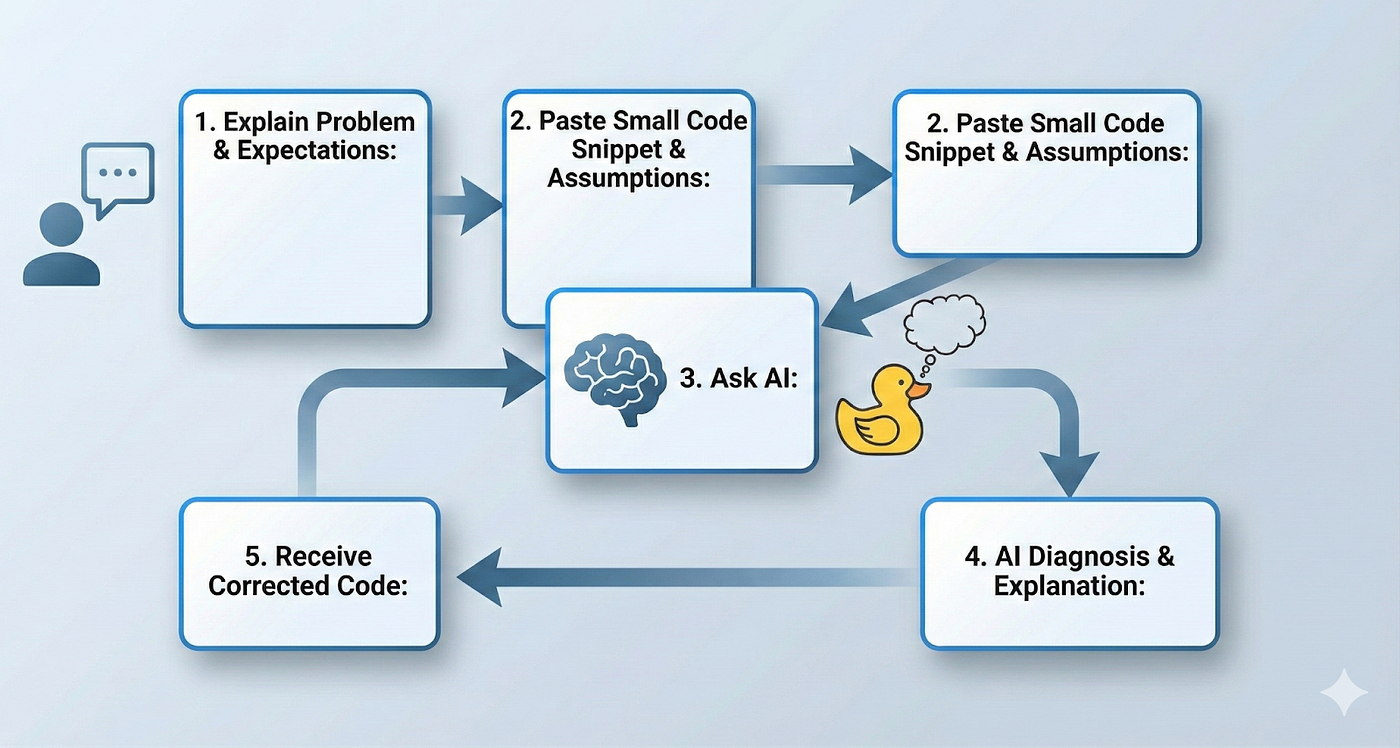
If you write code—whether you are a senior software engineer or someone trying to fix a broken WordPress snippet—both tools will feel like having a patient pair-programmer sitting next to you.
Claude has become a favorite in the developer community, especially with tools like Claude Code (which works directly in your terminal and codebase) and Artifacts, which lets you preview web components, React apps, and interactive tools live right next to your chat. Developers often praise Claude for understanding large, multi-file codebases and catching subtle logic bugs without breaking working code.
ChatGPT is no slouch either. With Canvas and Codex capabilities, you can highlight specific blocks of code, ask for targeted fixes, debug error logs, and run Python scripts directly inside the chat to test logic or manipulate data. For beginners learning Python, JavaScript, or SQL, ChatGPT is also brilliant at breaking down why a piece of code works line by line.
The Verdict for Coding: Both are top-tier. If you are working inside larger projects or building front-end interfaces, Claude often has a slight edge. If you are learning to code, scripting quick automations, or analyzing data with Python, ChatGPT is equally strong.
3. Research, Learning, and Fact-Checking
Gone are the days of opening twenty browser tabs just to understand a new topic. Both Claude and ChatGPT now include live web search and dedicated research modes that read through sources and synthesize answers for you.
ChatGPT’s Deep Research is designed to go down rabbit holes. You can give it a complex question—such as comparing solar battery incentives or researching market trends in a niche industry—and it will spend several minutes browsing dozens of websites, cross-referencing details, and handing you a structured report with citations.
Claude’s Research capabilities excel when you combine web information with your own files. For example, you can upload three PDFs of internal company notes and ask Claude to compare them against current industry data online. Its ability to synthesize long, dense material without missing key details makes it a dream study partner for students and analysts.
One Important Rule: Neither tool is immune to mistakes. AI models can still misread a date, misquote a statistic, or blend outdated information into an otherwise great answer. If you are publishing an article, quoting prices, or making a business decision, always click the source links and verify the facts yourself.
4. Image Generation and Multimedia

This is one of the clearest dividing lines between the two platforms.
ChatGPT has native image generation built straight into the chat. You can ask it to create a featured image for a blog post, design a simple logo concept, make a clean infographic, or even upload an existing photo and ask it to change the background or adjust specific details. For bloggers, marketers, and social media managers, having text and visuals in the same place is a massive time-saver.
Claude does not generate realistic photos or digital art natively. While it can create clean diagrams, flowcharts, and interactive SVG graphics using code inside Artifacts, you cannot ask it to "create a realistic photo of a minimalist home office."
The Verdict for Creatives: If creating visuals, thumbnails, or social graphics is part of your daily routine, ChatGPT wins easily.
5. Workspace Features and Ease of Use
Both platforms have clean, beginner-friendly interfaces—if you can send a text message, you can use either one. Where they differ is how they help you organize ongoing work:
Claude Projects & Artifacts: Projects let you create dedicated workspaces with custom instructions and uploaded background files (like your brand style guide or client briefs). Every chat inside that project automatically remembers that context. When Claude writes a document or builds code, Artifacts opens it in a clean side window so you are not scrolling endlessly through a messy chat thread.
ChatGPT Projects, Canvas & Custom GPTs: ChatGPT also offers Projects and a side-by-side editing tool called Canvas. On top of that, it lets you build or use Custom GPTs—specialized versions of ChatGPT tailored for specific tasks like SEO auditing, language tutoring, or meal planning—plus a remarkably smooth Voice Mode you can chat with hands-free while walking or driving.
6. Pricing: What Do You Get for Your Money?

Both companies follow a very similar pricing structure, making it easy to test before you spend a dime.
Claude AI Pricing
Free Plan ($0): Gives you access to Claude’s core models, file uploads, web search, and Artifacts. However, message limits reset every few hours, and during busy times, long conversations can hit a wall quickly.
Claude Pro (20/month,or~17/month billed annually): Unlocks much higher usage limits, priority access during peak hours, full access to Projects, Research features, and Claude Code.
Claude Max (Starting at $100/month): Built for heavy daily users, developers, and power researchers who never want to worry about hitting message caps.
ChatGPT Pricing
Free Plan ($0): Includes access to ChatGPT’s core models, web search, basic file uploads, and limited image generation.
ChatGPT Go / Plus ($20/month for Plus; lower-cost Go tiers available in select regions): Unlocks higher message limits, full access to image generation, Deep Research, Canvas, Custom GPTs, and advanced voice features.
ChatGPT Pro ($200/month): Aimed at researchers, engineers, and heavy power users who need near-unlimited access to OpenAI’s most demanding reasoning models.
Note: Pricing can vary slightly depending on your country, local taxes, and whether you subscribe via the web or mobile app stores.
Pros and Cons at a Glance
Claude AI
What’s Great:
Exceptionally natural, human-sounding writing style.
Handles long documents, books, and large codebases without losing track of details.
Artifacts and Projects create a calm, distraction-free workspace.
Top-notch coding accuracy.
Where It Falls Short:
No built-in photo or art generation.
Usage limits on the Free and Pro plans can feel restrictive during heavy work sessions.
ChatGPT
What’s Great:
True all-in-one toolkit (writing, image generation, voice, data analysis, deep research).
Huge ecosystem of Custom GPTs and integrations.
Fast, structured brainstorming and SEO planning.
Generous feature set even on the free tier.
Where It Falls Short:
Default writing style can feel a bit repetitive or "AI-ish" without good prompting.
With so many features packed in, the interface can occasionally feel crowded.
How I Actually Test Both Tools in Real Work

If you are trying to decide between the two, don't rely on benchmark charts—run a 10-minute real-world test using tasks you actually do every week. Here is a simple routine you can try today using their free plans:
The Writing Test: Give both tools the exact same prompt—for example, "Write a 400-word introduction for a beginner's guide on indoor gardening. Keep the tone warm, practical, and free of clichés." Read both out loud and see which one needs less editing.
The Document Test: Upload a long PDF, meeting transcript, or article draft and ask both to pull out the five most important takeaways and spot any weak arguments.
The Problem-Solving Test: Give them a messy real-world task—like organizing a weekly content calendar, debugging a spreadsheet formula, or explaining a confusing topic in plain English.
One thing you will quickly notice is that your prompt matters almost as much as the tool. Giving clear context, specifying your audience, and showing an example of the style you want will instantly double the quality of what both Claude and ChatGPT give back. And no matter which tool you pick, always treat the output as a strong first draft—adding your own stories, real-world experience, and fact-checks is what turns decent AI text into content people actually trust.
Final Verdict: Which One Should You Choose?
You don't necessarily have to pick one forever, especially since both offer capable free tiers. However, if you want a clear recommendation:
Choose Claude AI if your work revolves around long-form writing, editing, reading heavy documents, or software development—and you value clean, natural prose over flashy extras.
Choose ChatGPT if you want an all-in-one digital assistant that can write, generate images, run deep web research, analyze spreadsheets, and talk to you via voice mode without switching apps.
Start with the free versions of both this week. Pay attention to which tab you naturally reach for when you have a deadline—that will tell you everything you need to know.
ChatGPT is better if you want an all-in-one tool with image generation and voice chat, while Claude is better for natural long-form writing and coding.
Yes, both platforms offer free plans with daily usage limits that are great for casual tasks and testing.
Claude usually sounds more natural and human right out of the box, whereas ChatGPT is great for SEO outlines and quick brainstorming.
No, Claude does not create photos or digital art natively, though it can build simple diagrams and charts using code.
Both Claude Pro and ChatGPT Plus start at $20 per month for higher usage limits and access to advanced tools.
Sources and notes
Links the author listed for this post.
This article is based on information from the official Claude and ChatGPT websites, including their product features, subscription plans, and help documentation. It also considers practical use cases to provide readers with a balanced comparison.
More on AltFTool
- AltFTool (opens in a new tab)
altftool.com


Discussion
0 comments
No comments yet
Discussion will appear here once it loads.