Artificial intelligence is changing the way people create, edit and improve 3D designs. Tasks that once required advanced modelling skills and hours of manual work can now be supported by AI-powered tools. From adjusting shapes and improving textures to refining details and preparing models for different projects, AI is making 3D editing more accessible to beginners and experienced designers.
AI 3D model editing is useful for graphic designers, game developers, digital artists, product designers and hobbyists who want to improve their creative workflows. Instead of building everything from scratch, users can work with existing 3D models and make changes according to their requirements.
Platforms such as Tripo AI also help users explore AI-assisted 3D creation and editing workflows.
In this guide, we will explain what AI 3D model editing is, how it works, its important features, benefits and practical ways to refine and customize 3D designs.
What Is AI 3D Model Editing?
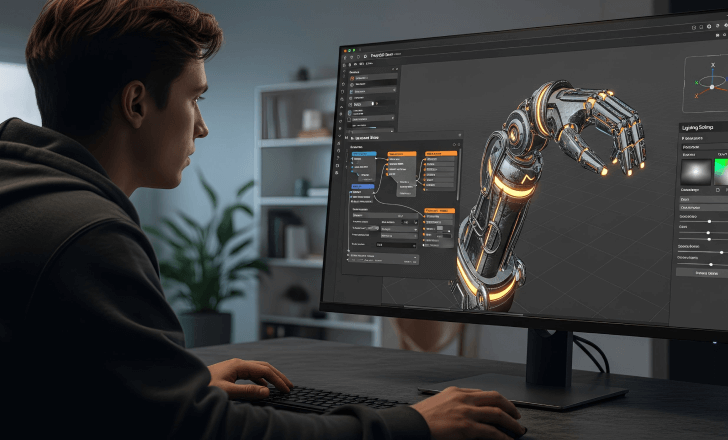
AI 3D model editing is the process of using artificial intelligence-powered software to modify, improve or customize digital three-dimensional models.
A 3D model contains information about an object's shape, dimensions, surface, geometry and appearance. Editing allows users to change these elements to achieve a particular visual or functional result.
AI-powered editing tools can assist with tasks such as:
Refining the shape and structure of 3D objects.
Improving surface textures and material details.
Adjusting colours and visual appearance.
Removing unwanted elements or correcting imperfections.
Optimizing models for different applications.
Preparing digital assets for animation or further editing.
For example, a designer can start with a basic 3D furniture model and adjust its appearance, improve its surface details or customize its materials to match a particular project.
How Does AI 3D Model Editing Work?
AI 3D editing tools use machine learning models and automated processing techniques to understand and modify digital 3D assets.
The exact process depends on the software and the editing feature being used. However, most workflows follow a few common steps.
1. Upload or Create a 3D Model
Start by uploading an existing 3D model or generating a new one using an AI-powered platform. Some tools support common 3D file formats, while others provide built-in model generation features.
2. Analyse the Model
The software processes the model's geometry, surface information and other available properties. This helps identify areas that may need refinement or modification.
3. Apply Editing Changes
Depending on the available features, users can adjust shapes, textures, colours, materials and other design elements. Some tools offer automated editing, while others provide manual controls.
4. Refine the Details
Review the modified model and make additional adjustments. This step helps improve visual consistency, remove unwanted imperfections and achieve the intended design.
5. Export the Final Model
Once the editing process is complete, export the model in a supported file format for use in animation, game development, product visualization, 3D printing or other creative projects.
AI 3D Model Editing Tools
AI-powered 3D editing platforms offer different features depending on their capabilities. Some of the most useful features include:
Key Features of AI 3D Model Editing Tools
Modern AI 3D editing tools offer several features that help creators refine, customize and optimize existing 3D models.
Geometry Refinement
Geometry refinement helps improve the structure and shape of a 3D object. It can assist with correcting uneven surfaces, adjusting model proportions and improving overall appearance.
AI Texture Enhancement
AI-assisted texturing can generate or improve surface details representing materials such as wood, metal, plastic, fabric and stone, making digital objects look more realistic.
Shape and Structure Modification
Editing tools can help modify the shape, size or structure of selected model parts. For example, a chair can be customized with different backrest shapes, leg designs or proportions.
Colour and Material Customization
Colour and material settings help determine the final appearance of a 3D model. Users can experiment with different colours, finishes and material properties.
Mesh Optimization
Mesh optimization improves model efficiency by managing unnecessary geometry and reducing complexity where appropriate. It is useful for game assets and real-time applications.
Model Segmentation
Segmentation separates a 3D model into individual parts or components. This makes it easier to customize specific sections, prepare assets for animation and manage model elements.
Benefits of Using AI for 3D Model Editing
AI-assisted editing can make 3D design workflows more convenient, especially when users need to work with multiple assets or experiment with different design ideas.
1. Saves Time
AI-powered features can automate certain repetitive tasks, reducing the amount of manual work involved in refining 3D models. This allows designers to spend more time on creative decisions.
2. Beginner-Friendly Workflow
People who are new to 3D modelling can use AI-assisted features to explore model creation and editing without having to master every technical modelling process immediately.
3. More Creative Flexibility
Users can experiment with different shapes, textures, materials and visual styles. This makes it easier to explore multiple design directions before choosing a final version.
4. Improves Design Quality
AI tools can assist with identifying imperfections, improving surface details and refining model appearance. However, the final quality still depends on the original model and the editing tools being used.
5. Supports Different Creative Projects
Edited 3D models can be used in several areas, including gaming, animation, product visualization, digital artwork and 3D printing.
6. Reduces Repetitive Manual Work
Automated features can help with certain time-consuming editing tasks. Designers can then focus on more complex adjustments that require human judgement and creativity.
How to Refine and Customize 3D Designs Using AI
If you want to improve an existing 3D model, following a structured workflow can help you achieve better results.
7 Steps to Edit an Existing 3D Model Using AI
Follow these simple steps to improve, customize and prepare your 3D model.
Choose the Right AI 3D Editing Tool
Start by selecting software that supports your project requirements. Check its available editing features, supported file formats, export options and pricing.
Upload Your Existing 3D Model
Import the model you want to edit. Make sure the file format is supported and that the model is suitable for your intended application.
Identify Areas That Need Improvement
Examine the model carefully and identify areas that require changes. These may include uneven geometry, missing details, rough textures or incorrect proportions.
Customize Shapes and Textures
Use the available editing features to adjust the model's appearance. Experiment with different materials, colours, shapes and surface details.
Check the Model's Geometry
Review the mesh structure and look for problems such as unwanted holes, overlapping surfaces or unnecessary polygons. Use the available correction and optimization tools where required.
Preview the Final Design
Rotate the model and inspect it from different angles. Check whether the changes look consistent and whether the model meets your original requirements.
Export and Save Your Model
Save the finished design in a file format compatible with your next project. Keep an original copy so you can make further changes if needed.
How Tripo AI Helps with 3D Model Creation and Editing
Tripo is an AI-powered platform designed to make 3D model creation more accessible. It can be useful for people who want to turn creative ideas into digital 3D assets.
Its available tools and workflow can support different stages of 3D model development.
Some areas users can explore include:
Text-to-3D generation: Create 3D models from written descriptions.
Image-to-3D generation: Use images as a starting point for creating 3D assets.
Texture generation: Add surface details and visual materials to models.
Model segmentation: Separate objects into different parts for further work.
Smart mesh features: Work with model geometry and mesh refinement.
Animation and rigging: Explore workflows for preparing characters for movement.
The availability of individual features, usage limits and export options may depend on the current Tripo plan and product version.
Common Applications of AI 3D Model Editing
AI-assisted 3D editing is useful across several creative and professional industries.
1. Game Development
Developers can refine characters, objects, props and environmental assets for video games. Optimized models can help support different game performance requirements.
2. Animation and Film
Artists can customize digital characters, objects and scene elements before using them in animation and visual production.
3. Product Design
Product designers can create and refine digital representations of furniture, accessories, electronics and other products.
4. 3D Printing
Users can prepare digital models for physical printing, provided the geometry, dimensions and file format meet the printer's requirements.
5. Architecture and Interior Design
Designers can refine furniture, decorative objects and architectural elements for digital presentations and visualizations.
6. Digital Art and Creative Projects
Digital artists can experiment with shapes, surface details and materials to create customized artwork and digital assets.
Common Challenges in AI 3D Model Editing
Although AI can simplify certain editing tasks, users should understand its limitations before relying on it for professional projects.
1. Inconsistent Model Geometry
Some AI-generated models may contain irregular surfaces, unnecessary polygons or structural problems. Manual corrections may still be required.
2. Texture and Detail Issues
AI-generated textures do not always match the intended material or design. Users may need to adjust colours, lighting and surface details.
3. Limited Editing Control
Some automated tools provide fewer controls than traditional 3D modelling software. This can make highly specific modifications difficult.
4. File Compatibility
Not every platform supports every 3D file format. Users should check compatibility before starting a project or exporting a finished model.
5. Performance and Optimization
Detailed 3D models can require significant computing resources. Models intended for games, animation or 3D printing may need additional optimization.
Tips for Getting Better Results from AI 3D Editing Tools
Here are some practical tips to improve your editing workflow:
Start with a good-quality 3D model whenever possible.
Use clear and specific instructions when working with prompt-based tools.
Make small changes instead of modifying every design element at once.
Check textures and geometry from multiple angles.
Avoid adding unnecessary details that increase model complexity.
Save different versions of your project before making major changes.
Check the final file format and export settings before using the model elsewhere.
Review the finished model manually instead of depending entirely on automated results.
AI 3D Model Editing vs Traditional 3D Model Editing
Both approaches help designers modify digital objects, but they differ in their workflows and level of automation.
Comparison | AI 3D Editing | Traditional 3D Editing |
|---|---|---|
Workflow | AI-assisted processes | Mostly manual processes |
Learning curve | Can be easier for beginners | Requires technical knowledge |
Texture creation | Can automate texture generation | Often requires manual setup |
Model refinement | AI-assisted optimization | Manual geometry adjustments |
Customization | Depends on available AI features | Detailed manual control |
Best suited for | Faster creative workflows | Precise and complex editing |
AI tools and traditional 3D software can also be used together. For example, a designer can generate or process a model with AI and then make detailed adjustments in Blender or Maya.
Things to Consider Before Choosing an AI 3D Editing Tool

Before selecting an AI-powered 3D modelling platform, consider the following factors:
Editing features: Check whether the platform supports texturing, segmentation, mesh optimization and other required operations.
Ease of use: Choose an interface that matches your experience level.
File formats: Make sure the software supports the formats needed for your projects.
Model quality: Review the geometry, textures and overall output quality.
Pricing: Compare free credits, subscription plans and usage limits.
Export options: Check whether you can export models into your preferred 3D software or game engine.
Project requirements: Consider whether you need models for gaming, animation, product visualization or 3D printing.
Conclusion
AI 3D model editing is making digital design more accessible by helping users refine shapes, improve textures, optimize geometry and customize existing models. It can reduce repetitive work and give designers more opportunities to experiment with different creative ideas.
Tools such as Tripo provide features for model generation, texturing, segmentation, retopology and animation preparation. These capabilities can support different stages of the 3D design process, from creating an initial asset to preparing it for further production.
However, AI-generated results still need proper review and sometimes manual adjustments. Choosing the right tools and following a structured editing workflow can help users create better-quality 3D designs for gaming, animation, product visualization and other creative applications.
FAQ'S
AI 3D model editing uses artificial intelligence to help modify, refine and improve digital 3D models. It can assist with textures, geometry, segmentation and other design tasks.
Yes. Many AI-powered platforms offer beginner-friendly features that make it easier to create and modify 3D models without extensive technical knowledge.
AI tools can help improve textures, optimize mesh structures and refine certain model details. However, results depend on the software and the quality of the original model.
Mesh optimization involves improving a model's geometry by managing its polygon count and structure. It can help make 3D assets more suitable for games, animation and other applications.
Tripo offers tools for AI texturing, model segmentation, retopology, Smart UV and rigging. These features can support different stages of 3D model processing and preparation.
Sources and review notes
References used to check facts, freshness, and reader-safe recommendations in this guide.
Information is based on official Tripo documentation and general 3D modelling concepts. Features may vary by software and subscription plan.
- 1
Discussion
0 comments
No comments yet
Discussion will appear here once it loads.