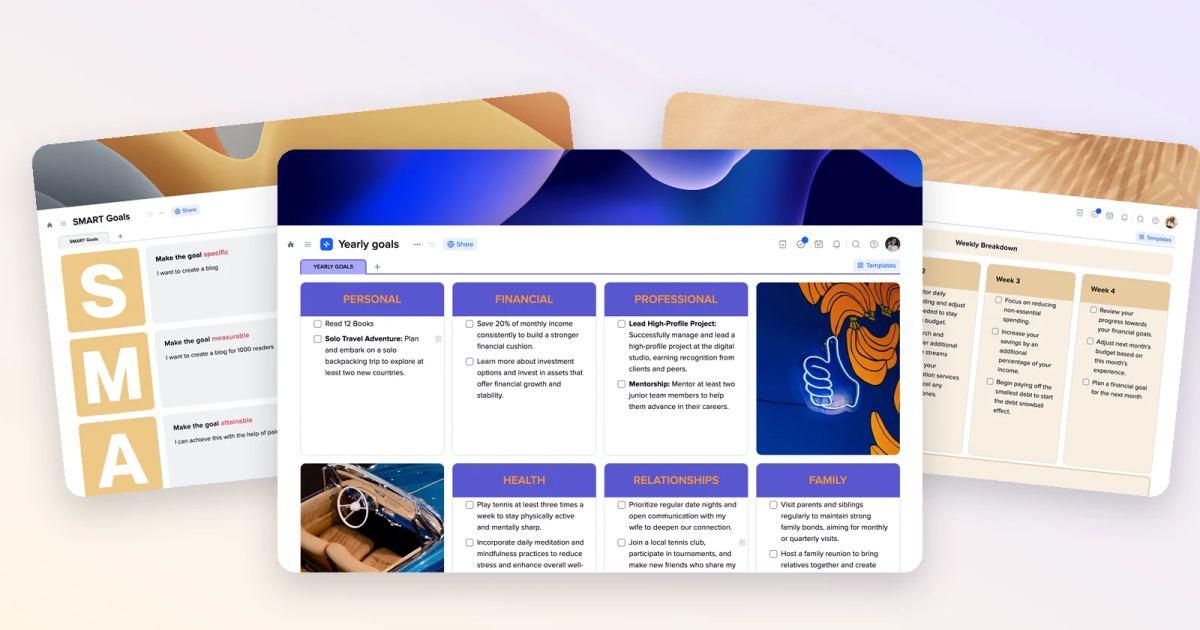
The beginning of a new year is the perfect opportunity to reflect on your achievements, set meaningful goals, and create a fresh plan for personal and professional growth. As 2027 approaches, many people are looking for smarter ways to organise their routines, manage their time, improve productivity, and turn their ambitions into achievable results.
However, setting goals is only the first step. The real challenge is staying consistent, tracking progress, and making time for the things that matter most. This is where digital tools can make a difference.
From productivity apps and digital calendars to habit trackers and AI-powered planning assistants, technology offers practical ways to organise your goals and build better routines. With the right tools, you can transform your ideas into structured plans, monitor your progress, and approach 2027 with greater clarity and confidence.
Whether you want to improve your career, learn a new skill, manage your finances, or create a healthier lifestyle, this guide explores useful digital tools and strategies to help you organise your goals for 2027.
Why Digital Tools Are Useful for Goal Planning
Traditional notebooks are useful for writing ideas, but digital planning tools offer additional features that make long-term organisation easier. You can update your plans, set reminders, track deadlines, and access your information across supported devices.
A digital goal planner can help you:
Break large goals into smaller, manageable tasks.
Organise personal and professional priorities.
Set deadlines and reminders.
Track habits and daily progress.
Review achievements at the end of each month.
Adjust your plans when circumstances change.
The most effective system is not necessarily the one with the most features. It is the one that fits your routine and encourages you to take consistent action.
Best Digital Tools to Organise Your Goals for 2027
Different tools support different planning styles. Some are designed for simple daily tasks, while others help you manage projects, build habits, or create a complete personal dashboard.
Notion – Create a Personal Goal Dashboard
Notion is a flexible workspace for organising notes, projects, tasks, and personal plans. You can create a customised dashboard for your 2027 goals and keep important information in one place.
Use it to organise:
Annual and monthly goals.
Personal development plans.
Learning schedules.
Project notes and resources.
Progress checklists.
You can create tables or database views to track each goal, its deadline, current status, and next action.
Best for: People who enjoy customising their planning system and keeping notes alongside their goals.
Google Calendar – Manage Your Time Effectively
Google Calendar helps you organise appointments, routines, deadlines, and time-based activities. Instead of simply writing down a goal, you can reserve time in your schedule to work toward it.
For example, if your goal is to learn a new skill, schedule three learning sessions every week.
Best for: Students, professionals, freelancers, and anyone who wants to build a consistent daily routine.
Todoist – Turn Goals Into Actionable Tasks
Todoist is a task management tool that helps you organise to-do lists, projects, priorities, and recurring tasks.
TechRepublic+1
You can create a project for each major goal and divide it into smaller tasks.
For example:
Goal | Actionable Task |
|---|---|
Learn a new skill | Complete one lesson every day |
Improve fitness | Schedule three weekly workouts |
Build a portfolio | Finish one project each month |
Read more books | Read for 20 minutes daily |
Best for: People who prefer simple task lists and clear deadlines.
Trello – Visualise Your Progress
Trello uses visual boards and cards to help you organise projects. It is useful when you want to see what you have planned, what you are currently doing, and what you have completed.
Create a board with columns such as:
Ideas
To Do
In Progress
Completed
Move your goal-related tasks across the board as you make progress.
Best for: Visual planners, creative professionals, and people managing multiple projects.
Microsoft To Do – Keep Daily Plans Simple
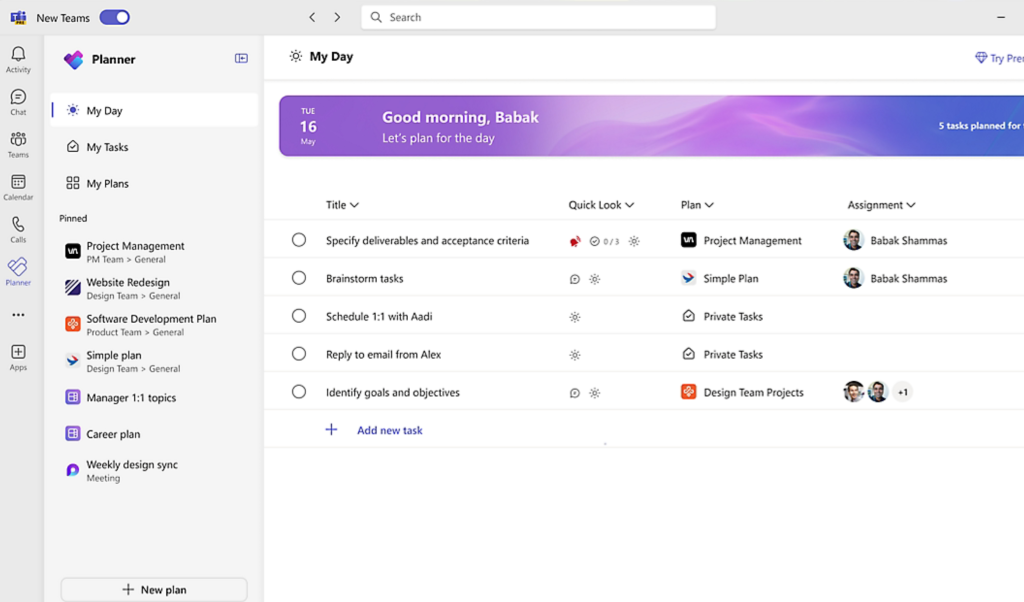
Microsoft To Do is useful for organising everyday tasks, reminders, and personal lists. It can be a practical starting point if you want a straightforward planning system without building a complicated dashboard.
Create separate lists for work, personal goals, shopping, learning, and weekly priorities.
Best for: People who want a simple task manager, especially those already using Microsoft services.
TickTick – Combine Tasks and Habits
TickTick brings task management together with features such as calendar planning, habit tracking, and focus tools.
This makes it useful for goals that depend on repeating small actions over time.
For example, you can track daily reading, exercise, writing, or language-learning habits while managing related tasks.
Best for: People who want daily tasks and habit tracking in a single planning environment.
ClickUp – Organise Professional and Team Goals
ClickUp is designed for project and task management, making it useful for work-related goals and collaborative planning.
You can organise projects, assign responsibilities, create deadlines, and monitor progress through different views.
Best for: Freelancers, teams, entrepreneurs, and professionals managing several work projects.
Digital Goal-Planning Tools at a Glance
Tool | Main Purpose | Ideal User |
|---|---|---|
Notion | Custom dashboards and notes | Personal planners |
Google Calendar | Scheduling and time management | Busy professionals |
Todoist | Tasks and deadlines | Daily task organisers |
Trello | Visual project boards | Creative planners |
Microsoft To Do | Simple lists and reminders | Everyday users |
TickTick | Tasks and habit tracking | Routine builders |
ClickUp | Projects and team goals | Professionals and teams |
Features and plan availability may change. Check each platform's official website before choosing a paid subscription.
How to Set Meaningful Goals for 2027
Before choosing a digital tool, take some time to understand what you want to achieve. A productivity app can organise your plans, but your goals should provide the direction.
Use the SMART Goal-Setting Method
The SMART framework helps make goals more practical and measurable.
SMART Element | Meaning | Example |
|---|---|---|
Specific | Clearly define your goal | Learn graphic design |
Measurable | Decide how progress will be measured | Complete 5 projects |
Achievable | Set a realistic target | Practise 30 minutes daily |
Relevant | Connect the goal to your priorities | Improve career opportunities |
Time-bound | Set a deadline | Complete the portfolio by June 2027 |
Instead of writing “I want to become more productive,” create a goal such as:
“I will complete my three most important tasks every weekday throughout the first quarter of 2027.”
This makes your intention easier to organise and track.
Create a Digital Goal-Planning System
You do not need to use every productivity app available. Combining too many tools can create confusion and unnecessary work.
A simple digital planning system can include three essential elements.
Step 1: Create an Annual Goals List
Start by writing down five to seven meaningful goals for 2027.
You might include:
Career development
Personal finance
Health and fitness
Education and learning
Travel and experiences
Personal relationships
Creative projects
Keep your list realistic. A smaller number of meaningful goals is easier to manage than a long list of unrelated ambitions.
Step 2: Break Goals Into Monthly Milestones
Large goals can feel overwhelming when you look at the entire year at once.
Divide each goal into monthly milestones. For example, if you want to build a professional portfolio, your plan might look like this:
Month | Milestone |
|---|---|
January | Choose a skill and learning resources |
February | Complete basic training |
March | Create the first project |
April | Improve existing work |
May | Build additional projects |
June | Publish the portfolio |
This approach gives you a clear direction without requiring you to plan every detail of the year in advance.
Step 3: Schedule Weekly Actions
A goal becomes more achievable when it has a place in your calendar.
Choose a few specific actions every week and schedule them around your existing responsibilities.
For example, you could reserve Monday and Wednesday evenings for learning, Saturday morning for personal projects, and Sunday for reviewing your progress.
Step 4: Track Your Progress Regularly
Use your chosen digital tool to record completed tasks, missed deadlines, and important achievements.
A weekly review can help you identify what is working and what needs improvement.
Ask yourself:
What did I accomplish this week?
Which tasks were delayed?
What distracted me from my priorities?
What should I focus on next week?
Progress tracking is not about achieving perfection. It is about understanding your routine and making better decisions.
Practical Tips for Staying Consistent Throughout 2027
Even the best digital planner cannot create progress without regular action. Building a sustainable routine is more important than constantly searching for new productivity apps.
Helpful goal-planning habits:
Start with one or two tools instead of downloading everything.
Keep your daily task list short and realistic.
Set reminders for important deadlines.
Review your goals every Sunday or at the beginning of each week.
Celebrate small milestones instead of waiting for major achievements.
Adjust your goals when your priorities change.
Turn off unnecessary notifications to protect your focus.
You can also explore useful digital resources on AltFTool to discover tools that support productivity, organisation, and everyday online tasks.
Make 2027 Your Year of Organised Progress
The new year is an opportunity to create better habits, explore new possibilities, and work toward goals that genuinely matter to you.
Digital tools can make the process easier by helping you organise your schedule, manage tasks, track habits, and review your achievements. However, the real value comes from using these tools consistently and keeping your plans realistic.
Choose a planning system that feels comfortable, divide your goals into manageable steps, and focus on steady progress rather than perfection.
With clear priorities and a practical digital routine, you can make 2027 a year of meaningful growth, better organisation, and greater confidence in your everyday decisions.
FAQs
Notion, Google Calendar, Todoist, Trello, Microsoft To Do, TickTick, and ClickUp are useful options for different planning needs.
Google Calendar or Microsoft To Do can be good starting points because they support simple scheduling, lists, and reminders.
Create a goal list, set deadlines, divide goals into smaller tasks, and review your progress weekly using a planner or task management app.
Yes. Several productivity platforms offer free plans or basic features. Check their current plan details to understand any limitations.
Start with around five meaningful goals across important areas of your life. You can adjust the number based on your responsibilities and available time.
Sources and notes
Links the author listed for this post.
This article is an original productivity and goal-planning guide. Tool descriptions and planning recommendations were informed by recent digital planner and goal-tracking comparisons.


Discussion
0 comments