The internet has become an important part of our everyday lives. From online shopping and digital payments to remote work, entertainment, and social media, we depend on internet access for almost everything. While technology has made daily activities easier, it has also created new concerns about online privacy, personal information, data tracking, and cybersecurity.
Many people now want more control over how their information travels across the internet. This is one reason VPN services have become increasingly popular. A Virtual Private Network, commonly known as a VPN, helps create a more private and encrypted internet connection.
Surfshark is one of the services operating in this space. It is best known for its VPN, but its product range also includes additional privacy and security tools. Its features are designed for people who want an extra layer of protection while browsing, travelling, working remotely, or using different devices.
In this guide, we will explore what Surfshark is, how it works, its main features, subscription options, advantages, limitations, and the things worth checking before choosing a plan.
What Is Surfshark?
Surfshark is a cybersecurity company that provides digital privacy and online security products. Its main offering is Surfshark VPN, which helps encrypt internet traffic and hide a user's original IP address while connected.
The basic idea is quite simple. When someone connects to the internet without a VPN, their traffic travels through their regular internet connection. When they use a VPN, their traffic is routed through a VPN server using an encrypted connection.

This can help protect browsing activity from certain types of network monitoring, especially when using unfamiliar or shared networks.
Surfshark also offers additional tools through its subscription packages. Depending on the selected plan, users may get access to features such as:
VPN protection for everyday internet use.
CleanWeb for blocking certain advertisements and trackers.
Alternative connection options for supported websites and apps.
Alert services for certain personal information exposures.
Search tools designed for more private browsing.
Antivirus and other security features in selected packages.
The available tools depend on the subscription, platform, and region.
How Does Surfshark VPN Work?
A VPN creates a secure connection between a user's device and a VPN server. Instead of sending internet traffic directly through the regular network route, the device sends it through the VPN connection.
This process helps encrypt traffic between the device and the VPN server. It also changes the IP address that websites generally see.
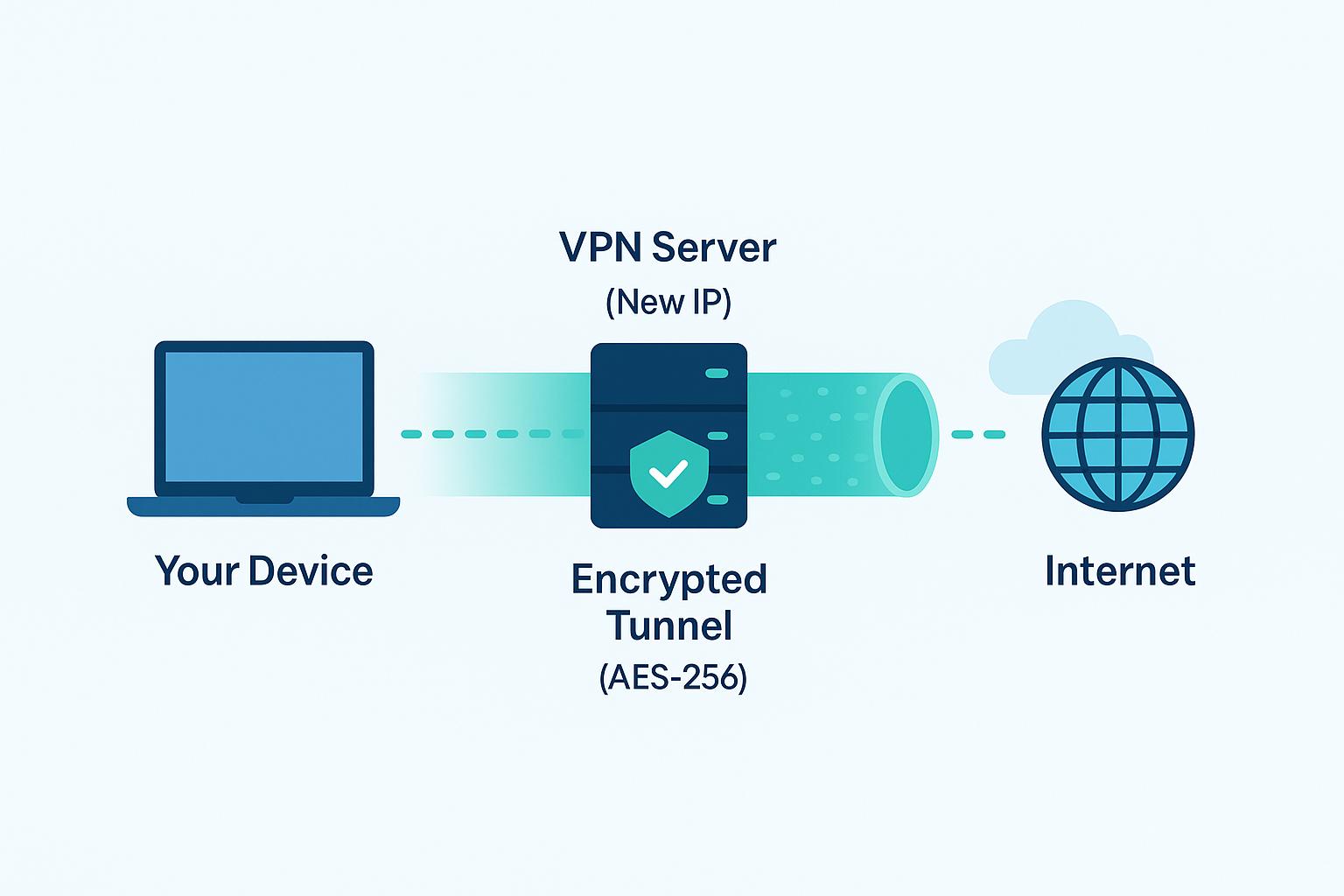
Here is how the process works:
1. Connecting to a VPN server
Users open the Surfshark application and select a server location. They can choose an available location or use the quick-connect option.
2. Creating an encrypted connection
Once connected, the VPN encrypts traffic travelling between the device and the VPN server. This helps prevent others on the same local network from easily viewing that traffic.
3. Masking the original IP address
Websites generally see the IP address of the selected VPN server rather than the user's original IP address. This can reduce exposure of location information associated with the original network.
4. Browsing through the VPN
After the connection is established, users can browse websites, use applications, stream content, and carry out other online activities through the VPN connection.
A VPN does not make a person completely anonymous. Websites can still collect information through cookies, account logins, browser settings, and other tracking methods. It is best understood as one part of a wider online privacy approach.
Key Features of Surfshark
Surfshark includes several features that focus on connection privacy, browsing protection, and managing internet traffic. Understanding what each feature does makes it easier to decide whether the service matches your needs.
1. VPN Encryption
Encryption is one of the most important parts of a VPN service. It helps protect information travelling between a device and the VPN server by converting it into an unreadable format for people who do not have the required access.
This is particularly useful when connecting through shared networks.
For example, imagine working from a café and checking emails or accessing work-related websites. A VPN adds an encrypted connection between your device and its server, providing an additional layer of protection.
2. IP Address Masking
Every internet connection uses an IP address. It can reveal information about the network and approximate location from which someone is connecting.
Surfshark VPN replaces the visible IP address with the address of its selected VPN server.
This can help users:
Reduce exposure of their original IP address.
Limit certain types of IP-based tracking.
Connect through available server locations.
Add another layer of privacy to everyday browsing.
However, IP masking does not prevent every form of online tracking. Websites may still identify users through accounts, cookies, and other information.
3. Kill Switch
A VPN connection can occasionally become unstable or disconnect. If this happens, a device may continue using its regular internet connection.
Surfshark's Kill Switch is designed to block internet access when the VPN connection drops unexpectedly.
This feature can be helpful for people who want to reduce the chance of accidentally browsing through an unprotected connection.
4. CleanWeb
Unwanted advertisements, trackers, and suspicious websites can make browsing frustrating. CleanWeb is designed to help block certain advertisements, trackers, and access to known malicious websites.
Its benefits may include:
Reducing some unwanted advertisements.
Blocking certain tracking attempts.
Helping users avoid some known harmful websites.
Making supported browsing experiences cleaner.
CleanWeb should not be treated as a complete replacement for antivirus software or careful online behaviour.
5. MultiHop
MultiHop is a feature that routes internet traffic through two VPN servers instead of one.
For example, a connection may pass through one VPN server before reaching another server and then continuing towards its destination.
This adds another routing layer, which may appeal to people who want additional connection privacy.
The trade-off is that using multiple servers can sometimes affect internet speed. The actual experience depends on server locations, network conditions, and other factors.
6. Bypasser
Bypasser is Surfshark's split-tunnelling feature. It allows users to decide which applications or websites should use the VPN connection and which should connect through their regular internet connection.
This can be useful when someone wants VPN protection for most activities but needs a particular application to use the normal connection.
For example, a user might want their browser to use a VPN while allowing a trusted local application to connect directly.
Availability and functionality can vary by operating system.
7. NoBorders Mode
NoBorders is designed to help users connect in network environments where VPN usage may be restricted or limited.
It can help the application identify suitable connection options under certain network conditions.
However, it does not guarantee that a VPN connection will work on every restricted network. Local laws, network policies, and service restrictions still apply.
8. Private DNS and Connection Protection
DNS is responsible for translating website names into the addresses computers use to communicate. DNS requests can reveal information about the websites someone is trying to access.
VPN services may handle DNS requests through their own infrastructure while the VPN is connected. This can help reduce exposure to the user's regular network provider.
The exact protection depends on the VPN configuration, device, and connection settings.
Surfshark Features at a Glance
Feature | Main Purpose | Practical Benefit |
VPN Encryption | Protects traffic between the device and VPN server | Adds connection privacy |
IP Masking | Replaces the visible original IP address | Limits IP-based exposure |
Kill Switch | Blocks internet access after a VPN disconnection | Reduces accidental exposure |
CleanWeb | Helps block certain ads and trackers | Supports cleaner browsing |
MultiHop | Routes traffic through two VPN servers | Adds another routing layer |
Bypasser | Selects which apps use the VPN | Offers connection flexibility |
NoBorders | Helps with certain restricted network environments | Provides alternative connection options |
Understanding Surfshark Subscription Plans
Surfshark offers different subscription packages for users with different requirements. The plans generally combine VPN protection with additional privacy and security tools.
The main packages include Starter, One, and One+.
Surfshark Starter
Starter is designed for people who mainly want VPN protection and essential online privacy features.
It may be suitable for users who want to:
Encrypt their internet connection.
Hide their original IP address.
Use VPN servers in available locations.
Access essential VPN features.
Connect multiple devices at the same time.
Surfshark One
Surfshark One combines VPN protection with additional digital security tools.
Depending on the current package and region, it may include features such as:
VPN protection.
Antivirus tools.
Alert services for certain personal information exposures.
Private search features.
This package may appeal to people who want more than a standard VPN subscription.
Surfshark One+
One+ is designed for users interested in a broader collection of digital security and identity-related tools.
It includes the features offered in its package, along with additional services that may vary by region and subscription terms.
Before choosing it, users should compare the included tools with their actual requirements. Paying for features that are rarely used may not be necessary.
Plan Comparison
Plan | Main Focus | Suitable For |
Starter | VPN and essential privacy features | Everyday VPN users |
One | VPN with additional security tools | Users wanting broader protection |
One+ | Expanded digital security and identity-related services | Users looking for a wider package |
Subscription prices, introductory offers, renewal rates, and included features can change. It is always sensible to review the current plan details before making a purchase.
Why Do People Use Surfshark?
Different people use VPN services for different reasons. Some want additional privacy while travelling, while others want a more secure connection when working from home or using public Wi-Fi.
Here are some common situations where Surfshark may be useful.
1. Using Public Wi-Fi
Public Wi-Fi is available in cafés, airports, hotels, libraries, and shopping centres. It is convenient, but users may not always know how secure the network is.
A VPN can encrypt traffic between the device and the VPN server, adding a layer of protection when using an unfamiliar network.
2. Working Remotely
Remote workers often access work platforms, email accounts, and online documents from different locations.
Using a VPN can add connection privacy when working through home networks or public Wi-Fi. However, employees should always follow their organisation's security policies and use approved work systems.
3. Travelling Frequently
People who travel regularly may connect through different internet networks throughout the day.
A VPN can provide a familiar encrypted connection across supported networks, making it easier to maintain an additional layer of privacy while travelling.
4. Protecting Everyday Browsing Privacy
Some users simply prefer to limit the amount of network information exposed during everyday internet use.
IP masking and encrypted connections can help with this goal, although they do not stop every form of tracking.
5. Managing Multiple Devices
Many people use a laptop, smartphone, tablet, and other internet-connected devices. Surfshark supports unlimited simultaneous VPN connections under its VPN offering, subject to its current terms.
This can be useful for households and individuals who regularly switch between devices.
Surfshark on Different Devices
A VPN becomes more convenient when it works with the devices people already use. Surfshark supports several major operating systems and platforms.
Device or Platform | Common Use |
Windows | Protecting browsing on a laptop or desktop |
macOS | Adding privacy to Mac internet connections |
Android | Securing supported mobile connections |
iOS | Using VPN protection on iPhone and iPad |
Linux | VPN access on supported Linux systems |
Browser Extensions | Managing supported browser traffic |
The features available in each application may differ. For example, a desktop application may provide settings that are not available in the same way through a browser extension.
It is a good idea to check the supported operating system and feature list before subscribing.
Surfshark for Public Wi-Fi: What Should Users Know?

Public Wi-Fi is useful when travelling or working outside the home. However, shared networks can create security risks, particularly when users connect without checking the network's reliability.
A VPN can help by encrypting traffic between the device and its VPN server.
Still, users should not assume that every public Wi-Fi network becomes completely safe after switching on a VPN.
A few practical precautions can make a difference:
Connect only to the correct Wi-Fi network.
Avoid opening unexpected links or downloading unknown files.
Use a VPN when connecting through unfamiliar networks.
Keep your operating system and applications updated.
Use two-factor authentication for important accounts.
Avoid sharing sensitive information through untrusted websites.
Log out of accounts when using shared devices.
These habits work alongside VPN protection rather than replacing it.
Surfshark and Online Privacy
Online privacy is about more than hiding an IP address. Websites, applications, advertisers, and other services may collect information through different methods.
A VPN can help protect network traffic and reduce exposure of the original IP address. However, it cannot automatically prevent websites from collecting information when users sign in or accept tracking technologies.
Surfshark also promotes a no-logs policy. This means the service states that it does not keep certain records of users' online activity. Its privacy claims and independent audit information are worth reviewing before subscribing.
Users should understand the difference between a privacy policy and a guarantee of complete anonymity.
For better privacy, combine VPN usage with these habits:
Use unique passwords for important accounts.
Enable two-factor authentication.
Review application permissions regularly.
Avoid sharing unnecessary personal information.
Check website privacy settings.
Keep devices and browsers updated.
Be careful with suspicious emails and messages.
Surfshark vs. a Regular Internet Connection
A regular internet connection and a VPN connection work differently. Understanding these differences helps users decide when using a VPN makes sense.
Regular Internet Connection | Surfshark VPN Connection |
Uses the normal network route | Routes traffic through a VPN server |
Websites generally see the network's IP address | Websites generally see the VPN server's IP address |
Does not add VPN encryption | Encrypts traffic between the device and VPN server |
Depends on the network's security | Adds another layer of connection protection |
Does not offer VPN server selection | Allows users to select available server locations |
Uses the normal internet connection settings | Provides additional VPN connection controls |
The main difference is the additional encrypted connection and IP address masking provided by a VPN. It is not a complete cybersecurity solution, but it can be a useful privacy tool.
Advantages of Surfshark
Surfshark offers several features that may make it useful for everyday internet users.
1. Unlimited simultaneous connections
Users can connect multiple supported devices at the same time under the VPN service's current terms. This is convenient for people who use several devices.
2. Useful privacy features
Features such as IP masking, encryption, and Kill Switch provide additional control over internet connections.
3. Additional security tools
Selected subscription packages include tools beyond the VPN, which may be helpful for users looking for a broader security package.
4. Multiple supported platforms
Surfshark supports major operating systems, allowing users to access its service across different devices.
5. Flexible connection settings
Features such as MultiHop and Bypasser give users more control over how their internet traffic is routed.
6. User-friendly applications
The applications are designed to make connecting to a VPN manageable for people who do not have advanced networking knowledge.
Limitations of Surfshark
It is equally important to understand what a VPN cannot do. No online security product can remove every digital risk.
Some points worth considering include:
VPN speed may vary depending on server distance and network conditions.
Some advanced tools are available only with selected subscriptions.
Features may differ between operating systems.
A VPN does not prevent all advertisements or tracking methods.
It cannot protect users from every phishing attack or malicious download.
Certain websites may restrict access when they detect VPN traffic.
Long-term subscription discounts may come with different renewal prices.
Understanding these limitations helps users make a more informed decision.
Advantages and Limitations at a Glance
Advantages | Limitations |
Supports unlimited simultaneous VPN connections | Speed can vary across servers |
Provides encrypted VPN connections | Does not guarantee complete anonymity |
Includes Kill Switch and CleanWeb | Some features require higher-tier plans |
Supports multiple platforms | App features may differ |
Offers additional privacy and security tools | Cannot prevent every online threat |
Provides flexible server connection options | Some websites may restrict VPN access |
Is Surfshark Easy for Beginners?
A common concern among first-time VPN users is whether the application will be difficult to understand.
Surfshark is designed to make the basic process straightforward. Users generally do not need advanced technical knowledge to connect to a VPN server.
The basic setup process usually looks like this:
Select a suitable subscription plan.
Create an account.
Download the application for a supported device.
Install the application and sign in.
Open the VPN section.
Choose a server location or use quick connect.
Confirm that the VPN connection is active.
After connecting, users can explore additional settings such as Kill Switch, CleanWeb, and other available features.
Beginners can start with the basic connection and gradually explore the advanced options as they become more comfortable.
Things to Check Before Choosing a Surfshark Subscription
Choosing a VPN should not be based only on its advertised price. The right plan depends on how frequently someone uses a VPN and which features they actually need.
Consider the following points before subscribing.
Subscription Duration
VPN providers may offer monthly and longer-term subscription options. Longer plans can have lower advertised monthly costs, but they require a bigger upfront payment.
Renewal Pricing
Introductory discounts may not reflect the renewal price. Always check how much the subscription will cost after the initial period.
Included Features
Compare Starter, One, and One+ to understand which features are included. Do not pay extra for tools that you are unlikely to use.
Device Compatibility
Check whether your phone, computer, tablet, or other devices are supported.
Server Availability
Look at the available server locations and consider whether they suit your browsing requirements.
Refund Policy
Read the latest refund and cancellation terms. Check the conditions and time limits rather than assuming every subscription has identical terms.
Surfshark vs. Other VPN Services: What Should You Compare?
When choosing a VPN, it is useful to compare several services rather than making a decision based on brand popularity alone.
Here are some important factors to consider:
Comparison Factor | What to Check |
Security | Encryption standards and connection protection |
Privacy | No-logs policy and independent audits |
Server Network | Available locations and server coverage |
Device Support | Compatible operating systems and applications |
Speed | Performance across different server locations |
Features | Kill Switch, split tunnelling, and ad blocking |
Pricing | Subscription cost and renewal rates |
Customer Support | Availability of help and troubleshooting resources |
A good VPN should match your requirements, provide clear privacy information, and offer features that are easy to understand and use.
Who Should Consider Using Surfshark?
Surfshark may be worth considering for people who want an additional layer of privacy while using the internet.
Type of User | How Surfshark May Help |
Frequent Travellers | Adds encryption when using unfamiliar Wi-Fi |
Remote Workers | Provides additional connection privacy |
Students | Supports privacy on shared networks |
Everyday Internet Users | Helps mask their original IP address |
Multi-Device Users | Supports multiple simultaneous VPN connections |
Privacy-Conscious Users | Offers VPN and additional privacy tools |
The service may be useful for different types of users, but the right subscription depends on individual requirements and budget.
Tips for Getting Better Use from Surfshark
Simply installing a VPN is not enough. Users should understand the settings and use them according to their needs.
Here are some practical suggestions:
Use the Kill Switch: Enable it if you want internet access blocked when the VPN connection unexpectedly drops.
Choose suitable servers: A nearby server may offer better speed, although actual performance varies.
Explore CleanWeb: Check whether its available blocking features suit your browsing habits.
Review Bypasser settings: Use split tunnelling only when you understand which applications will bypass the VPN.
Keep the application updated: Updates can include improvements, fixes, and security changes.
Check connection status: Make sure the VPN is connected when you intend to use it.
Read privacy information: Understand what the service collects and how it handles account information.
These small steps can help users get more value from the service.
Is Surfshark Worth Considering?
Surfshark brings together VPN protection, privacy features, and additional digital security tools in one service. Features such as encrypted connections, IP masking, Kill Switch, CleanWeb, and MultiHop make it an option worth exploring for people who want more control over their online privacy.
Its support for multiple platforms and unlimited simultaneous VPN connections can also be useful for individuals and households that regularly switch between devices.
However, a VPN should never be treated as a complete solution to every online security problem. It cannot stop every scam, prevent all tracking, or guarantee complete anonymity. Users still need strong passwords, updated devices, and careful browsing habits.
Overall, Surfshark can be a practical option for people looking for a VPN service with additional privacy features. Before choosing a subscription, compare the available plans, check the latest pricing, and select the tools that genuinely match your everyday needs.
Frequently Asked Questions
Surfshark is mainly used for VPN protection, encrypted internet connections, and online privacy. It also offers additional security tools through selected subscription plans.
Yes. When connected to a VPN server, websites generally see the server's IP address instead of the user's original IP address.
Yes. Surfshark supports unlimited simultaneous VPN connections, subject to its current terms and conditions.
Its VPN encryption adds a layer of protection when using public Wi-Fi. However, users should still follow safe browsing practices.
Yes. Its applications are designed to make connecting to a VPN straightforward, so beginners can use the basic features without advanced technical knowledge.
Sources and notes
Links the author listed for this post.
Information is based on Surfshark's official website, product features, security information, subscription plans, and company background.
- 1surfshark.com (opens in a new tab)
surfshark.com


Discussion
0 comments
No comments yet
Discussion will appear here once it loads.