Typing is an essential skill in today's digital world. Whether you are a student, working professional, job applicant, freelancer, or regular computer user, typing quickly and accurately can save time and improve productivity. From writing emails and preparing assignments to completing office tasks and online examinations, good typing skills make everyday work easier.
An online typing test is a simple way to check how fast and accurately you can type. It measures your typing speed in Words Per Minute (WPM), tracks mistakes, and helps you understand where you need improvement.
In 2026, several free online typing test tools allow users to practise directly in their browsers without installing additional software. You can choose a short one-minute test or a longer practice session depending on your experience and learning goals.
In this guide, we will explore how online typing tests work, how to measure your typing speed, the best ways to improve accuracy, and useful tips for developing better keyboard skills.
What Is an Online Typing Test?
An online typing test is a browser-based tool that measures your typing performance. It displays a passage, sentence, or group of words that you need to type within a specific time limit.
Once the test begins, the tool records your typing speed, completed words, errors, and overall accuracy. At the end, you receive a performance report showing how well you performed.
Most typing tests offer different time durations, including:
1-minute typing test for a quick speed check.
3-minute typing test for regular practice.
5-minute typing test for consistency.
10-minute typing test for longer typing sessions.
These tests are useful for beginners who want to learn keyboard basics and experienced typists who want to improve their performance.
Why Should You Take an Online Typing Test in 2026?
Typing speed is useful in education, employment, freelancing, and everyday computer activities. Regular testing helps you understand your current ability and track your progress.
Here are some important reasons to take an online typing test.
1. Measure Your Typing Speed
A typing test calculates how many words you can type in one minute. This measurement, known as WPM, gives you a clear idea of your current typing level.
You can take the same test again after practising to see whether your speed has improved.
2. Improve Typing Accuracy
Typing quickly is not enough if you make frequent mistakes. Accuracy measures how correctly you type the given text.
Regular practice helps you recognise common typing errors, reduce unnecessary corrections, and develop better control over the keyboard.
3. Prepare for Typing Exams
Many government recruitment examinations, clerical positions, data-entry jobs, and office-related roles include typing assessments.
An online typing test can help candidates practise under timed conditions and become more comfortable with typing passages accurately.
4. Save Time on Daily Tasks
Faster typing can make routine activities more efficient, including writing emails, preparing reports, creating documents, and entering information into spreadsheets.
5. Build Confidence
Tracking your performance helps you understand your strengths and weaknesses. As your speed and accuracy improve, you may feel more confident when handling typing-related tasks.
How Does an Online Typing Test Work?
Most online typing test platforms follow a simple process. You do not need advanced technical knowledge to get started.
Follow these steps to check your typing performance:
Open a Typing Test Website: Choose a free online typing test tool that offers speed and accuracy measurements.
Select the Test Duration: Choose a one-minute, three-minute, or five-minute test according to your preference.
Read the Given Text: A passage or collection of words will appear on your screen.
Start Typing: Type the displayed content using your keyboard. Try to maintain a comfortable and consistent pace.
Complete the Test: Finish the passage or continue until the timer reaches zero.
Check Your Results: Review your WPM, accuracy percentage, and typing mistakes.
For better results, take multiple tests under similar conditions instead of relying on a single attempt.
Understanding WPM and Typing Accuracy
Two important measurements in a typing test are Words Per Minute (WPM) and typing accuracy. Understanding these results can help you identify what to improve.
What Is WPM in a Typing Test?
WPM stands for Words Per Minute. It measures how many standardised words you can type in one minute.
In most typing tests, one word is calculated as five characters, including spaces and punctuation. This standard makes it easier to compare typing performance.
For example:
20 WPM means you type around 20 standard words per minute.
40 WPM indicates a faster typing pace.
60 WPM represents a higher level of typing speed.
80 WPM or more indicates advanced typing performance.
What Is Typing Accuracy?
Typing accuracy measures the percentage of text entered correctly.
For example, if you type 100 characters and 95 are correct, your accuracy is approximately 95%.
A high accuracy percentage indicates that you can type the given text with fewer mistakes.
Difference Between WPM and Accuracy
Measurement | What It Shows |
|---|---|
WPM | How quickly you type |
Accuracy | How correctly you type |
Error Rate | How many typing mistakes you make |
Consistency | How steadily you maintain your typing performance |
Both speed and accuracy matter. Increasing your WPM while maintaining good accuracy is a more useful goal than typing quickly with frequent errors.
What Is a Good Typing Speed in 2026?
A good typing speed depends on your experience, profession, and the type of work you perform. Beginners should focus on learning correct finger placement before trying to achieve higher WPM scores.
Here is a general typing speed reference:
Typing Speed | Skill Level |
|---|---|
10–20 WPM | Beginner |
20–30 WPM | Basic |
30–40 WPM | Intermediate |
40–60 WPM | Good |
60–80 WPM | Advanced |
80+ WPM | Very Fast |
These are general guidelines rather than official performance standards. Some jobs and recruitment examinations may require specific typing speeds, which should always be checked in the relevant notification.
Best Free Online Typing Test Tools in 2026
Several websites offer free typing tests, practice exercises, and performance tracking. Here are some popular options worth exploring.
Typing.com
Typing.com offers typing lessons, timed tests, and interactive exercises. It is useful for beginners who want to develop proper keyboard skills.
Visit Typing.com →Monkeytype
Monkeytype provides customisable typing tests with different time limits, word counts, themes, and performance statistics.
Visit Monkeytype →10FastFingers
10FastFingers is known for its one-minute typing tests. It helps users measure WPM and compare their results with other typists.
Visit 10FastFingers →Keybr
Keybr focuses on improving typing skills through adaptive exercises. It helps users practise difficult letter combinations and improve finger control.
Visit Keybr →Ratatype
Ratatype provides typing lessons, speed tests, and practice activities. It can help beginners learn touch typing and improve accuracy.
Visit Ratatype →10 Effective Tips to Improve Your Typing Speed and Accuracy
Improving typing performance requires regular practice and correct technique. You do not need to spend several hours practising every day. A consistent routine can help you develop better keyboard habits.
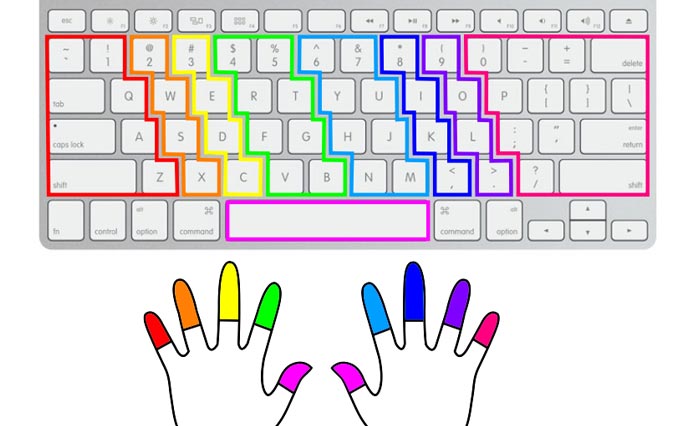
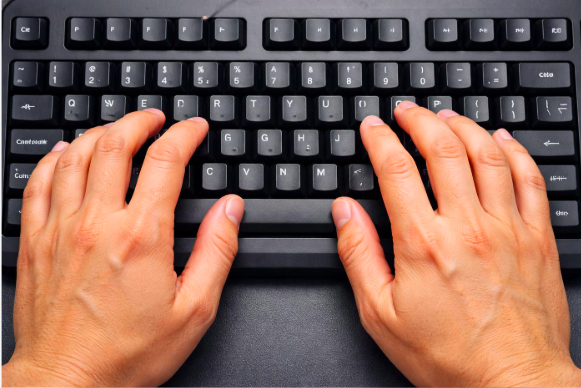
1. Learn Proper Finger Placement
Start by learning the home row keys: A, S, D, F, J, K, L, and semicolon. Keep your fingers positioned correctly so that each finger can reach its assigned keys comfortably.
2. Practise Touch Typing
Touch typing means typing without constantly looking at the keyboard. It helps you develop muscle memory and maintain a more consistent typing rhythm.
3. Focus on Accuracy First
Avoid rushing to achieve a higher WPM score. Practise entering words correctly before gradually increasing your typing speed.
4. Practise Every Day
Spend 10–15 minutes daily on typing exercises. Short and consistent sessions can help you build stronger keyboard habits.
5. Use Different Practice Passages
Practise with sentences, paragraphs, numbers, punctuation, and commonly used words. This prepares you for different types of typing tasks.
6. Maintain Proper Posture
Sit comfortably with your back supported, shoulders relaxed, and wrists in a neutral position. Keep your screen at a comfortable viewing height.
7. Avoid Looking at the Keyboard
Try to focus on the screen while typing. Looking down repeatedly can interrupt your rhythm and slow your progress.
8. Identify Common Mistakes
Review your test results to find frequently mistyped letters or words. Give extra practice to the keys and combinations that cause problems.
9. Increase Your Speed Gradually
Once you can maintain good accuracy, gradually challenge yourself with faster typing exercises. Avoid making sudden jumps in your target WPM.
10. Track Your Progress
Record your daily typing speed and accuracy. Comparing results over several weeks can help you understand whether your practice routine is working.
Online Typing Test for Students and Job Seekers
Typing skills can be useful in education and professional life. Students often use keyboards for assignments, projects, research, and examinations. Developing typing skills can make these activities easier.
For job seekers, typing speed may be an important requirement for data-entry, clerical, administrative, and customer-support positions.
Some recruitment examinations include separate typing tests with specific language, speed, and accuracy requirements. Candidates should check the official examination guidelines before preparing.
Regular online typing practice can help candidates become familiar with timed tests and improve their confidence.
Common Typing Mistakes to Avoid
Many people practise regularly but do not see consistent improvement because of incorrect typing habits.
Watch out for these common mistakes:
Typing too fast: Increasing speed without maintaining accuracy can lead to frequent errors.
Incorrect finger placement: Using only two or three fingers can limit your typing efficiency.
Looking at the keyboard: Constantly checking key positions interrupts your typing rhythm.
Poor sitting posture: Uncomfortable positioning can make longer practice sessions difficult.
Skipping regular practice: Inconsistent practice makes it harder to build muscle memory.
Ignoring test results: Repeating tests without reviewing mistakes may slow improvement.
Correcting these habits can make your typing practice more effective.
How to Create a Daily Typing Practice Routine
A simple practice schedule can help you improve without making typing feel like a difficult task.
Here is an example of a 15-minute daily routine:
15-Minute Typing Practice Plan
Warm-Up
Practise basic letters, common words, and simple sentences to prepare your fingers for typing exercises.
Accuracy Practice
Focus on correct spelling, punctuation, and finger placement. Try to reduce typing errors instead of rushing.
Speed Practice
Complete a timed typing test and try to maintain a steady pace while keeping your accuracy consistent.
Review Results
Check your WPM, accuracy, and common mistakes. Record your results to track your typing progress.
Follow this routine consistently and adjust the exercises according to your typing level.
Benefits of Using a Free Online Typing Test

Free online typing tests make it easier to practise without investing in expensive courses or specialised software.
Some major benefits include:
Easy Accessibility: Most tools work directly in a web browser.
No Installation Required: You can start practising without downloading desktop applications.
Flexible Practice: Choose different test durations according to your schedule.
Instant Results: Review your speed and accuracy immediately after completing a test.
Suitable for Different Levels: Beginners and experienced typists can both benefit.
Progress Tracking: Some platforms offer statistics that help you monitor improvements.
However, features vary between websites, so check the available test modes and tracking options before choosing a platform.
Conclusion
An online typing test is a practical way to measure your typing speed, improve accuracy, and develop better keyboard skills. Whether you are a student, job seeker, freelancer, or working professional, regular typing practice can help you complete digital tasks more efficiently.
Start with a simple one-minute test to understand your current WPM and accuracy. Focus on correct finger placement, practise touch typing, and gradually increase your speed as your accuracy improves.
You can explore free platforms such as Monkeytype, Typing.com, 10FastFingers, Keybr, and Ratatype to practise different typing exercises.
Remember that good typing performance is not just about reaching a high WPM score. Consistency, accuracy, and proper technique are equally important.
FAQ'S
An online typing test is a browser-based tool that measures how quickly and accurately you can type words, sentences, or paragraphs within a specific time limit.
Open a free typing test website, select a test duration, type the displayed passage, and review your WPM and accuracy results.
A speed of around 20–30 WPM is a reasonable initial target for beginners. Focus on accuracy before trying to type faster.
Monkeytype, Typing.com, 10FastFingers, Keybr, and Ratatype are popular options. The best choice depends on whether you want speed tests, structured lessons, or personalised practice.
Practise for 10–15 minutes daily, learn proper finger placement, use touch typing, maintain good posture, and review your mistakes after every test.
Sources and notes
Links the author listed for this post.
Information is based on general typing practices and features available on popular online typing test platforms.


Discussion
0 comments