Repetitive text work can quietly consume a lot of time. Copying content, cleaning text, changing formats, applying the same transformations again and again, or preparing information for different workflows may seem like small tasks. But when they are repeated dozens of times, they can become a major part of the workday.
This is where AltF Flow can be useful.
AltF Flow is an online text workflow automation tool designed to help users create reusable workflows for text-processing tasks. Instead of performing every transformation manually, users can organize multiple actions into a workflow and run them together.
For writers, marketers, developers, students, researchers, and professionals who regularly work with text, this approach can make routine tasks easier to manage.
What Is AltF Flow?
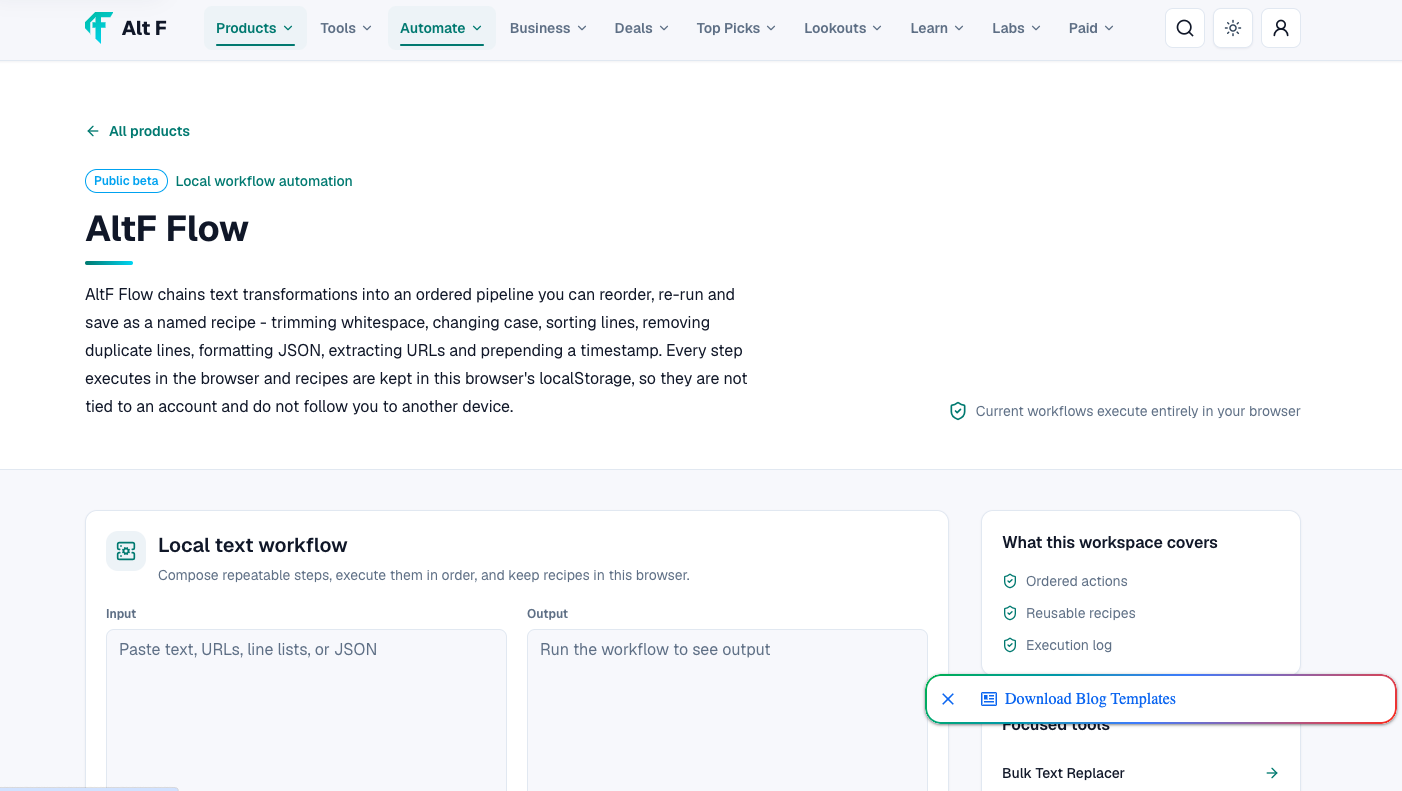
AltF Flow is a browser-based workflow tool focused on text transformation and automation. It allows users to build a sequence of actions that can be applied to text in a structured way.
The basic idea is simple:
Input text → Apply actions → Process the text → Get the final output
Rather than handling each step separately, you can create a reusable workflow containing the actions you need.
For example, imagine you receive a large piece of text that needs to be cleaned, reformatted, transformed, and prepared for another task. Instead of repeating each step manually, a workflow can organize those actions into a consistent sequence.
Why This Approach Is Useful
The value of workflow automation is not necessarily about replacing complex human work. It is often about removing repetitive steps from everyday processes.
Common Task | How a Workflow Can Help |
|---|---|
Cleaning text | Apply repeatable transformations |
Formatting content | Standardize formatting steps |
Text conversion | Process text through multiple actions |
Content preparation | Create a repeatable sequence |
Repetitive editing | Reduce manual repetition |
Data preparation | Apply consistent transformations |
This makes AltF Flow particularly useful when the same type of text processing needs to happen repeatedly.
How AltF Flow Works
The workflow concept behind AltF Flow is easier to understand when you think of it as a series of instructions.
You start with your input text and then arrange the actions you want the system to perform.
For example:
Input → Clean → Transform → Format → Output
Each action represents one stage of the process.
The advantage is that once you have created a useful workflow, you can reuse the same structure rather than rebuilding the process every time.
A Simple Example
Suppose a content creator regularly receives text that needs to be processed in several stages.
Instead of manually handling each stage:
Copy the text.
Perform the first transformation.
Copy the result.
Apply another transformation.
Reformat the output.
Repeat the process for the next document.
A reusable workflow can organize these actions into one repeatable process.
Important Pointer: The biggest benefit comes when a task is repeated frequently. For a one-time transformation, manual editing may be faster. For recurring work, reusable workflows can save more time.
Why Text Workflow Automation Matters in 2026
Modern digital work produces a huge amount of text. Emails, blog drafts, product descriptions, social media content, research notes, documentation, reports, and marketing copy all require text processing.
Many of these tasks are not necessarily difficult. They are simply repetitive.
Automation helps create a more structured workflow.
Instead of spending time remembering which steps need to be performed every time, users can build a process once and reuse it.
This can also improve consistency. If the same workflow is applied to similar inputs, the process is less dependent on manually remembering every individual step.
AltF Flow 2026: Free Text Workflow Automation Tool Online is easier when the workflow is broken into clear steps. This guide explains what to check first, how to avoid common mistakes, and where AltFTool can speed up the task.
Before you start
Define the result you want from altf flow 2026: free text workflow automation tool online.
Collect the files, links, or details you need before using a tool.
Check the final output before downloading, sharing, or publishing it.
Step-by-step workflow
Choose the right method. Match the tool or process to the exact task.
Review the settings. Look for quality, format, privacy, and output options.
Save the result. Keep the final file or link in a place you can find later.
Final thoughts
Use this process when you need a fast but careful way to handle altf flow 2026: free text workflow automation tool online. Keep the steps simple, check the source details, and use related AltFTool resources when the task needs a dedicated utility.
Who Can Use AltF Flow?
AltF Flow can be useful for anyone who regularly performs structured text-processing tasks.
Content Writers
Writers often work with large amounts of text and may need to repeatedly clean, restructure, or prepare content.
A reusable workflow can help standardize routine processing before the content moves to the next stage.
Digital Marketers
Marketers work with product descriptions, campaign copy, social content, emails, landing-page text, and other forms of written material.
Workflow-based processing can help organize repetitive text operations.
Developers
Developers often handle strings, documentation, test data, snippets, and other text-based information.
A workflow can provide a convenient way to perform repeatable transformations without manually repeating every operation.
Students and Researchers
Students may work with notes, research material, copied text, and structured information.
Simple text workflows can help organize repetitive preparation tasks.
Business Professionals
Reports, internal documents, communication templates, and other business materials often involve recurring formatting and text-processing work.
A reusable workflow can make those processes more systematic.
Common Use Cases for AltF Flow
The exact workflow you create depends on your needs, but the broader concept can be applied to many situations.
User Type | Potential Use |
|---|---|
Writers | Prepare and transform drafts |
Marketers | Process recurring campaign text |
Developers | Handle text and string transformations |
Researchers | Organize text-processing steps |
Students | Prepare notes and written material |
Businesses | Standardize repetitive text tasks |
Creators | Process content for different platforms |
The important point is flexibility. A workflow does not have to be complicated to be useful.
Reusable Workflows Make Repetitive Tasks Easier
One of the most useful concepts in workflow automation is reusability.
Imagine you have a process that you perform every Monday. If the process has five separate steps, you might repeat those five steps every week.
After creating a workflow, the same structure can be reused.
This can help reduce:
Repetitive clicking
Manual copying and pasting
Forgotten processing steps
Inconsistent formatting
Unnecessary repeated work
The more frequently a task is performed, the more valuable a reusable workflow can become.
Building a Simple Text Workflow
Creating a workflow becomes easier when you first understand the goal.
Step 1: Identify the Repetitive Task
Ask yourself which text-related task you keep doing repeatedly.
For example, perhaps you frequently receive text that requires the same sequence of transformations.
Step 2: Break the Task Into Actions
Write down every step in order.
For example:
Input → Action 1 → Action 2 → Action 3 → Final Output
Breaking a large task into smaller actions makes the workflow easier to understand.
Step 3: Arrange the Actions
Put the actions into the correct sequence.
The order matters because the output of one step can become the input for the next.
Step 4: Test the Workflow
Use a sample piece of text before applying the workflow to important content.
Check whether each step produces the expected result.
Step 5: Reuse and Improve
Once the workflow works correctly, reuse it whenever the same task appears.
If you notice an unnecessary step, remove it. If another transformation is consistently required, add it.
Workflow Automation vs Manual Text Editing
Manual editing is not going away. In fact, it remains useful for creative decisions and tasks that require human judgment.
The difference is that automation can handle predictable and repetitive operations.
Manual Editing | Workflow Automation |
|---|---|
Each task is handled separately | Multiple actions can be organized together |
More repetitive | More reusable |
Depends on manual consistency | Uses a defined sequence |
Useful for one-off tasks | Useful for recurring tasks |
Flexible for creative decisions | Efficient for predictable processes |
A practical workflow often combines both.
Use automation for repeatable processing and human judgment for decisions that require context, creativity, or review.
AltF Flow for Content Workflows
Content production often involves more than simply writing.
A piece of content may move through research, drafting, editing, formatting, optimization, publishing, and distribution.
Not every stage should be automated. However, repetitive text-processing steps can potentially be organized into workflows.
For example, a content team may have recurring formatting or preparation tasks that follow the same pattern.
A workflow can help make those steps easier to repeat.
Important Pointer: Automation should support your content process, not replace editorial review. Always check important content before publishing.
Benefits of Using a Text Workflow Tool
There are several practical advantages to using a structured workflow approach.
Saves Repetitive Effort
When the same actions are performed repeatedly, organizing them into a reusable workflow can reduce manual effort.
Improves Consistency
A defined sequence helps ensure that recurring tasks follow the same process.
Makes Processes Easier to Repeat
Once a workflow is created, it can be reused instead of rebuilt from scratch.
Helps Organize Complex Tasks
A multi-step process can be easier to understand when broken into individual actions.
Supports Faster Experimentation
Users can modify workflows and test different sequences without completely changing their entire process.
Tips for Creating Better Workflows
A good workflow does not need to be complicated.
Start with simple processes and improve them gradually.
Keep workflows focused: Build a workflow around one clear objective.
Use logical order: Make sure each action appears in the sequence where it is actually needed.
Test with sample text: Testing before using important content helps identify problems.
Avoid unnecessary steps: More actions do not automatically mean a better workflow.
Review the output: Automation should still be followed by quality checking when the result matters.
AltF Flow for Productivity
Productivity is not simply about working faster. It is also about reducing unnecessary effort.
If a person spends several minutes every day performing the same text-processing routine, those minutes can add up over weeks and months.
A reusable workflow can shift that process from “remember and repeat” to “build once and reuse.”
That change can be particularly useful for people who manage large volumes of digital content.
Free Online Workflow Automation
Another advantage of browser-based tools is accessibility.
An online workflow tool can be useful when you want to work without installing a large desktop application. This can make it easier to access your workflow from a compatible browser and integrate it into everyday digital work.
For students, freelancers, creators, and small teams, free online tools can also provide an accessible way to experiment with automation before considering more advanced solutions.
How to Decide If AltF Flow Is Right for You
AltF Flow may be worth exploring if your work includes repetitive text-processing tasks.
Ask yourself:
Do I repeat the same text transformations regularly?
Do I often perform several text actions in a fixed order?
Would a reusable process save me manual effort?
Do I want to organize repetitive text work?
Would a browser-based workflow fit my routine?
If the answer to several of these questions is yes, a text workflow approach may fit naturally into your process.
AltF Flow in a Modern Digital Workflow
The future of productivity is increasingly focused on connecting individual actions into smoother processes.
Instead of using one tool for every tiny task, users can think in terms of workflows.
That means identifying a goal, breaking it into steps, automating predictable actions, and keeping human review where it matters.
AltF Flow fits into this approach by focusing specifically on reusable text-processing workflows.
For content teams, marketers, developers, students, and everyday users, the biggest opportunity is not simply processing text faster. It is creating a repeatable system that makes recurring work easier to manage.
Quick checklist
Confirm the main goal for altf flow 2026: free text workflow automation tool online.
Compare the available options before choosing one workflow.
Use the related AltFTool utilities to finish the task faster.
AltF Flow is an online text workflow automation tool designed to help users create reusable sequences for text-processing tasks.
AltF Flow is presented on AltFTool as a free product/workspace. Availability and features may change over time.
Writers, marketers, developers, students, researchers, creators, and business professionals can use text workflows for repetitive processing tasks.
A text workflow is a sequence of actions applied to text in a defined order to produce a desired output.
Yes. Reusability is one of the main ideas behind workflow-based text processing, allowing recurring tasks to follow an established sequence.
Who should use Digital Tools
AltF Flow 2026: Free Text Workflow Automation Tool Online is built for writers, students, and teams working with text, files, and document cleanup. The main goal is clearer writing, cleaner documents, and faster review workflows, so the guide focuses on practical choices instead of broad theory.
Use it when you need one of these outcomes:
- checking writing length before submission
- combining or preparing files for sharing
- cleaning language, formatting, or readability before publishing
How to get a better result
- Paste or upload a small sample first to confirm the tool behavior.
- Apply the correction, merge, count, or translation workflow.
- Review the output for formatting, meaning, and missing sections.
- Save the final version only after checking the most important details.
Start small, check the first output, and only then repeat the workflow with the full file, text, media, or game session. That gives you a quick quality check before you spend more time.
Quality checks before you trust the output
- the final text still says what you intended
- file order and page order are correct before export
- names, numbers, dates, and translated terms are reviewed manually
Do not treat automated text output as final without review. The tool can speed up cleanup, but names, facts, tone, and context still need a human pass.
Continue your workflow
If you want to try the workflow now, open the related AltFTool tool area. For more reading, continue through the Digital Tools archive or the AltFTool PDF and document guides.
This creates a cleaner path from explanation to action: read the guide, test the tool, compare the output, and move into the next related AltFTool resource only when it helps the task.
Sources and review notes
References used to check facts, freshness, and reader-safe recommendations in this guide.
Information is based on publicly available details from the official AltFTool AltF Flow page. Features, workflow options, availability, and usage limits may change over time, so users should check the latest product information before use.
- 1AltFTool
altftool.com
Discussion
0 comments
No comments yet
Discussion will appear here once it loads.