Working with text sounds easy until you have to do the same thing hundreds of times.Maybe you need to remove duplicate lines from a list. Perhaps you have text in the wrong case, messy spacing, inconsistent formatting, or data that needs to be cleaned before you can use it somewhere else. Sometimes the task is tiny — but when you repeat it again and again, those tiny tasks quickly become a time drain.
This is where text transformation workflows can make a real difference.
Instead of manually fixing every piece of text, you can create a repeatable process that handles multiple transformations in a consistent way. AltF Flow is built around this idea, giving users a browser-based way to organize text-processing steps into reusable workflows.
What Is Text Workflow Automation?
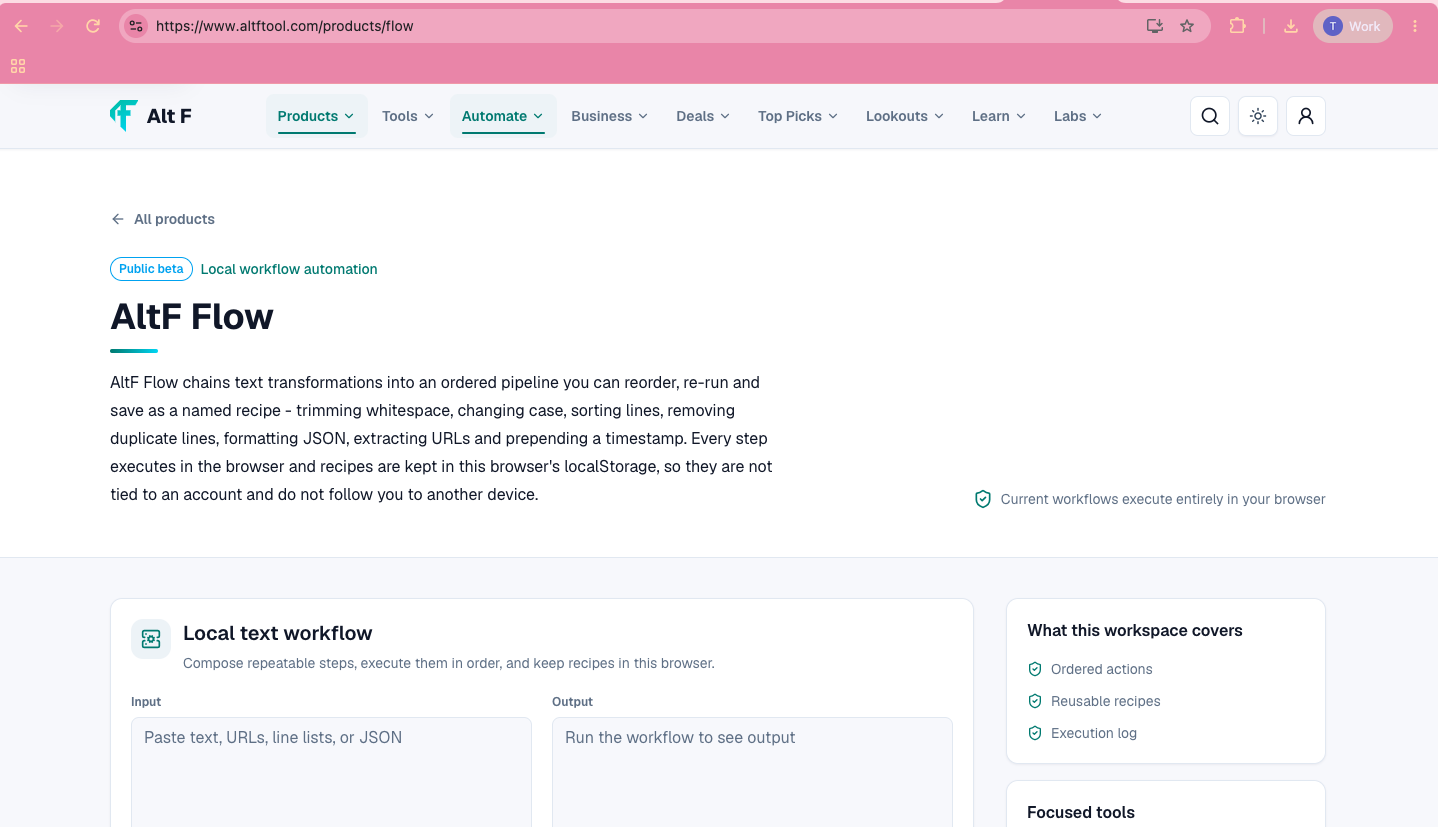
Text workflow automation means creating a sequence of actions that transforms text from one format into another.
Think of it like a small assembly line.
You start with messy or unstructured text. Then you apply a series of steps:
Input → Clean → Transform → Format → Output
For example, imagine you have a list containing:
Duplicate entries
Random capitalization
Extra spaces
Unwanted characters
Inconsistent formatting
Instead of correcting everything manually, you can apply a series of transformations to produce a cleaner result.
The benefit is not just speed. It is consistency.
When you repeat the same process manually, it is easy to miss something. A defined workflow gives you a repeatable method.
Why Text Cleanup Takes More Time Than Expected
Text cleanup is one of those jobs that looks simple from the outside.
Removing spaces? Easy.
Changing uppercase to lowercase? Easy.
Sorting a list? Easy.
Removing duplicates? Also easy.
But combine all those tasks and repeat them across different datasets, documents, lists, or projects, and the process becomes surprisingly tedious.
For people who regularly work with content, spreadsheets, datasets, URLs, product information, research notes, or technical text, these repetitive tasks can become part of the daily routine.
A workflow approach helps turn those repeated actions into a predictable process.
Automate Text Formatting, Cleanup & Data Transformations is easier when the workflow is broken into clear steps. This guide explains what to check first, how to avoid common mistakes, and where AltFTool can speed up the task.
Before you start
Define the result you want from automate text formatting, cleanup & data transformations.
Collect the files, links, or details you need before using a tool.
Check the final output before downloading, sharing, or publishing it.
Step-by-step workflow
Choose the right method. Match the tool or process to the exact task.
Review the settings. Look for quality, format, privacy, and output options.
Save the result. Keep the final file or link in a place you can find later.
Final thoughts
Use this process when you need a fast but careful way to handle automate text formatting, cleanup & data transformations. Keep the steps simple, check the source details, and use related AltFTool resources when the task needs a dedicated utility.
Extract URLs From Text
Another common task is pulling URLs out of a larger block of text.
Imagine you have copied a document containing sentences, links, notes, and other information. Manually finding every URL can be tedious.
A URL extraction transformation can help isolate the web addresses so you can process them separately.
This can be useful for research, content workflows, website audits, or organizing reference material.
Work With Timestamps
Dates and timestamps often appear in technical data, logs, exports, and other structured information.
Having transformation steps for timestamps can make certain data-processing workflows easier to manage.
Instead of repeatedly converting or formatting values by hand, you can incorporate the required transformation into your workflow.
Build Reusable Workflows
One of the most useful ideas behind AltF Flow is reusability.
Suppose you regularly receive a list that needs the same five cleanup steps.
You could perform those five actions manually every time.
Or you could create a workflow that follows the same sequence whenever you need it.
For example:
Trim → Remove Duplicates → Sort → Change Case → Format
Once the process is defined, you have a repeatable recipe for that particular task.
This is especially helpful when the same type of cleanup appears regularly in your work.
Why Reusable Recipes Matter
Imagine you are working on a project where you receive hundreds of product names every week.
Every list needs:
Extra spaces removed
Duplicate names removed
Names standardized
Entries sorted
Final formatting applied
Doing this manually every time creates unnecessary work.
A reusable workflow gives you a consistent process.
It also makes it easier to remember which steps you normally apply.
That matters because productivity is not always about doing complicated things faster. Sometimes it is simply about removing unnecessary repetition.
Who Can Benefit From Text Workflow Tools?
You do not need to be a developer to find text transformations useful.
Content Creators
Writers and content teams frequently work with lists, headings, URLs, keywords, copied text, and structured information.
Simple transformations can reduce repetitive editing.
SEO Professionals
SEO work often involves keywords, URLs, search data, titles, lists, and other text-heavy information.
Cleaning and organizing that information can make routine workflows easier.
Developers
Developers regularly work with JSON, URLs, logs, text data, timestamps, and structured content.
A browser-based transformation workflow can be handy for quick processing without creating a custom script for every small task.
Researchers
Research often produces large collections of notes, links, names, references, and copied information.
Cleaning that material before analysis can save time.
Students
Students may use text transformations for organizing notes, lists, references, or project data.
Business Teams
Operations, marketing, support, and other teams can encounter repetitive text-processing tasks that do not require a large software system — just a reliable way to clean and organize information.
Automation Does Not Always Mean Complex Software
The word "automation" can make people think of complicated systems, APIs, scripts, and integrations.
But automation can be much simpler.
If you take a process that normally requires five manual actions and turn it into one repeatable workflow, you have already removed unnecessary repetition.
That is the practical side of text workflow automation.
You do not necessarily need to build a large application.
Sometimes you just need a reliable sequence of transformations.
Browser-Based Processing Can Be Convenient
A browser-based workflow tool can be useful when you need a quick solution without installing another application.
You can work directly from your browser and focus on the transformation you need.
For occasional tasks, this can be more convenient than writing a script from scratch.
For repeated tasks, reusable workflows can provide an additional productivity advantage.
When Should You Use a Text Transformation Workflow?
A workflow is particularly useful when:
You repeat the same text cleanup regularly
Your input contains inconsistent formatting
You need to apply several transformations in sequence
You frequently remove duplicates
You work with lists or structured text
You need to extract URLs
You format JSON regularly
You want a repeatable process for similar data
If you only need to change one word once, manual editing may be perfectly fine.
Automation becomes more valuable as volume and repetition increase.
Automation Is About Consistency, Not Just Speed
Speed is an obvious benefit, but consistency can be even more important.
Suppose two people clean the same dataset manually. They might make slightly different decisions about spaces, capitalization, duplicates, or formatting.
A defined workflow provides a common process.
That makes the result easier to reproduce.
For teams, this can be particularly helpful because everyone can follow the same transformation sequence rather than inventing their own method every time.
Things to Check Before Using Any Workflow
Before processing important information, understand what the tool does with your data.
This is especially important when working with:
Customer information
Private business data
Passwords or authentication information
Confidential documents
Proprietary datasets
Personally identifiable information
Always review the relevant privacy and data-handling information before putting sensitive content into any online tool.
For non-sensitive text, the workflow can be much more straightforward.
AltF Flow as a Practical Text Workflow Tool
AltF Flow focuses on turning individual text transformations into a more organized workflow.
Instead of thinking about each operation separately, you can think about the entire process.
For example:
Clean → Transform → Organize → Format
That approach makes sense when your task involves several small operations rather than one large transformation.
The goal is simple: make repetitive text processing easier to repeat.
Quick checklist
Confirm the main goal for automate text formatting, cleanup & data transformations.
Compare the available options before choosing one workflow.
Use the related AltFTool utilities to finish the task faster.
AltF Flow is a browser-based text workflow tool that helps users combine different text transformations into reusable workflows for repetitive processing tasks.
You can use text transformations for tasks such as cleaning text, changing letter case, removing duplicates, sorting lists, formatting JSON, extracting URLs, and working with timestamps.
Yes. Duplicate-removal transformations can help clean lists and datasets by removing repeated entries.
Yes. JSON formatting can make structured data easier to read, inspect, and work with.
Reusable workflows are sequences of text transformations that can be applied repeatedly to similar types of input, helping reduce manual steps.
Who should use Digital Tools
Automate Text Formatting, Cleanup & Data Transformations is built for writers, students, and teams working with text, files, and document cleanup. The main goal is clearer writing, cleaner documents, and faster review workflows, so the guide focuses on practical choices instead of broad theory.
Use it when you need one of these outcomes:
- checking writing length before submission
- combining or preparing files for sharing
- cleaning language, formatting, or readability before publishing
How to get a better result
- Paste or upload a small sample first to confirm the tool behavior.
- Apply the correction, merge, count, or translation workflow.
- Review the output for formatting, meaning, and missing sections.
- Save the final version only after checking the most important details.
Start small, check the first output, and only then repeat the workflow with the full file, text, media, or game session. That gives you a quick quality check before you spend more time.
Quality checks before you trust the output
- the final text still says what you intended
- file order and page order are correct before export
- names, numbers, dates, and translated terms are reviewed manually
Do not treat automated text output as final without review. The tool can speed up cleanup, but names, facts, tone, and context still need a human pass.
Continue your workflow
If you want to try the workflow now, open the related AltFTool tool area. For more reading, continue through the Digital Tools archive or the AltFTool PDF and document guides.
This creates a cleaner path from explanation to action: read the guide, test the tool, compare the output, and move into the next related AltFTool resource only when it helps the task.
Sources and review notes
References used to check facts, freshness, and reader-safe recommendations in this guide.
Based on the official AltF Flow product page, covering browser-based text workflows, reusable transformation pipelines, text cleanup, formatting, and other repeatable text-processing tasks.
- 1AltFTool
altftool.com
Discussion
0 comments
No comments yet
Discussion will appear here once it loads.