In today's digitally connected world, security has become one of the most important concerns for individuals, businesses, and organizations. From personal smartphones and laptops to large business networks and cloud platforms, almost every digital system depends on technology to store, process, and exchange information. However, even the most advanced systems can contain weaknesses that expose them to potential risks. These weaknesses are commonly known as vulnerabilities.
A vulnerability is a weakness or flaw in a system, application, network, process, or security arrangement that could be exploited to cause harm, gain unauthorized access, expose sensitive information, or interrupt normal operations.
Understanding vulnerabilities is essential because cyber threats continue to evolve. A small software configuration mistake, an outdated application, or a weak password policy can create opportunities for attackers. Identifying these weaknesses early allows organizations to strengthen their security before problems become serious.
You can also explore free online tools on AltFTool for useful digital utilities that support everyday productivity and technical tasks. These resources can complement a broader approach to managing digital work and improving online practices.
What Is Vulnerability?
In cybersecurity, vulnerability refers to a weakness in hardware, software, networks, applications, or security procedures that may allow an attacker to compromise a system.
These weaknesses can develop during software development, system configuration, infrastructure management, or everyday technology use.
For example, imagine a company using an outdated website platform that contains a known security flaw. If the company does not install the available security update, an attacker may exploit that weakness to access sensitive information.
Vulnerabilities do not always result in cyberattacks. However, when they remain unaddressed, they increase the possibility of security incidents.
Simple Examples of Vulnerabilities
Using weak or easily guessed passwords.
Running outdated operating systems or applications.
Leaving unnecessary network ports exposed.
Incorrectly configuring cloud storage permissions.
Failing to encrypt sensitive information.
Using software with known security weaknesses.
Important: A vulnerability is a weakness, a threat is something that could cause harm, and risk represents the potential likelihood and impact of that harm.
Different Types of Vulnerabilities in Cybersecurity
Vulnerabilities can exist in different parts of a digital environment. Some affect software applications, while others involve network infrastructure, hardware, cloud platforms, or human behaviour.
Understanding these categories helps security teams identify where protection is needed.
1. Software Vulnerabilities
Software vulnerabilities are weaknesses in applications, operating systems, or computer programmes. They may occur because of coding errors, insecure development practices, or outdated software components.
For example, a website containing an SQL injection vulnerability may allow an attacker to interfere with database queries if appropriate security controls are missing.
2. Network Vulnerabilities
Network vulnerabilities occur when network infrastructure or communication systems are not properly secured. Weak firewall settings, exposed services, and insecure communication protocols can create opportunities for unauthorized access.
3. Hardware Vulnerabilities
Hardware vulnerabilities are weaknesses associated with physical devices, processors, memory components, or firmware. These issues may affect computers, servers, routers, and other connected devices.
4. Human Vulnerabilities
Human vulnerabilities involve mistakes or behaviours that can weaken security. Clicking suspicious links, sharing passwords, falling for phishing emails, or using unsecured devices can expose personal and business information.
5. Cloud Security Vulnerabilities
Cloud vulnerabilities arise when cloud-based platforms, storage systems, or services are incorrectly configured or inadequately protected.
For example, publicly accessible cloud storage containing confidential business documents can expose sensitive information.
6. Configuration Vulnerabilities
Configuration vulnerabilities occur when systems are not configured according to appropriate security standards. Default passwords, excessive permissions, unnecessary services, and weak access controls are common examples.
Common Types of Vulnerabilities at a Glance
Vulnerability Type | Common Example | Potential Risk | Prevention Method |
|---|---|---|---|
Software | Outdated applications | Unauthorized access | Install updates |
Network | Weak firewall settings | Network intrusion | Configure firewalls |
Hardware | Firmware weaknesses | Device compromise | Update firmware |
Human | Phishing emails | Credential theft | Security awareness |
Cloud | Public storage access | Data exposure | Review permissions |
Configuration | Default passwords | Unauthorized access | Secure configuration |
What Causes Security Vulnerabilities?
Vulnerabilities can develop for several reasons. Sometimes they are introduced during software development, while in other situations they result from poor maintenance or incorrect security practices.
Identifying the underlying causes is an important step towards building a safer digital environment.
1. Outdated Software and Systems
Technology requires regular maintenance. When organizations continue using outdated applications, operating systems, or plugins, they may remain exposed to publicly known security weaknesses.
Software updates frequently include security patches that fix these issues.
2. Weak Password Management
Simple passwords and reused login credentials can make accounts easier to compromise. If one account becomes exposed, attackers may attempt to use the same credentials elsewhere.
Using unique passwords and multifactor authentication can significantly improve account security.
3. Poor Security Configuration
Incorrect system settings can create unnecessary security gaps. For example, giving employees administrator privileges when they only need basic access increases the potential impact of compromised accounts.
4. Coding Errors
Programming mistakes can introduce weaknesses into applications. Insecure input handling, improper authentication, and insufficient access validation are common examples.
5. Lack of Security Awareness
Employees and users who are unfamiliar with common cyber threats may unintentionally expose systems to attacks. Regular awareness training helps reduce mistakes and encourages safer digital behaviour.
6. Insufficient Security Testing
When applications and networks are not regularly tested, weaknesses may remain undiscovered. Security assessments, code reviews, and vulnerability scanning help identify problems before attackers find them.
How Do Vulnerabilities Affect Individuals and Businesses?
A vulnerability can create serious consequences depending on the system involved, the sensitivity of the information, and whether an attacker successfully exploits the weakness.
The impact may range from temporary service interruptions to major financial and reputational damage.
Impact Area | What Can Happen? | Example | Possible Consequence |
|---|---|---|---|
Data Security | Sensitive information is exposed | Customer records leak | Privacy violations |
Financial Security | Money or resources are lost | Fraudulent transactions | Financial damage |
Business Operations | Services become unavailable | Website disruption | Lost productivity |
Reputation | Customers lose confidence | Public security incident | Reduced trust |
Legal Compliance | Security obligations are breached | Personal data exposure | Regulatory consequences |
System Integrity | Information is modified | Unauthorized database changes | Incorrect business records |
Why Vulnerabilities Should Never Be Ignored
Even a seemingly minor weakness can become serious when combined with other security issues.
For example, an outdated application combined with weak access controls may create a larger attack opportunity than either weakness would create independently.
Businesses should therefore assess vulnerabilities according to their severity, exposure, and potential business impact rather than treating every weakness equally.
What Is Vulnerability Assessment?
A vulnerability assessment is a structured process used to identify, analyse, and prioritize security weaknesses in systems, applications, networks, and infrastructure.
Its main purpose is to help organizations understand their security condition and decide which issues need attention first.
A typical assessment includes several stages:
1. Identify Digital Assets
The first step is understanding which systems need protection. This may include websites, databases, servers, cloud platforms, employee devices, and business applications.
2. Scan for Weaknesses
Security teams use vulnerability scanning tools to identify known weaknesses, outdated software, insecure configurations, and exposed services.
3. Analyse and Prioritize Findings
Not every vulnerability represents the same level of danger. Teams evaluate the severity, exploitability, exposure, and potential impact of each finding.
4. Fix Identified Issues
Organizations apply security patches, change configurations, improve access controls, or update vulnerable software components.
5. Verify the Fixes
After applying corrections, security teams perform follow-up checks to confirm that the identified weaknesses have been addressed.
Vulnerability Assessment Process
Assessment Stage | Main Activity | Expected Result | Importance |
|---|---|---|---|
Identification | List systems and assets | Asset inventory | Know what needs protection |
Detection | Scan systems | Security findings | Discover weaknesses |
Evaluation | Analyse severity | Risk prioritization | Focus on critical issues |
Remediation | Apply fixes | Reduced exposure | Improve security |
Verification | Retest systems | Confirmed corrections | Maintain protection |
Popular Tools Used to Identify Vulnerabilities
Cybersecurity professionals use different tools to discover and evaluate weaknesses. The right tool depends on the environment, testing requirements, and technical expertise.
Some widely recognized security tools include:
Tool | Main Purpose | Common Use | Suitable For |
|---|---|---|---|
Nessus | Vulnerability scanning | Identifying known weaknesses | Security teams |
OpenVAS | Vulnerability assessment | Scanning network systems | Security professionals |
Burp Suite | Web application testing | Finding web security issues | Web security testers |
Nmap | Network discovery and auditing | Identifying open ports and services | Network administrators |
OWASP ZAP | Web application security testing | Detecting common web weaknesses | Developers and testers |
These tools should be used only on systems that you own or have explicit permission to assess. A scan does not guarantee that every vulnerability has been identified.
Best Practices to Prevent and Manage Vulnerabilities
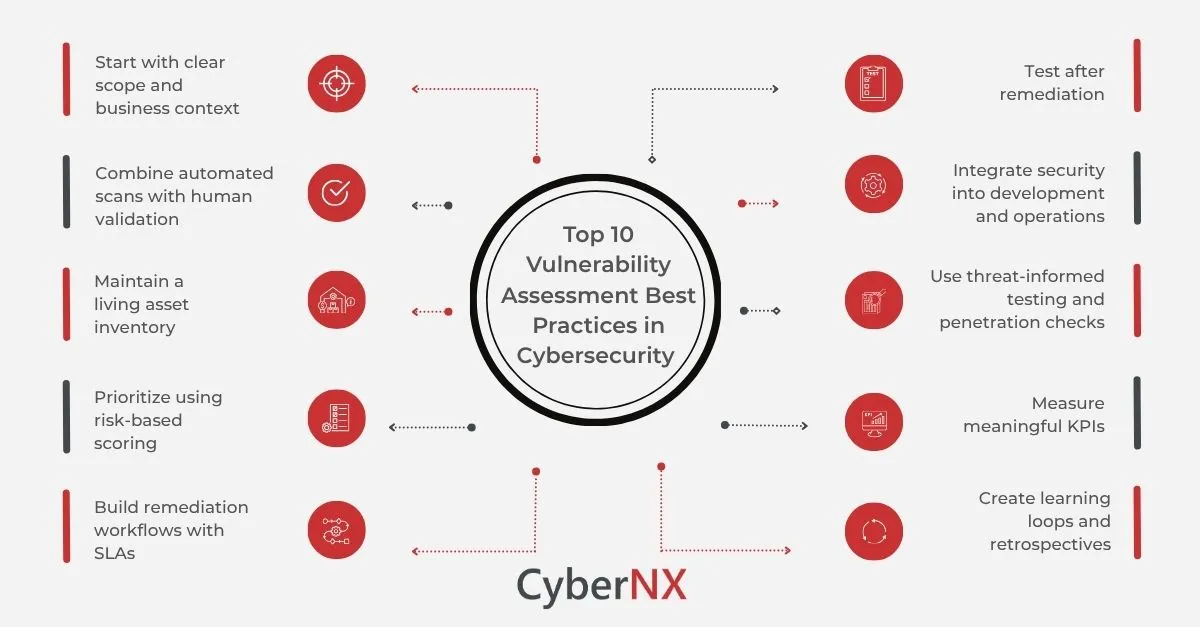
Preventing every vulnerability is not always possible, but organizations can reduce their exposure through consistent security practices.
Here are some practical measures that individuals and businesses can follow.
1. Keep Software Updated
Install security updates for operating systems, applications, browsers, plugins, and device firmware. Enable automatic updates wherever appropriate.
2. Use Strong Authentication
Create unique passwords for different accounts and enable multifactor authentication. Password managers can help users manage credentials securely.
3. Perform Regular Security Assessments
Schedule vulnerability assessments and security reviews to discover weaknesses before they become serious problems.
4. Apply the Principle of Least Privilege
Give users and applications only the permissions necessary to perform their responsibilities. Review access rights regularly.
5. Secure Networks and Devices
Use properly configured firewalls, secure Wi-Fi settings, endpoint protection, and encrypted connections.
6. Train Employees
Provide regular cybersecurity awareness training. Teach employees how to recognize suspicious messages, avoid unsafe downloads, and report unusual activity.
7. Maintain Regular Backups
Keep important data backed up using secure storage practices. Test recovery procedures so information can be restored when needed.
8. Create an Incident Response Plan
Prepare clear procedures for identifying, reporting, containing, and recovering from security incidents.
Important pointers for better vulnerability management:
Prioritize critical and actively exploited vulnerabilities.
Maintain an updated inventory of hardware and software.
Remove unused accounts and unnecessary services.
Monitor systems for suspicious activity.
Document security findings and remediation actions.
Review third-party software and service providers.
Vulnerability vs Threat vs Risk: Understanding the Difference
These three cybersecurity terms are closely connected but have different meanings. Understanding the distinction helps businesses make better security decisions.
Term | Meaning | Example | Role in Security |
|---|---|---|---|
Vulnerability | A weakness in a system | Outdated software | Creates an exposure |
Threat | A potential cause of harm | Cybercriminal | May exploit weaknesses |
Risk | Potential likelihood and impact of harm | Possible data breach | Helps prioritize action |
Exploit | A method or technique used to take advantage of a weakness | Malicious code targeting a flaw | Can enable an attack |
For example, an outdated website plugin is a vulnerability. A cybercriminal attempting to compromise the website is a threat. The possibility and potential consequences of a successful attack represent the risk.
The Role of Vulnerability Management in Modern Cybersecurity
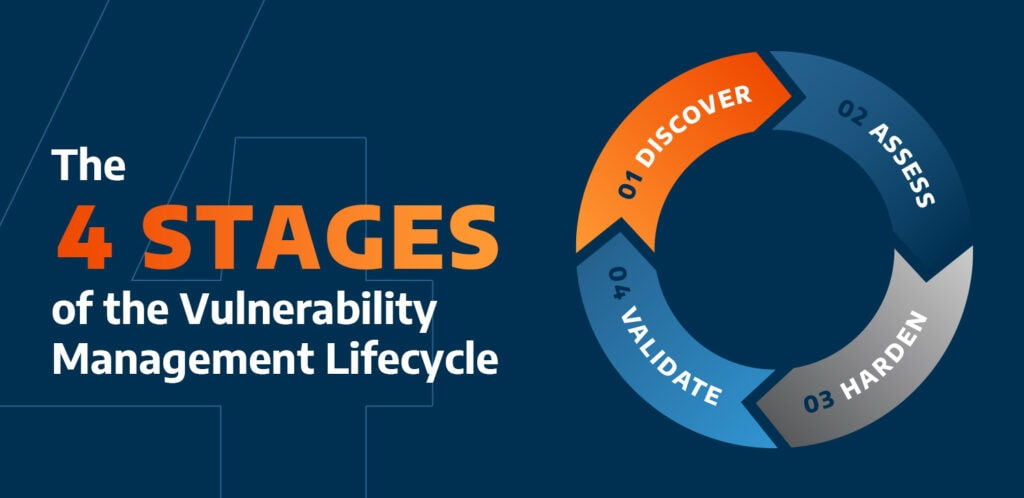
Vulnerability management is an ongoing process rather than a one-time security activity. Organizations need to continuously discover, evaluate, prioritize, and address weaknesses as technology and cyber threats change.
Modern businesses increasingly depend on cloud services, remote work environments, mobile devices, and third-party applications. This makes regular security monitoring more important than ever.
A strong vulnerability management programme helps organizations:
Reduce their attack surface.
Protect confidential business information.
Improve application and network security.
Support regulatory and compliance requirements.
Reduce unexpected downtime.
Build customer confidence.
For additional cybersecurity knowledge, explore the OWASP Foundation to learn about web application security risks, secure development practices, and useful educational resources.
You can also explore free online tools on AltFTool for useful digital utilities that support everyday productivity and technical tasks. These resources can complement a broader approach to managing digital work and improving online practices.
Frequently Asked Questions (FAQs)
A vulnerability is a weakness in a system, application, network, or process that could be used to cause damage or gain unauthorized access.
The main types include software, hardware, network, cloud, human, and configuration vulnerabilities.
A software vulnerability is a flaw in an application or operating system that may allow attackers to access information, execute unauthorized actions, or disrupt services.
Attackers may use malicious code, stolen credentials, insecure configurations, or specialized techniques to take advantage of weaknesses in digital systems.
Sources and notes
Links the author listed for this post.
This article is prepared using general cybersecurity knowledge and established information security resources. The following references provide additional information about vulnerability identification, security standards, and risk management.
More on AltFTool
- AltFTool (opens in a new tab)
altftool.com


Discussion
0 comments
No comments yet
Discussion will appear here once it loads.