
Finding the right doctor is a big part of taking care of your health. Whether you need a general physician, dentist, dermatologist or specialist, it helps to choose someone who understands your concerns. But finding the right person isn't always easy. You may have to compare several doctors, check their qualifications, work out your insurance coverage and find a slot that fits your schedule. In the past, most people relied on recommendations from friends, family or local clinics. Today, online healthcare platforms have made the whole process far more convenient. One of them is Zocdoc, which helps patients search for doctors, see available appointments and book visits online.
With Zocdoc, you can search by location, medical need, insurance and appointment preferences. Instead of spending hours calling different clinics, you can look at several options in one place. Still, choosing a doctor takes more than grabbing the first open slot. You should think about experience, patient reviews, accepted insurance plans and the kind of care you need. A little research up front can save you a lot of trouble later.
In this guide, we'll walk through how to find the right doctor online using Zocdoc in 2026. We'll also cover what to check before booking and how to make smarter healthcare decisions.
What Is Zocdoc and How Does It Work?
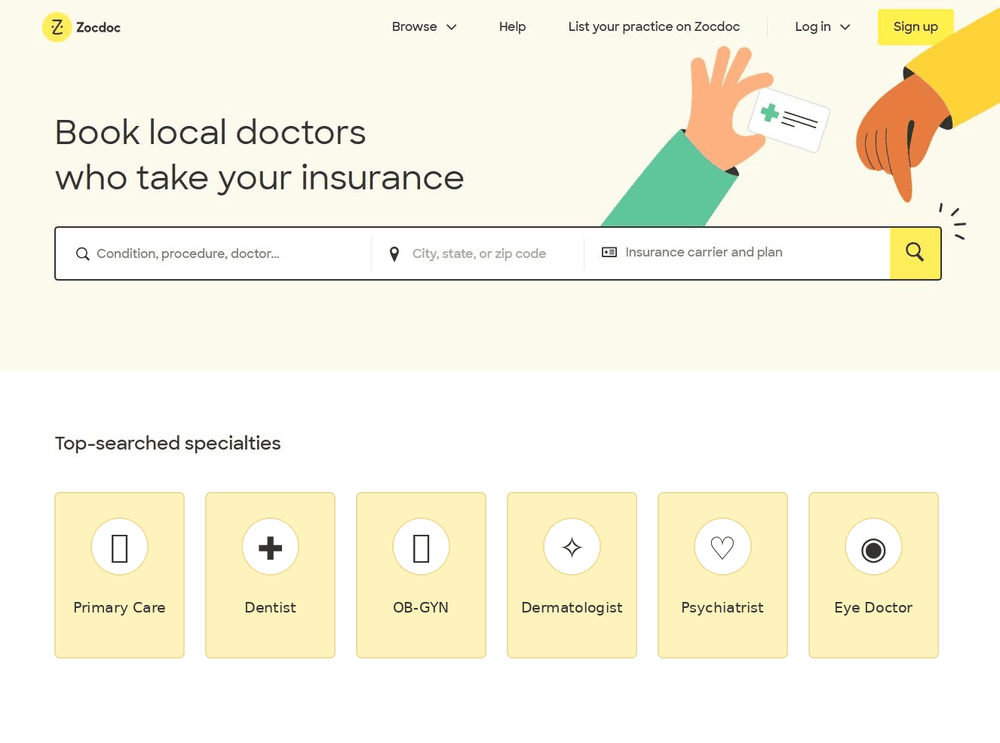
Zocdoc is an online healthcare platform that helps people find doctors and book appointments. You can search for providers by specialty, location, insurance and appointment availability.
Someone looking for a dentist, for example, can search for dental professionals nearby, review their profiles and check appointment options. A person who needs a primary care doctor can do the same and find providers who match their needs. The platform is built to make finding a doctor and scheduling a visit easier.
Main Features of Zocdoc
Some of the most useful features are:
Searching for doctors by medical specialty
Finding healthcare providers by location
Checking accepted health insurance plans
Reading patient reviews and ratings
Exploring available appointment times
Booking appointments online
Finding providers who offer virtual visits where available
These features help you narrow down your choices before you book.
1. Identify What Type of Doctor You Need
Before you start searching, work out what kind of medical professional you need. Different doctors specialise in different areas, so picking the right specialty saves time. A general health concern may suit a primary care physician, while a skin problem may need a dermatologist.
Common Types of Doctors You Can Search For
Primary Care Physician: For general health concerns, routine checkups and preventive care.
Dentist: For dental examinations, tooth pain and oral health.
Dermatologist: For skin, hair and nail conditions.
Cardiologist: For heart-related health concerns.
Orthopedic Specialist: For bone, joint and muscle problems.
Gynecologist: For women's reproductive health needs.
Psychiatrist: For mental health assessment and treatment.
Choosing the right specialty keeps your search focused. If you're not sure which specialist you need, a primary care physician can often point you in the right direction.
2. Visit the Zocdoc Website and Start Your Search
Once you know the type of doctor you need, open the official Zocdoc website or use its mobile app. The search is simple. You can type in a doctor's name, a specialty, a health concern or your reason for the visit, and then add your preferred location.
If you need a skin specialist, for instance, search for a dermatologist and enter your city or ZIP code. The platform will then show matching providers based on those details.
Use Search Filters to Narrow Down Results
Zocdoc offers several filters that make it easier to find a suitable doctor. Depending on your search, you can narrow results by:
Medical specialty and reason for visit
Location and distance
Accepted health insurance
Appointment availability
Preferred doctor gender
In-person or video appointments
These filters save time, especially when your search brings up a long list of doctors.
3. Check Doctor Profiles and Professional Experience
Once you have your results, don't book right away. Take a little time to read through the doctor's profile and understand their background and services. A profile can include qualifications, specialties, practice details, office photos and appointment availability.
What Should You Check?
Keep these points in mind before choosing a healthcare professional:
Education and qualifications: Look at the doctor's medical education, credentials and relevant training.
Specialisation: Make sure the doctor treats the condition you need help with.
Experience: Review their background and experience in that specialty.
Office location: Think about whether the clinic is easy to reach for regular visits.
New patient availability: Check whether the provider is accepting new patients.
A detailed profile helps you understand a doctor's background, but it shouldn't replace your own judgement or proper medical advice.
4. Read Patient Reviews Before Choosing a Doctor
Patient reviews show you what other people experienced during their visits. They can tell you about communication, staff behaviour, waiting times and the overall clinic experience. Zocdoc displays verified reviews from patients who booked through the platform, and both positive and negative feedback can appear, so you get a fuller picture.
Look Beyond the Overall Rating
A high rating can look like an easy answer, but the number alone doesn't tell the whole story. Read a few recent reviews and look for patterns. Several patients might mention that the doctor explains things clearly, or that appointments usually start on time.
Also think about whether the feedback matches your own priorities. If you're seeing a specialist, clear communication and good explanations may matter more to you than how the clinic looks. Reviews are useful for understanding experiences, but they can't guarantee medical outcomes or prove that a doctor is right for you.
5. Check Whether the Doctor Accepts Your Health Insurance
Healthcare costs can be a real concern, especially if you need regular visits or specialist care. Before booking, check whether the doctor accepts your insurance plan. Zocdoc lets you add your insurance carrier and specific plan while searching, which helps show whether providers are in-network or out-of-network for your coverage.
Verify Your Insurance Details
Make sure you choose the correct insurance company and plan. Two plans from the same company can have different provider networks.
Before confirming your appointment, it's worth checking:
Whether the doctor is in-network
Whether your visit needs a referral
Whether a copayment or deductible applies
Whether the service is covered by your insurance
Whether the clinic accepts your specific plan
Insurance listings can change, and coverage depends on your own policy. Contact the doctor's office and your insurance company to confirm your benefits before the visit.
6. Compare Appointment Availability and Choose a Convenient Time
Finding a good doctor matters, but so does the timing of your visit. If you have a busy work schedule or family responsibilities, a convenient slot makes healthcare much easier to manage. Zocdoc shows available appointment times for participating providers, so you can compare options and pick one without making several phone calls.
Consider Your Daily Schedule
Before booking, think about travel time, work commitments and other responsibilities. If you work during the day, an evening appointment may suit you better. If the clinic is far away, plan for how long it will take to get there.
Don't pick a slot just because it's the earliest one. Make sure the doctor, the location and the type of consultation all meet your needs.
7. Explore Virtual Doctor Visits
Virtual appointments are another convenient option for people who'd rather consult a doctor from home. Zocdoc lets you search for providers who offer video visits where available. This can work well for follow-ups and for health concerns that don't need a physical examination.
When Are Video Appointments Useful?
Virtual consultations may be suitable for:
Discussing certain ongoing health concerns
Follow-up appointments
Reviewing treatment progress
Asking questions about prescribed medication
Certain general healthcare consultations
That said, not every condition can be assessed over video. Physical examinations, lab tests and urgent situations may need in-person care. Choose the consultation type based on your medical needs and your doctor's recommendation.
8. Book Your Doctor Appointment Online
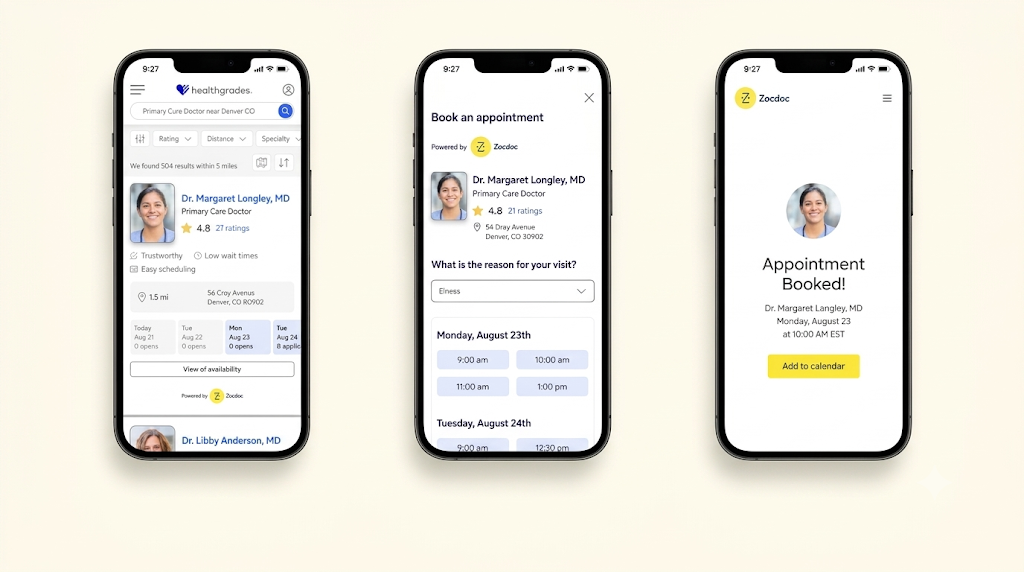
After comparing profiles, insurance details, reviews and appointment times, you're ready to book. Select your preferred provider and an available slot, then follow the instructions on the website or app. Depending on the provider, you may need to enter your contact details, insurance information and reason for the visit.
Review Your Booking Confirmation
Before you finish, double-check the appointment date, time, doctor and clinic location. Keep your confirmation handy so you can refer to it later. Also find out whether the office needs ID, insurance documents, previous medical reports or forms before your visit.
If you need to change or cancel, read the platform's instructions and the provider's cancellation policy.
9. Understand Zocdoc's AI-Powered Search Features in 2026
Technology keeps changing how people find medical services. In 2026, Zocdoc has introduced an AI Care Assistant in beta that lets patients describe their needs in everyday language. Instead of knowing the exact medical term, you can simply explain what you're experiencing, and the assistant helps identify relevant providers based on visit reasons, insurance and availability.
Someone with frequent heartburn, for example, can describe it in plain words rather than searching with complicated terms. This can make searching easier, especially for people who aren't familiar with medical specialties.
However, AI-powered search is not a medical diagnosis. It can't replace a doctor's examination or professional advice. Zocdoc also offers a classic search option for people who prefer traditional filters.
10. Important Things to Remember Before Booking
Online booking is convenient, but a few precautions are worth taking before you confirm. First, remember that Zocdoc is a healthcare technology marketplace, not a medical provider. It connects you with participating professionals but doesn't decide which doctor gives the best care. Its results depend on factors like visit requirements, location, insurance and availability, and sponsored listings may appear at the top with a label.
Keep these points in mind:
Verify the doctor's credentials and relevant experience.
Confirm insurance coverage directly with your provider.
Check the clinic address and appointment details.
Read the cancellation and rescheduling policies.
Keep your medical records ready for the consultation.
Never delay emergency medical care while searching online.
These simple steps help you make a more informed healthcare decision.
Benefits of Using Zocdoc for Finding Doctors Online
Benefits of Using Zocdoc for Finding Doctors Online
🔎 Convenient Doctor DiscoveryExplore different healthcare professionals online without contacting every clinic separately. Compare doctor profiles and find suitable options easily. | ⏰ Time-Saving BookingCheck available appointment slots and choose a convenient time without making several phone calls. | 🛡️ Insurance-Based SearchesFilter doctor searches according to your health insurance provider and plan. |
⭐ Patient FeedbackRead verified patient reviews to understand other patients' experiences before choosing a doctor. | 💻 Virtual ConsultationsFind participating doctors who offer video appointments and connect remotely. | 🏥 Multiple Medical SpecialtiesExplore primary care, dermatology, dentistry, psychiatry and other medical specialties. |
Conclusion
Finding the right doctor online doesn't have to be complicated. With Zocdoc, you can explore healthcare professionals, compare profiles, read verified reviews, check insurance information and book available appointments from one place.
Still, your choice shouldn't depend only on ratings or how soon a slot is open. Think about qualifications, experience, communication style, location and insurance coverage before you decide. Whether you're planning a routine checkup, looking for a dentist or searching for a specialist, start by understanding your healthcare needs, use the filters, compare providers and verify the important details before booking.
In 2026, digital healthcare platforms are making it easier than ever to find a doctor and schedule a visit. Used carefully, Zocdoc can be a helpful tool for organising your healthcare and finding a provider who fits your needs.
Zocdoc helps patients find doctors, compare providers and book medical appointments online.
Yes, patients can search for doctors and book appointments through Zocdoc for free.
Enter your medical specialty, location and insurance details to find suitable doctors.
Yes, you can read verified patient reviews before choosing a doctor.
You can search for doctors who accept your specific health insurance plan.
Sources and notes
Links the author listed for this post.
This article is based on information from Zocdoc's official website, healthcare resources and general online doctor-booking practices to help readers make informed healthcare decisions.
- 1


Discussion
0 comments