Finding the right doctor is not always easy. Sometimes, you need to call several clinics, check whether they accept your insurance, compare appointment timings, and still wait days before getting an answer. This process can become frustrating, especially when you need medical attention quickly.
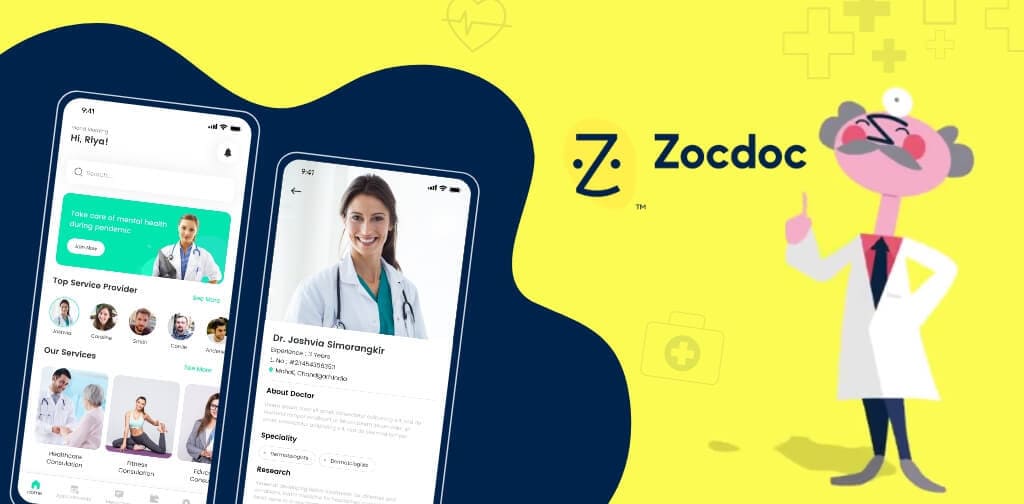
This is where Zocdoc can make things simpler. It is an online healthcare marketplace that helps patients search for doctors, compare provider profiles, read patient reviews, check appointment availability, and book appointments.
Instead of visiting multiple clinic websites or making several phone calls, patients can use one platform to explore different healthcare providers and find options that match their needs.
Let's understand how Zocdoc works, what services it offers, how to book an appointment, and what patients should know before using it.
What Is Zocdoc?
Zocdoc is a digital healthcare marketplace founded in 2007. It connects patients with healthcare providers through its website and mobile app.
The platform is designed to make finding and booking medical appointments more convenient. Patients can search for doctors by name, medical specialty, health concern, location, and insurance information.
Zocdoc allows users to explore provider profiles, check available appointment times, and book appointments online. Depending on the provider, patients may be able to choose between an in-person visit and a virtual consultation.
One important thing to understand is that Zocdoc is not a hospital, clinic, or medical provider. It is a technology platform that helps patients discover healthcare professionals and schedule appointments.
Key Details About Zocdoc
Feature | Information |
Company | Zocdoc |
Founded | 2007 |
Industry | Healthcare Technology |
Main Service | Doctor discovery and appointment booking |
Platform | Website and mobile app |
Primary Market | United States |
Appointment Types | In-person and virtual, where available |
Main Users | Patients and healthcare providers |
How Does Zocdoc Work?
Zocdoc makes the doctor-search process easier by bringing important information together in one place.
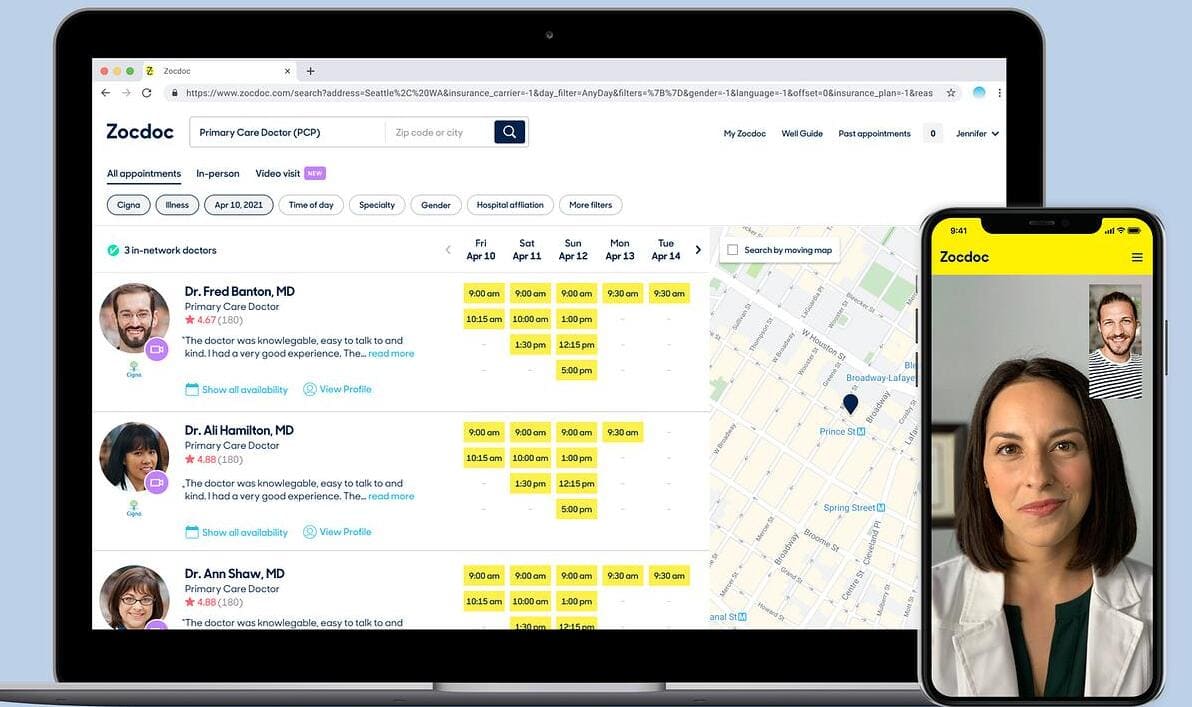
Patients can enter their healthcare needs, choose a location, and add insurance details to discover relevant providers. The platform then displays matching profiles and available appointment times.
Here is how the process generally works.
Step 1: Search for a Doctor or Health Concern
Start by entering the name of a doctor, medical specialty, procedure, or health concern.
For example, patients can search for:
Primary care doctors
Dentists
Dermatologists
Cardiologists
Eye doctors
Gynecologists
Psychiatrists
Orthopedic specialists
Patients do not always need to know the exact medical terminology. They can describe their concern in everyday language and explore relevant search options.
Step 2: Add Your Location
After entering the type of doctor or care needed, provide a city, state, or ZIP code.
Zocdoc uses location information to show healthcare providers who may be suitable for the selected area.
Patients can also adjust the search area if they are willing to travel farther for an appointment.
Step 3: Select Your Insurance Plan
One of Zocdoc's useful features is its insurance search option.
Patients can enter their insurance carrier and plan details to find providers who list that plan as accepted.
This can help narrow down the search and reduce the time spent contacting individual clinics.
However, insurance information should always be confirmed with the provider and insurance company before an appointment. Coverage, deductibles, copayments, and network status can depend on the specific plan and service.
Step 4: Compare Doctor Profiles
Once the search results appear, patients can review different healthcare providers.
A profile may include:
Doctor's name and specialty
Education and qualifications
Office location
Patient ratings and reviews
Accepted insurance information
Available appointment times
Office photographs and other details
This information helps patients compare their options before making a decision.
Step 5: Choose an Appointment Time
Patients can check available appointment slots and select a suitable date and time.
Availability can change, so the times displayed on the platform may not remain the same throughout the day.
Step 6: Complete the Booking
After selecting an appointment, follow the booking instructions and provide the requested information.
Patients should review the appointment details carefully, including the doctor's location, visit type, date, and time.
Main Features of Zocdoc
Zocdoc offers several features designed to make the healthcare appointment process more convenient.
1. Find Doctors Across Different Specialties
Patients can explore healthcare professionals across a wide range of medical specialties.
Whether someone needs a routine checkup, dental appointment, skin consultation, or specialist visit, the platform can help them discover relevant providers.
Some commonly searched specialties include:
Primary care
Dentistry
Dermatology
Cardiology
Obstetrics and gynecology
Ophthalmology
Orthopedics
Mental health services
The availability of providers depends on the location and search criteria.
2. Insurance-Based Doctor Search
Healthcare expenses can be difficult to manage, particularly when a provider is outside a patient's insurance network.
Zocdoc allows users to add insurance information during their search. This helps them identify providers who report accepting their selected insurance plan.
Before booking, patients should still verify their coverage directly. A provider appearing as in-network does not automatically guarantee that every service will be covered.
3. Verified Patient Reviews
Choosing a doctor is a personal decision. Many patients want to understand other people's experiences before scheduling an appointment.
Zocdoc displays patient ratings and reviews on provider profiles. These reviews can help people learn about experiences involving communication, appointment scheduling, and office visits.
Patients should remember that reviews represent individual experiences. They should not be treated as a complete measure of a doctor's medical ability.
4. Real-Time Appointment Availability
Calling different clinics to ask about available appointments can take time.
Zocdoc displays appointment openings shared by participating providers. Patients can check available times and choose an option that fits their schedules.
The availability shown may change as appointments are booked or updated.
5. In-Person and Virtual Visits
Some providers listed on Zocdoc offer both in-person appointments and virtual consultations.
This gives patients the opportunity to explore different appointment formats, depending on their healthcare needs and the services offered by the provider.
Virtual appointments are not suitable for every medical concern. A doctor may recommend an in-person examination when necessary.
6. Mobile App Convenience
Zocdoc also offers a mobile app that helps patients search for providers and manage appointment-related activities.
Using the app can make it easier to check appointment details and keep track of scheduled visits.
What Types of Doctors Can You Find on Zocdoc?
Zocdoc supports searches across many healthcare specialties. The exact providers available depend on the patient's location, insurance, and appointment requirements.
Medical Specialty | What They Help With |
Primary Care Doctor | General health concerns and routine checkups |
Dentist | Teeth, gums, and oral health |
Dermatologist | Skin, hair, and nail conditions |
Cardiologist | Heart and cardiovascular health |
Gynecologist | Women's reproductive health |
Ophthalmologist | Eye diseases and medical eye care |
Orthopedic Specialist | Bones, joints, and muscles |
Psychiatrist | Mental health assessment and treatment |
Optometrist | Vision testing and eye care |
Pediatrician | Healthcare for children |
Patients should select a specialist based on their healthcare needs and consult a qualified medical professional if they are unsure which type of doctor to see.
Zocdoc's AI Care Assistant: A New Way to Search
Zocdoc has introduced an AI Care Assistant in beta for some users. This feature is designed to help patients describe their healthcare needs in everyday language.
Instead of searching only with a formal medical term, users can explain their symptoms, concerns, or the type of care they are looking for.
The AI Care Assistant may ask follow-up questions to understand the search better and help display relevant providers.
For example, someone who is unsure which specialist to search for can describe their concern in simple words. The assistant can then help guide the search toward relevant provider options.
Important: The AI Care Assistant is a search-support feature, not a medical diagnosis tool. It does not replace professional medical advice, examination, or treatment. It is also a beta feature, so availability may vary between users.
How Does Zocdoc Help Patients Choose a Doctor?

Choosing a healthcare provider involves more than looking at a star rating. Patients should consider several details before booking.
Here are some useful points to review:
Medical specialty: Check whether the provider handles the specific healthcare concern.
Qualifications: Review the doctor's education, credentials, and listed certifications.
Insurance: Confirm that the provider accepts the exact insurance plan.
Location: Consider travel time and clinic accessibility.
Availability: Look for an appointment time that suits your schedule.
Patient reviews: Read multiple reviews to understand different experiences.
Visit type: Check whether the provider offers in-person or virtual consultations.
Zocdoc helps organize this information, but the final decision belongs to the patient.
Is Zocdoc Free to Use?
For patients, Zocdoc's doctor-search and appointment-booking service is free to use. Patients can browse providers, compare profiles, and book appointments without paying Zocdoc a platform booking fee.
However, free platform access does not mean that medical care itself is free.
Patients may still need to pay for:
Consultation fees
Insurance copayments
Deductibles
Medical tests
Prescriptions
Treatments or procedures not covered by insurance
The final cost depends on the healthcare provider, insurance coverage, and medical service.
Zocdoc Pricing Overview
Service | Patient Cost |
Searching for doctors | Free |
Browsing provider profiles | Free |
Reading patient reviews | Free |
Booking through the platform | Free |
Doctor consultation | Depends on provider and insurance |
Medical tests and treatment | Depends on the service |
Is Zocdoc Safe and Reliable?
Zocdoc offers a structured way to discover healthcare providers, but patients should understand how its verification process works.
According to Zocdoc, providers go through an onboarding verification process that includes checking an active medical licence and reviewing listed specialty qualifications and credentials.
The platform also displays provider information and patient reviews to help users make informed choices.
However, verification should not be confused with a guarantee of medical quality or treatment results.
Before booking an appointment, patients should:
Review the doctor's qualifications and specialty.
Confirm the clinic's address and contact information.
Verify insurance coverage directly.
Read reviews from multiple patients.
Contact the provider if any information is unclear.
Confirm appointment details before visiting.
Zocdoc is a discovery and booking platform. It does not replace independent research or professional medical judgment.
Advantages of Using Zocdoc
Zocdoc can be useful for patients who want to make the doctor-search process more organized.
Here are some of its main advantages:
Convenient searching: Explore healthcare providers from one platform.
Insurance filters: Narrow down results using insurance information.
Patient reviews: Read feedback from people who have visited providers.
Appointment availability: Check available time slots online.
Multiple specialties: Search for different types of healthcare professionals.
Virtual visit options: Find providers offering video appointments.
Mobile access: Use the website or app to manage appointment-related activities.
Limitations of Zocdoc
Although the platform offers several useful features, it may not be the perfect option for every patient.
Some limitations include:
Provider availability depends on the patient's location.
Not every doctor or medical practice is listed.
Insurance information may need direct confirmation.
Appointment slots can change quickly.
Reviews may not represent every patient's experience.
Some providers may offer only in-person or only virtual appointments.
The platform primarily serves the United States, so it may not be suitable for patients seeking doctors in other countries.
Patients should also remember that Zocdoc does not provide emergency medical services. Anyone experiencing a medical emergency should contact local emergency services rather than waiting to book an online appointment.
Zocdoc for Healthcare Providers
Zocdoc is not only designed for patients. It also offers services for doctors, independent practices, and healthcare organizations.
The platform helps participating providers become discoverable to people searching for medical care in their area.
Healthcare providers can use Zocdoc to:
Reach potential new patients.
Display their professional profiles.
Share accepted insurance information.
Show appointment availability.
Receive online appointment bookings.
Collect patient feedback and reviews.
Manage parts of the appointment intake process.
Zocdoc's provider business model is different from its patient-facing service. Providers may pay fees for new-patient bookings, depending on their specialty and location. Specific pricing and terms should be confirmed directly with Zocdoc.
Zocdoc vs. Traditional Doctor Booking
Many patients are familiar with booking appointments by calling a clinic directly. Zocdoc offers another way to complete this process.
Feature | Zocdoc | Traditional Phone Booking |
Doctor Search | Online search | Usually requires research or referrals |
Appointment Timing | View available slots online | Ask clinic staff |
Patient Reviews | Available on profiles | Usually found elsewhere |
Insurance Search | Insurance filters available | Confirm directly with clinic |
Booking | Online booking for participating providers | Phone call or clinic visit |
Convenience | Available online | Depends on clinic hours |
Both methods can be useful. Patients can choose whichever approach works best for their situation.
Who Should Use Zocdoc?
Zocdoc may be useful for people who want a simpler way to explore healthcare providers and schedule appointments.
It can be particularly helpful for:
People moving to a new city and looking for a doctor.
Patients searching for a specialist.
Individuals who want to compare provider profiles.
People looking for doctors who accept their insurance.
Busy professionals who prefer online appointment booking.
Patients interested in virtual consultations.
Families searching for different types of healthcare providers.
However, patients with complex medical needs may need additional guidance from their existing doctor or healthcare team when selecting a specialist.
Tips for Getting Better Results on Zocdoc
A few simple steps can make the search process more useful.
1. Use specific search terms: Describe your concern clearly instead of entering a very broad keyword.
2. Add accurate insurance details: Select the correct insurance carrier and plan whenever possible.
3. Check the appointment type: Make sure the provider offers the kind of visit you need.
4. Compare multiple profiles: Do not make a decision based on only one rating or review.
5. Check the location: Choose a clinic that is practical to reach.
6. Confirm the details: Contact the clinic if you have questions about costs, coverage, or preparation for the appointment.
7. Keep appointment information handy: Save the date, time, provider details, and any instructions shared after booking.
Finding a suitable doctor should not require hours of searching and repeated phone calls. Zocdoc aims to make this process more convenient by bringing provider profiles, insurance information, patient reviews, and appointment availability together.
Its search filters, online booking options, mobile app, and virtual visit listings can help patients explore healthcare choices in a more organized way.
Still, a platform can only help with the discovery process. Patients should always check a doctor's qualifications, confirm insurance coverage, and discuss their medical needs with a qualified professional before making healthcare decisions.
For people in the United States who prefer managing appointment searches online, Zocdoc can be a useful tool for getting started.
Looking for More Healthcare Tools?
Apart from finding doctors and booking appointments, managing everyday health information is also important. Explore AltFTool's Health & Fitness tools for helpful resources such as a Symptom Checker, Doctor Visit Question Builder, Symptom Diary, Health Log, Health Checkup Reminder Planner, and AI Medical Report Analyzer. These tools can help users organize health information, prepare for doctor visits, and keep track of everyday wellness activities.
Frequently Asked questions
Zocdoc helps patients find healthcare providers, compare profiles, read patient reviews, and book medical appointments online.
Yes, patients can search for doctors and book appointments through Zocdoc without paying a platform booking fee. Medical services may still cost money.
Yes, patients can select their insurance plan to find providers who list it as accepted. Coverage should be confirmed directly before booking.
Yes, some listed providers offer virtual consultations. Availability depends on the doctor, specialty, and location.
Zocdoc primarily serves patients in the United States. Its provider listings and insurance search features are focused on the US healthcare market.
Sources and notes
Links the author listed for this post.
Information is based on Zocdoc’s official website and help centre, covering its doctor-search platform, appointment booking, insurance filters, provider profiles, and patient reviews.
- 1zocdoc.com (opens in a new tab)
zocdoc.com


Discussion
0 comments