Technology is changing the way people use computers, manage applications, and handle everyday digital tasks. Behind many of the tools and services we use today, two important things are working together: software and virtualization technology.
Software helps computers perform different tasks, while virtualization makes it possible to use computing resources in more flexible ways. Both technologies have become important for businesses, developers, IT professionals, and regular computer users.
Think about a company that needs to run several applications, manage different operating systems, and store large amounts of data. Buying a separate physical computer for every task would be expensive and difficult to manage. This is where software and virtualization make a real difference.
When these technologies work together, they help create a more organized, flexible, and efficient computing environment.
Let's understand how they work, why they matter, and where they are used in everyday life.
What Is Software Technology?
Software technology refers to the programs, applications, and systems that tell a computer what to do. Without software, computer hardware would not be able to perform useful tasks on its own.
From opening a web browser to editing documents, managing business accounts, or developing mobile applications, software plays a role in almost everything we do on a computer.

There are different types of software, and each serves a particular purpose.
Common Types of Software
1. System Software
System software manages computer hardware and provides a platform for other programs to run.
Examples include:
Windows
Linux
macOS
Device drivers
2. Application Software
This is the software people use to complete specific tasks.
Examples include:
Microsoft Word
Google Chrome
Adobe Photoshop
Accounting applications
Video editing software
3. Programming Software
Programming software helps developers write, test, and maintain computer programs.
Examples include:
Visual Studio Code
Git
Compilers
Debugging tools
4. Utility Software
Utility programs help maintain, protect, and improve computer performance.
Examples include:
Antivirus programs
File compression tools
Backup applications
Disk management tools
Each type of software has a different job, but together they make computers useful for personal and professional work.
What Is Virtualization Technology?
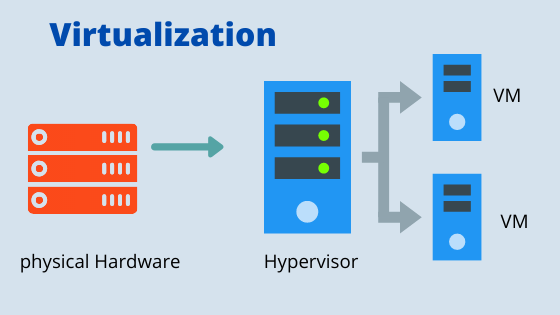
Virtualization technology allows one physical computer or server to behave like multiple separate computing environments.
In simple words, it creates virtual versions of computing resources using specialized software.
For example, imagine having one powerful computer that can run multiple operating systems at the same time. You could use one virtual environment for Windows, another for Linux, and a third for testing applications.
All these environments can work independently while sharing the resources of the same physical machine.
This technology is commonly used in data centres, cloud platforms, software development, and business IT systems.
Important Components of Virtualization
Virtual Machines (VMs): Software-based computers that run their own operating systems and applications.
Hypervisor: A software layer that creates and manages virtual machines while allocating physical resources.
Host Machine: The actual physical computer or server that provides the hardware resources.
Guest Operating System: The operating system running inside a virtual machine.
Virtual Resources: Computer resources such as processing power, memory, storage, and networking provided to virtual environments.
These components work together to make virtualization possible.
How Software and Virtualization Technology Work Together
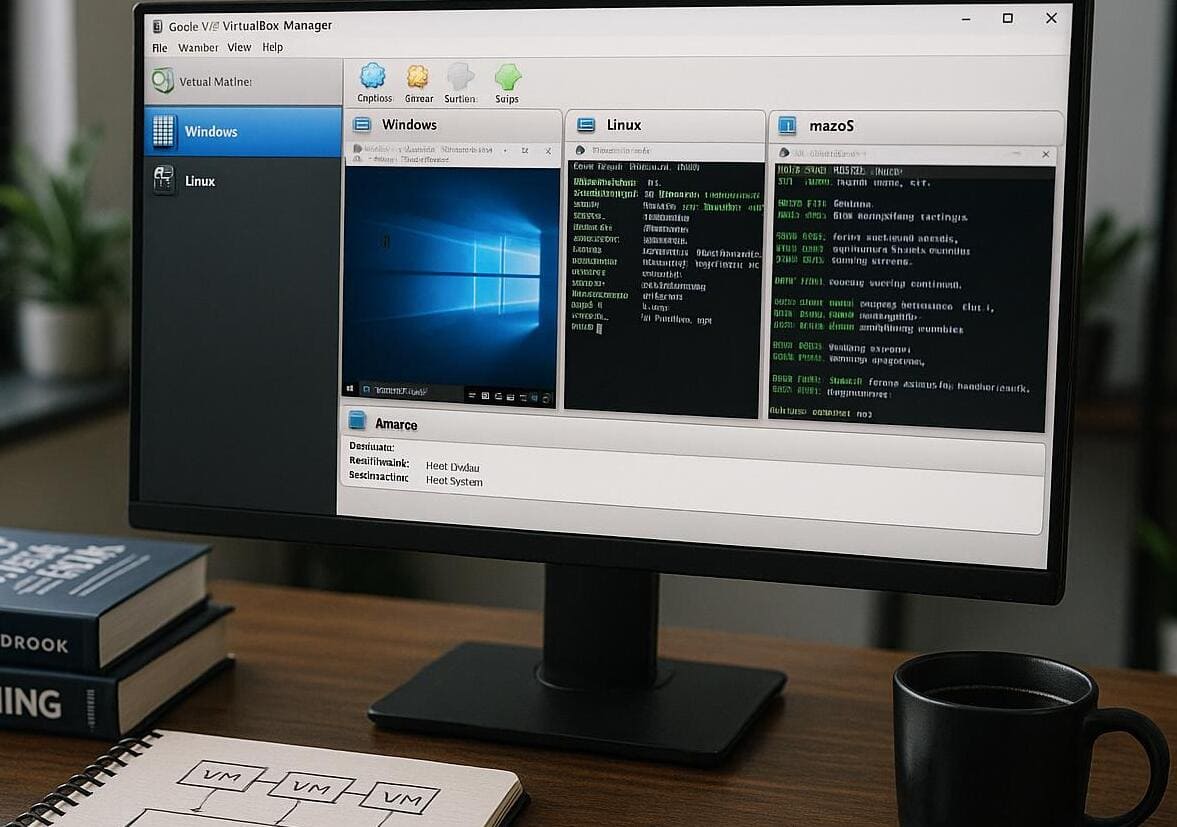
Software and virtualization are closely connected. Software provides the applications and operating systems, while virtualization creates the environment where multiple systems and applications can run using shared physical hardware.
Let's understand this with a simple example.
Suppose a software development company wants to test an application on different operating systems. Instead of purchasing several computers, the company can use virtualization software to create multiple virtual machines on one physical server.
Each virtual machine can run a different operating system. Developers can install their applications, test features, identify errors, and make improvements without needing separate physical devices.
How the Two Technologies Work Together
Software provides the instructions: Operating systems and applications tell the computer what tasks need to be performed.
Virtualization creates separate environments: Virtual machines provide independent spaces for running different operating systems and applications.
The hypervisor manages resources: It distributes available CPU power, RAM, storage, and networking among virtual machines.
Applications run inside virtual environments: Users can install and operate software within each virtual machine.
Management tools keep everything organized: IT teams can monitor, update, configure, and manage virtual environments.
The result is a computing setup where multiple software systems can operate without requiring a separate physical computer for every task.
Key Benefits of Combining Software and Virtualization
Using software and virtualization together can make computer systems easier to manage. It also helps organizations get more value from their existing hardware.
Here are some of the biggest benefits.
1. Better Use of Computer Resources
Running several virtual machines on one physical server helps organizations use available hardware more efficiently. Instead of leaving computer resources unused, they can distribute them across different workloads.
2. Reduced Hardware Expenses
Businesses do not always need to purchase separate computers for every application or department. Virtualization can help reduce hardware purchases, electricity consumption, and maintenance costs.
3. Easier Software Testing
Developers can test applications in different environments without changing their main computer setup.
For example, they can check whether an application works properly on Windows and Linux using separate virtual machines.
4. More Flexible Work Environments
Virtual machines can be configured according to specific needs. IT teams can create new environments, change resource allocations, or remove unused machines when required.
5. Improved Workload Isolation
Different virtual machines can operate separately. If one environment experiences an application problem, other virtual machines may continue working normally.
However, isolation does not remove every security risk. Proper updates, access controls, backups, and monitoring are still important.
6. Easier Backup and Recovery
Virtual environments can be backed up and restored using suitable management tools. This can help businesses recover systems more efficiently after technical problems.
Types of Virtualization Used in Modern Computing
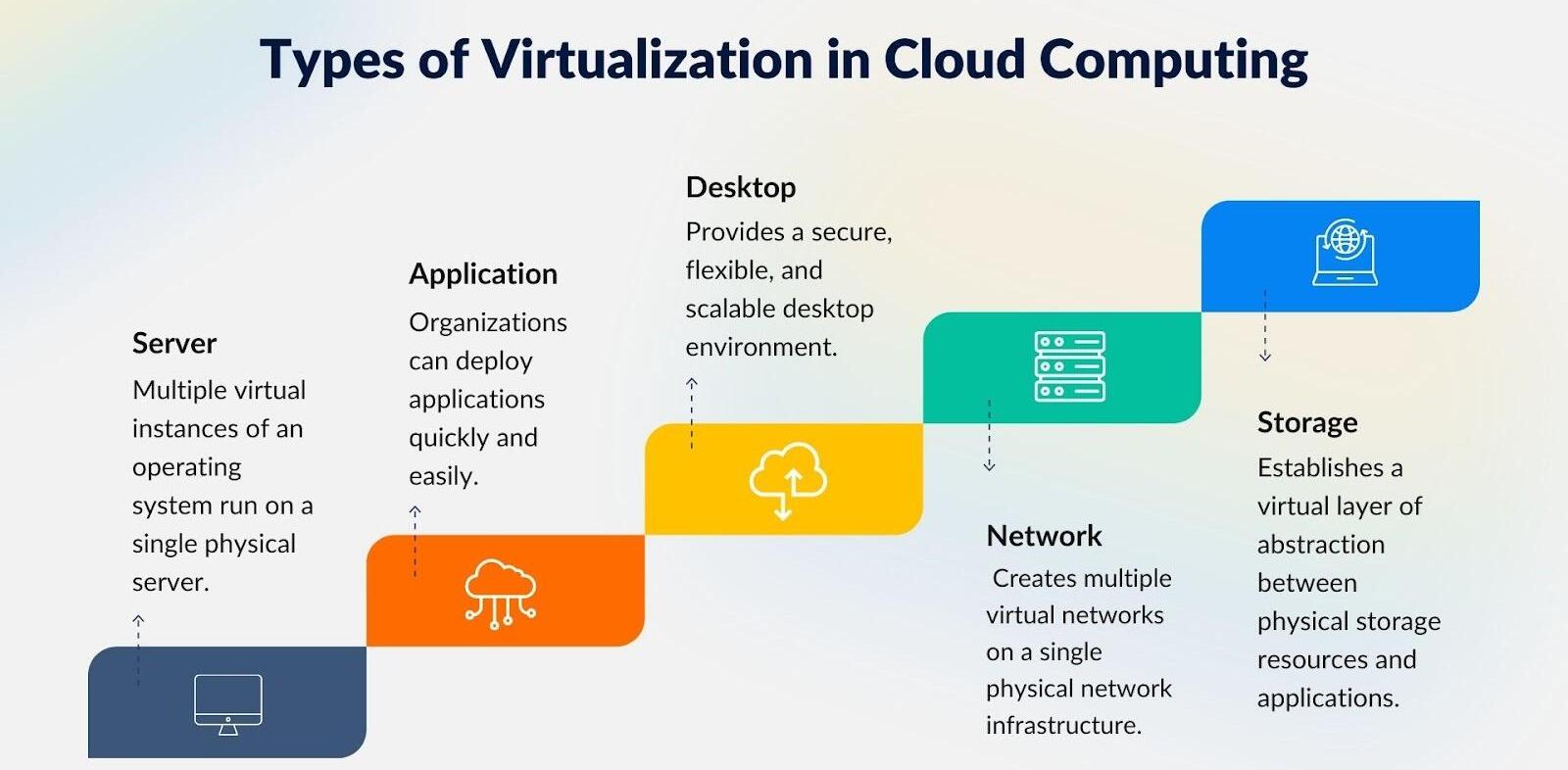
Virtualization is not limited to creating virtual computers. It can be used in several areas of IT infrastructure.
Type | What It Does | Common Use |
Server Virtualization | Divides one physical server into multiple virtual servers | Business IT systems |
Desktop Virtualization | Provides virtual desktop environments | Remote working |
Storage Virtualization | Combines storage resources into a managed pool | Data management |
Network Virtualization | Creates virtual network resources | Network management |
Application Virtualization | Runs applications in isolated or managed environments | Software access |
Operating System Virtualization | Uses containers to isolate applications | Application development |
Each type solves a different problem, but the main goal is similar: making computing resources easier to manage and use.
Popular Software and Virtualization Tools
Several software platforms help users create, operate, and manage virtual environments. Some are designed for personal use, while others are built for larger organizations.
Software or Tool | Main Purpose | Typical Users |
VMware | Creates and manages virtual machines | Businesses and IT teams |
Oracle VirtualBox | Runs different operating systems virtually | Students and developers |
Microsoft Hyper-V | Provides hardware virtualization | Windows users and businesses |
Docker | Runs applications in containers | Developers |
KVM | Provides virtualization on Linux systems | IT professionals |
Proxmox VE | Manages virtual machines and containers | Server administrators |
These tools are not all the same. For example, Docker uses containers rather than traditional full virtual machines. Choosing the right option depends on the type of application, available hardware, budget, and technical requirements.
Real-World Uses of Software and Virtualization Technology
You might not always notice virtualization while using digital services, but it plays an important role in many modern computing environments.
1. Software Development and Testing
Developers often need to test applications on different operating systems and configurations.
Virtual machines make this easier because they can create separate testing environments without requiring multiple physical computers.
2. Cloud Computing Services
Cloud platforms use virtualization and related technologies to provide computing resources to customers.
Businesses can access virtual servers, storage, and other resources without managing all the physical infrastructure themselves.
3. Business Operations
Companies use virtualization to run business applications, manage databases, and support internal systems.
It can also help IT departments organize workloads across different virtual environments.
4. Education and Training
Students can learn about operating systems, networking, and software development using virtual machines.
Teachers can also create separate environments for practical computer lessons without changing the main classroom systems.
5. Data Centres
Data centres use virtualization to manage large numbers of workloads across physical servers.
This approach can improve resource utilization and make infrastructure management more flexible.
6. Remote Working
Virtual desktop environments can allow employees to access a managed desktop from supported devices and locations.
This can help organizations provide a consistent working environment while maintaining centralized IT management.
Software vs Virtualization Technology: Understanding the Difference
Although these technologies work closely together, they have different responsibilities.
Comparison | Software Technology | Virtualization Technology |
Main Purpose | Runs programs and performs tasks | Creates virtual computing environments |
Main Function | Provides instructions and features | Shares and manages physical resources |
Examples | Windows, Chrome, Photoshop | VMware, Hyper-V, VirtualBox |
Usage | Personal and business computing | Servers, testing, cloud and IT systems |
Main Benefit | Makes computers useful | Makes computing resources more flexible |
An easy way to understand it: Software tells a computer what to do, while virtualization provides additional environments in which software can operate.
Challenges of Using Software and Virtualization
Even though these technologies offer many advantages, they also come with a few challenges. Understanding these limitations helps users make better technology decisions.
1. Hardware Requirements
Running multiple virtual machines requires sufficient processing power, memory, and storage. Older computers may struggle when too many virtual environments are active.
2. Technical Knowledge
Setting up and managing virtual environments can be confusing for beginners. Users may need some understanding of operating systems, networking, and system administration.
3. Security Management
Virtual environments need regular security updates, strong passwords, proper permissions, and monitoring. A poorly configured host or hypervisor can create risks for multiple virtual machines.
4. Performance Issues
If several virtual machines use too many resources at once, performance can slow down. Proper resource allocation is important to avoid this problem.
5. Maintenance and Management
Managing multiple virtual machines can become complicated as an organization grows. IT teams need suitable tools and clear management practices to keep everything running properly.
How to Choose the Right Software and Virtualization Solution
Not every user or business needs the same technology. The right choice depends on what you want to achieve.
Before selecting a solution, consider these points:
Understand your requirements: Decide whether you need software testing, server management, remote desktops, or application deployment.
Check hardware compatibility: Make sure your computer or server has enough RAM, storage, and processing power.
Consider ease of use: Beginners may prefer tools with simple interfaces and clear setup instructions.
Review security features: Look for access controls, update support, backup options, and monitoring capabilities.
Compare costs: Consider licensing fees, maintenance expenses, and hardware requirements.
Think about future growth: Choose a solution that can support your needs as your workload increases.
A little planning can prevent unnecessary expenses and technical difficulties later.
The Future of Software and Virtualization Technology
Software and virtualization technology continue to develop as businesses become more dependent on digital systems.
Cloud computing, automation, containerization, and artificial intelligence are influencing how applications are developed, deployed, and managed.
Some important developments include:
Cloud-Based Infrastructure: More organizations are using cloud platforms to access computing resources when needed.
Container Technology: Containers are helping developers package and deploy applications more consistently.
Automation: IT teams are using automation to manage repetitive infrastructure tasks.
AI-Powered Management: Artificial intelligence can assist with workload monitoring, resource planning, and identifying unusual system activity.
Hybrid Computing: Businesses are combining on-premises infrastructure with cloud services to meet different operational requirements.
These developments show that software and virtualization will continue to play an important role in modern IT environments.
Software and virtualization technology may sound like complicated technical subjects, but their purpose is quite practical. Software helps computers perform useful tasks, while virtualization allows computing resources to be shared across multiple independent environments.
Together, they make it easier to develop applications, test operating systems, manage business systems, and support cloud-based services.
Whether someone is learning computer technology, building software, or managing a company's IT infrastructure, understanding how these two technologies work together provides a useful foundation for navigating the digital world.
As technology continues to move forward, their combined role will remain important in making computing more flexible, manageable, and efficient.
FAQ’s
Software technology includes the programs and applications used to perform tasks on computers, smartphones, and other digital devices.
Virtualization technology allows one physical computer to run multiple virtual machines with separate operating systems and resources.
Software runs inside virtual machines, making it easier to test applications, manage systems, and use computer resources efficiently.
It helps reduce hardware costs, improve flexibility, simplify IT management, and make better use of available resources.
It is widely used in cloud computing, software development, data centres, businesses, educational institutions, and remote working environments.
Sources and review notes
References used to check facts, freshness, and reader-safe recommendations in this guide.
Content is based on general software and virtualization concepts, industry practices, and technology documentation.
- 1aws.amazon.com (opens in a new tab)
aws.amazon.com
Discussion
0 comments
No comments yet
Discussion will appear here once it loads.