Working with different file formats and programming languages is a normal part of digital work today. Developers, students, content creators, designers, and professionals often need to convert information from one format to another before they can use it properly.
A developer might need to convert JSON into YAML. A web designer may need to work with SVG or HTML. Someone working with data may need to change the structure of a file without manually rewriting everything.
Doing these conversions by hand can take time and can also introduce small errors. Online converter tools make the process much simpler by handling repetitive formatting and transformation tasks in just a few steps.
In 2026, there are many free online tools that can help users transform code, structured data, markup, and other digital formats without installing complicated software.
What Are Format and Code Converters?
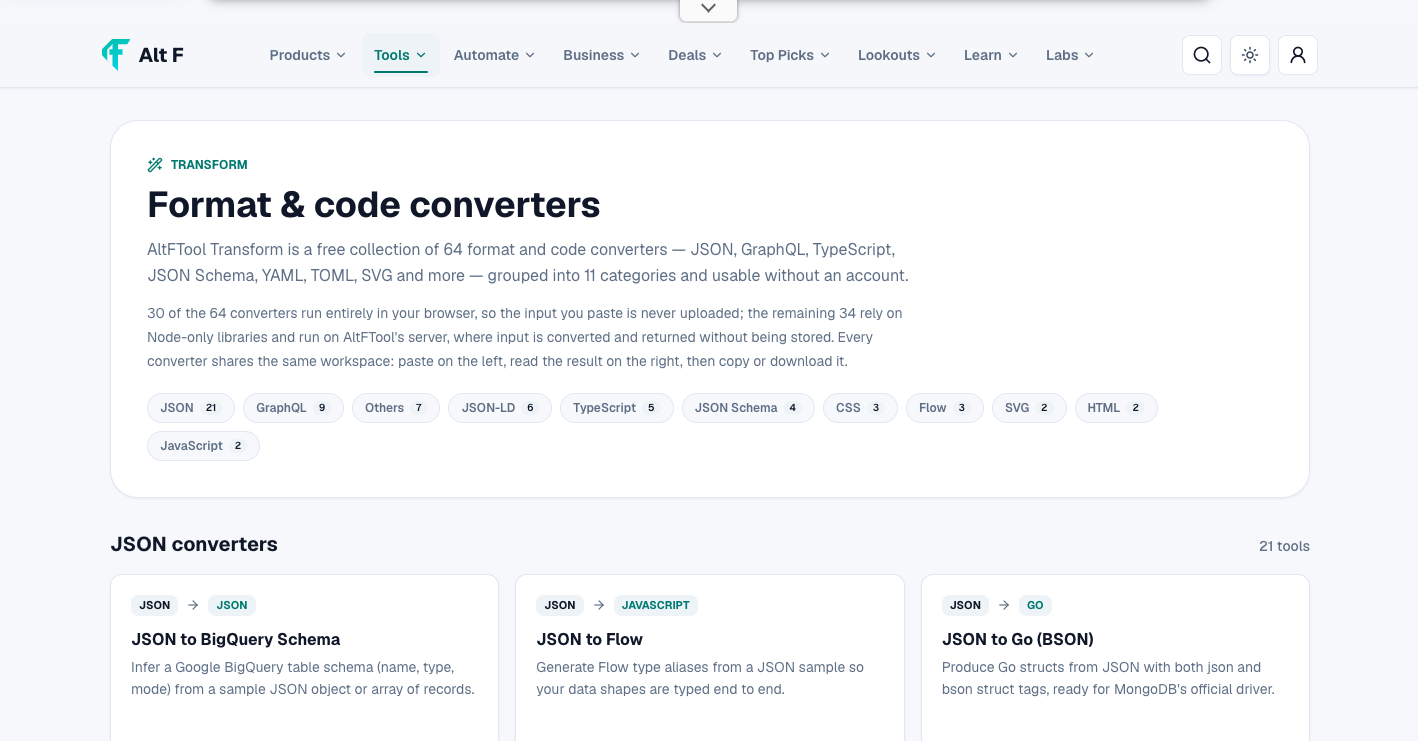
Format and code converters are online tools that transform information from one format into another.
The original content usually remains the same in meaning, while its structure or syntax is changed to match the requirements of another format.
For example, a JSON file can be transformed into YAML, or HTML code can be converted into another useful structure. These tools are especially helpful when working with applications, APIs, websites, databases, and development projects.
Instead of manually changing every line, users can provide their existing content and let the converter handle the repetitive work.
Why Are Online Converters Useful?
Manual conversion can become frustrating when a file contains hundreds or thousands of lines. Even a small formatting mistake can cause errors later.
Online converters can help by:
Saving time on repetitive tasks
Reducing manual formatting
Making data easier to reuse
Helping beginners work with unfamiliar formats
Supporting quick testing and experimentation
Making development workflows more convenient
For simple conversion jobs, an online tool can often be much faster than setting up a separate software application.
Popular Types of Converters
Different projects require different types of conversion. Some tools focus on structured data, while others are designed for web development or file formatting.
JSON Converters
JSON, or JavaScript Object Notation, is widely used for exchanging structured information between applications.
Developers frequently work with JSON when dealing with APIs, configuration files, web applications, and databases.
A JSON converter can help transform or format JSON into another structure. JSON formatting tools can also make difficult-to-read data easier to understand.
YAML Converters
YAML is commonly used for configuration files because its structure is designed to be relatively easy for humans to read.
Developers may need to convert JSON data into YAML when working with configuration systems or tools that use YAML-based files.
A converter can make this process faster and reduce the chance of formatting mistakes.
HTML Converters
HTML is the basic markup language used to structure content on the web.
HTML conversion tools can be useful when developers need to transform or process markup for different purposes. They can also help users clean up or restructure existing HTML content.
These tools are particularly useful during website development, testing, and content migration.
SVG Tools
SVG stands for Scalable Vector Graphics. It is widely used for icons, logos, illustrations, and other graphics that need to remain sharp at different sizes.
SVG-related converters can help users work with vector graphics and transform SVG content into formats or structures needed for different projects.
Designers and developers can benefit from these tools when moving graphics between design and development workflows.
Best Format & Code Converters 2026: Free Online Tools is easier when the workflow is broken into clear steps. This guide explains what to check first, how to avoid common mistakes, and where AltFTool can speed up the task.
Before you start
Define the result you want from best format & code converters 2026: free online tools.
Collect the files, links, or details you need before using a tool.
Check the final output before downloading, sharing, or publishing it.
Step-by-step workflow
Choose the right method. Match the tool or process to the exact task.
Review the settings. Look for quality, format, privacy, and output options.
Save the result. Keep the final file or link in a place you can find later.
Final thoughts
Use this process when you need a fast but careful way to handle best format & code converters 2026: free online tools. Keep the steps simple, check the source details, and use related AltFTool resources when the task needs a dedicated utility.
TypeScript Converters
TypeScript adds features such as static typing to JavaScript development.
Developers sometimes need to transform TypeScript-related code or work between different programming formats during development. Conversion tools can simplify certain repetitive tasks and make code easier to adapt.
However, automatically converted code should always be reviewed before being used in a production project.
How Do Code Converters Work?
Most online code converters follow a simple process.
First, the user provides the original code or data. The converter analyzes its structure and identifies the relevant elements. It then applies the rules required by the target format and generates the converted output.
The user can usually copy the result or download it for further use.
The exact process depends on the tool. Some converters are designed for straightforward formatting, while others perform more complex transformations.
Benefits of Using Free Online Conversion Tools
One of the biggest advantages of online converters is convenience.
There is usually no need to install a large application. Many tools work directly in a web browser, making them accessible from different devices.
Quick Access
Browser-based tools can be opened whenever needed. This is convenient when working on a computer that does not have specialized development software installed.
Simple Workflow
Most converters use a straightforward input-and-output system. Paste or upload the source content, select the required format, and generate the result.
Useful for Learning
Beginners can also use converters to understand how the same information appears in different formats.
For example, comparing JSON and YAML versions of similar data can make their structural differences easier to understand.
Less Repetitive Work
When a conversion involves a large amount of structured information, automation can save considerable time compared with manually rewriting the content.
Things to Check Before Using a Converter
Not every converter works in exactly the same way. Before choosing a tool, it is worth checking a few important details.
Supported Formats
Make sure the tool supports both your source format and the format you want to create.
File Size Limits
Some free online tools limit the size of files that can be uploaded or processed.
Accuracy
Conversion results should be checked carefully, particularly when the content is being used in an important application.
Privacy
Avoid uploading sensitive or confidential information to an online converter unless you understand how the service handles uploaded data.
Export Options
Check whether the converted result can be copied, downloaded, or saved in the format you need.
Are Online Converters Safe?
Online converters can be convenient, but users should still think about privacy and security.
If you are converting public information or a small piece of non-sensitive code, the risk may be relatively low. However, private business documents, passwords, API keys, customer information, proprietary code, and other confidential data require greater care.
Before uploading sensitive material, review the tool's privacy policy and data-handling practices.
It is also important to remove passwords, access tokens, and other secrets from code before sharing it with an online service.
Online Converter vs. Manual Conversion
Both approaches have their place.
Manual conversion gives users complete control and may be necessary when the transformation requires custom logic. It can also be useful when the source and target structures are very different.
Online converters are more convenient for repetitive or standardized tasks.
Factor | Online Converter | Manual Conversion |
|---|---|---|
Speed | Usually faster | Can take more time |
Repetitive tasks | Very useful | Time-consuming |
Custom transformations | May be limited | Highly flexible |
Technical knowledge | Often lower | Usually higher |
Large files | Depends on tool limits | Depends on available software |
Privacy | Check service policies | Data can remain local |
The right approach depends on the complexity and sensitivity of the project.
Who Can Use Format and Code Converters?
These tools are not limited to professional developers.
Students can use them while learning programming, web development, and data formats.
Developers can use converters to speed up repetitive formatting and transformation tasks.
Designers can use tools for working with SVG and other digital assets.
Content creators may use format conversion tools when preparing files for websites or different platforms.
Businesses can use conversion tools when moving structured information between systems, provided the tool meets their security requirements.
Tips for Getting Better Conversion Results
A few simple habits can make online conversion easier.
Clean the Original Content
Before converting, remove unnecessary characters, broken formatting, or incomplete sections from the source material.
Validate the Output
Do not assume that every conversion is perfect. Review the generated result and check whether the structure is correct.
Keep a Backup
Save a copy of the original content before performing a major transformation.
Avoid Sensitive Information
Do not paste passwords, private keys, confidential documents, or other sensitive information into a service unless you have verified that the platform is appropriate for that data.
Test Before Production
If converted code is going into a website, application, or business system, test it first. A small formatting difference can sometimes cause unexpected results.
Quick checklist
Confirm the main goal for best format & code converters 2026: free online tools.
Compare the available options before choosing one workflow.
Use the related AltFTool utilities to finish the task faster.
A code converter is a tool that transforms code or structured information from one format into another. It can reduce repetitive manual work during development.
Yes. Free converters can be useful for everyday formatting and transformation tasks, especially when users only need occasional conversions.
Yes. Online tools can transform JSON data into YAML and can be useful when working with configuration files or systems that use YAML.
Yes. Even when a converter produces a valid-looking result, it is a good idea to review and test the output before using it in an important project.
Who should use Tools
Best Format & Code Converters 2026: Free Online Tools is built for readers who want a faster way to finish everyday web tasks. The main goal is shorter workflows, clearer outputs, and reusable tool habits, so the guide focuses on practical choices instead of broad theory.
Use it when you need one of these outcomes:
- testing a task before choosing a heavier app
- saving time on a repeated browser workflow
- combining a guide with a related AltFTool utility
How to get a better result
- Read the core use case and decide what output you need.
- Open the related AltFTool utility and test it with a small sample.
- Review the result, adjust settings, and repeat only if needed.
- Continue with related tools or guides for the next step in the workflow.
Start small, check the first output, and only then repeat the workflow with the full file, text, media, or game session. That gives you a quick quality check before you spend more time.
Quality checks before you trust the output
- the input is clean before running the tool
- the output matches the format you need
- private details are removed before sharing or downloading
Do not overcomplicate a simple task. Start with the smallest sample that proves the workflow, then scale up once the output looks right.
Continue your workflow
If you want to try the workflow now, open the related AltFTool tool area. For more reading, continue through the Tools archive or the AltFTool tools directory.
This creates a cleaner path from explanation to action: read the guide, test the tool, compare the output, and move into the next related AltFTool resource only when it helps the task.
Sources and review notes
References used to check facts, freshness, and reader-safe recommendations in this guide.
Information is based on publicly available details from official tool pages, documentation, and relevant online resources. Tool features, supported formats, and availability may change, so users should check the respective tool's official page for the latest information.
- 1AltFTool
altftool.com
Discussion
0 comments
No comments yet
Discussion will appear here once it loads.