Creating an AI-generated video can sound incredibly simple: describe an idea, enter a prompt, and let the AI do the rest. In reality, getting a video that actually looks the way you imagined can take a lot of trial and error. The wording of the prompt matters, but so do camera movement, lighting, pacing, framing, duration, and the overall visual direction.
That is where AltFTool's PromptReel comes into the picture. PromptReel is designed as a library of professionally crafted AI video prompts that can be used for marketing videos, product advertisements, social media reels, promotional content, brand videos, product launches, and cinematic videos. The prompts include details such as camera language, lighting, movement, and pacing, so creators have more than just a basic sentence to work with.
A More Practical Way to Find AI Video Prompts
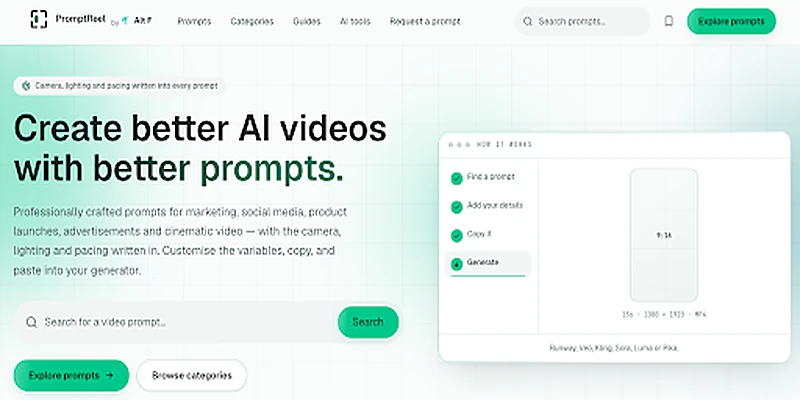
One of the frustrating parts of creating AI videos is knowing what to write in the first place. You may have a clear idea in your head but struggle to turn it into instructions that an AI video generator can understand.
PromptReel approaches this differently by organizing prompts around the actual outcome you want to create. Instead of simply searching by technical format, users can explore prompts based on the type of video they are working on. The platform presents multiple categories, each built around a specific type of video task.
This can be especially useful when the goal is to create something for a particular purpose rather than experiment with random prompts.
Prompts Built for Different Video Goals
The PromptReel library covers several practical categories, including Marketing Videos, Product Advertisements, Social Media Reels, Promotional Videos, Brand Videos, and Product Launches. Each category is designed around the needs of that particular type of content.
For example, marketing prompts are built around a clear message and call to action, while product advertisement prompts focus on product presentation, benefits, and visual impact. Social media reel prompts are designed around vertical, fast-paced content, while brand videos focus more on identity and recognition.
This organization can save creators from starting with a blank screen every time they need a new video idea.
Camera, Lighting, and Movement Are Already Considered
A strong AI video prompt needs more than a description of what should appear on screen. The way a scene is filmed can completely change its appearance.
PromptReel includes details such as the subject, lens, lighting, movement, and pacing in its prompts. These elements can then be customized according to the creator's own project.
That is particularly helpful for people who understand the visual result they want but do not necessarily know how to describe every filmmaking detail themselves.
Instead of writing something vague like "create a cinematic product video," a structured prompt can provide much more direction about how the product should appear, how the camera should move, and how the scene should progress.
A Simple Four-Step Workflow
The basic process on PromptReel is straightforward. First, find a prompt that matches the type of video you want to make. Next, add your own details to the variables included in the prompt. After that, copy the completed prompt and take it to the AI video generator of your choice.
The platform also makes important specifications visible before you dive into a prompt. Depending on the prompt, details can include aspect ratio, duration, platform requirements, and camera language. This gives creators a better idea of whether a prompt fits their project before they spend time customizing it.
Useful for Marketing and Product Videos
Businesses and marketers constantly need fresh video content. Product launches, promotional campaigns, advertisements, social posts, and brand stories can all require different visual approaches.
PromptReel includes professionally crafted prompts specifically for these types of projects. Its product advertisement section, for instance, includes concepts such as Luxury Product Hero Spot, Floating Product Studio Spot, Unboxing First Impression, and Macro Texture Study.
These examples show how a single product can be presented in very different ways. A luxury-focused video might emphasize controlled lighting and premium presentation, while an unboxing concept can focus on the reveal and packaging experience.
Social Media Content Gets Its Own Focus
Short-form video has its own visual language. A social media reel needs to grab attention quickly, work well in a vertical format, and communicate its idea without wasting too much time.
PromptReel includes social-media-focused prompts such as Three Second Hook Reel, alongside other vertical concepts. The library focuses on fast-cut content and short attention spans.
That makes the collection useful for creators who regularly produce Instagram Reels, short promotional videos, or other vertical social content.
Free Prompts Are Available Too
You do not necessarily have to start with a paid or locked resource. PromptReel has a collection of free prompts that users can read, copy, download, and customize. A good portion of the library is available without requiring an account.
The free collection includes ideas such as Founder Story In Sixty Seconds, Customer Testimonial Montage, Straight Offer Announcement, Behind The Scenes Trust Builder, Unboxing First Impression, and Macro Texture Study.
Having open examples can also help beginners understand what a detailed AI video prompt actually looks like before creating their own.
Prompts Can Be Adapted to Different AI Generators
Another useful part of the workflow is that PromptReel does not require users to generate their video inside the platform.
PromptReel works as a prompt library rather than a video generator. Once a prompt has been customized, it can be copied into AI video generators such as Runway, Veo, Kling, Sora, Luma, or Pika.
This gives creators flexibility. They can use the prompt library for planning and prompt creation while continuing to use the AI video generation platform they already prefer.
Different Prompts for Different Visual Styles
Not every video needs to look like an advertisement. Sometimes the goal is a cinematic scene, a product reveal, a social clip, a brand story, or a piece of visual B-roll.
PromptReel's library reflects these differences. Its examples include cinematic portrait work, product launch concepts, lifestyle brand videos, direct-response advertisements, social media hooks, and other formats.
This variety can make the platform useful for more than one type of creator. A small business owner may use it for product promotion, while a content creator might use it for social media or storytelling.
Helpful for Creators Who Keep Starting From Scratch
There is a certain amount of repetition involved in AI video creation. Even when the concept changes, creators often need to think about the same fundamentals: what the subject is doing, where the camera should move, how the lighting should look, how long the shot should last, and what kind of mood the scene should create.
A structured prompt library can take some of that repetitive thinking out of the process.
PromptReel's prompts include variables that users can fill in with their own brand, product, audience, color, duration, and other project-specific information.
That means a prompt does not have to remain a fixed template. It can become a starting point that is adapted to a completely different project.
Weekly Prompt Inspiration
For creators who enjoy regularly experimenting with AI video, PromptReel also offers a weekly email featuring new video prompts and the working notes behind them.
The notes can include what changed between attempts, which wording worked better, and where a particular generation still struggled. Prompts can also be written differently for different generators because the same wording does not always transfer perfectly between models.
That behind-the-scenes approach can be useful because creators learn not only what prompt to use, but also how the prompt evolved.
A Free Starter Pack for New Users
PromptReel also offers a free pack of 25 Premium AI Video Prompts covering product advertisements, reels, explainers, cinematic brand films, and cinematic B-roll. The prompts include their variables and specifications.
For someone who is new to AI video prompting, this kind of starter collection can provide practical examples to study and customize rather than trying to develop a complete prompting style from nothing.
A Useful Addition to the AltFTool Ecosystem
PromptReel is part of the wider AltFTool platform, which brings together online tools, extensions, resources, guides, and workflow-focused products. AltFTool also has a broader collection of AI tools and resources for creators and professionals.
That makes PromptReel particularly relevant for people who already use online tools as part of their creative workflow. A creator can use the prompt library to prepare the visual concept and then move into the appropriate AI video generator to produce the final result.
AltFTool's broader platform also includes other creator-oriented resources, so PromptReel fits naturally into a larger content-production workflow.
Making AI Video Creation Feel Less Complicated
AI video generation can be incredibly creative, but it can also become frustrating when the output keeps missing the original idea. Sometimes the problem is not the video generator itself. The prompt simply does not give the model enough useful direction.
A well-structured prompt can provide that missing direction. Details about camera movement, lighting, pacing, subject, environment, and visual style give the generator more information to work with.
PromptReel makes those details part of the starting point, which means creators can spend less time wondering what to write and more time adapting the idea to their own project.
Where PromptReel Fits In
Good AI video creation starts before the video is generated. The prompt sets the direction, and the more clearly that direction is communicated, the easier it becomes to experiment with different visual results.
AltFTool's PromptReel provides a structured library of professionally crafted prompts for marketing videos, product advertisements, social media reels, promotional videos, brand content, product launches, and cinematic projects. It also offers free prompts, searchable categories, customizable variables, specifications, and a workflow that lets users take the finished prompt into their preferred AI video generator.
For creators who want better starting points for AI video projects without writing every prompt from scratch, PromptReel offers a practical place to explore ideas, customize them, and turn them into prompts that are ready for the next stage of the creative process.
Frequently Asked Question
It’s a handy collection of AI video prompts that gives creators fresh ideas without starting every video from scratch.
You can find prompts for product ads, social reels, cinematic videos, brand content, and plenty of other creative projects.
No, it’s a prompt library. You can take a prompt, customize it, and use it with your preferred AI video generator.
Yes, you can adjust details like the product, brand, style, audience, visuals, duration, and other creative elements.
Creators, marketers, brands, and anyone making AI videos can use it to turn rough ideas into more detailed video concepts.
Who should use Digital Tools
AltFTool PromptReel for Smarter and More Creative AI Videos is built for readers who want a faster way to finish everyday web tasks. The main goal is shorter workflows, clearer outputs, and reusable tool habits, so the guide focuses on practical choices instead of broad theory.
Use it when you need one of these outcomes:
- testing a task before choosing a heavier app
- saving time on a repeated browser workflow
- combining a guide with a related AltFTool utility
How to get a better result
- Read the core use case and decide what output you need.
- Open the related AltFTool utility and test it with a small sample.
- Review the result, adjust settings, and repeat only if needed.
- Continue with related tools or guides for the next step in the workflow.
Start small, check the first output, and only then repeat the workflow with the full file, text, media, or game session. That gives you a quick quality check before you spend more time.
Quality checks before you trust the output
- the input is clean before running the tool
- the output matches the format you need
- private details are removed before sharing or downloading
Do not overcomplicate a simple task. Start with the smallest sample that proves the workflow, then scale up once the output looks right.
Continue your workflow
If you want to try the workflow now, open the related AltFTool tool area. For more reading, continue through the Digital Tools archive or the AltFTool tools directory.
This creates a cleaner path from explanation to action: read the guide, test the tool, compare the output, and move into the next related AltFTool resource only when it helps the task.
Sources and review notes
References used to check facts, freshness, and reader-safe recommendations in this guide.
Information is based on the AltFTool PromptReel page and its listed AI video prompt features and use cases.
- 1AltFTool
altftool.com
Discussion
0 comments
No comments yet
Discussion will appear here once it loads.