Student life is a mix of classes, assignments, exams, projects, presentations, deadlines, and plenty of last-minute work. Keeping everything organized can sometimes feel like a full-time job on its own. The good news is that digital tools can make many everyday academic tasks easier to manage.
AltF Campus is designed as a student-focused digital resource that brings useful tools for study, grades, academic planning, productivity, and everyday college tasks into one place.
Whether you are a school student, college student, university learner, or someone working on an academic project, having the right tools can reduce repetitive work and help you spend more time actually learning.
What Is AltF Campus?
AltF Campus is a student-oriented collection of digital tools available through AltFTool. It focuses on common academic and student productivity needs rather than being limited to a single type of task.
Students regularly need to calculate grades, organize information, prepare academic work, manage deadlines, and complete various digital tasks. Using separate websites for every small requirement can become inconvenient.
A centralized collection makes it easier to discover tools based on what you need at that moment.
Student Need | Useful Tool Category |
|---|---|
Study planning | Academic planning tools |
Grade calculation | Grade and GPA tools |
Assignment work | Writing and productivity tools |
Research | Research and information tools |
Presentations | Design and presentation tools |
Calculations | Calculator and academic tools |
Organization | Productivity tools |
College tasks | General student utilities |
The idea is simple: instead of searching the internet every time you need help with a small academic task, you can explore relevant digital resources from a student-focused collection.
Why Students Need Digital Tools in 2026
Academic work has changed significantly. Students now use laptops, smartphones, cloud platforms, online classrooms, digital documents, productivity apps, and AI-powered resources as part of their everyday routines.
However, having access to technology does not automatically make studying easier.
The challenge is often finding the right tool for the right task.
For example, a student may need one tool to calculate grades, another to organize study time, and another to prepare a presentation. When these tasks are handled manually, small amounts of time can quickly add up.
Digital tools can help simplify those repetitive activities.
Important Pointer: Use technology to support your learning process rather than relying on it to replace understanding. Tools are most useful when they save time while keeping the student involved in the work.
Study Tools for Better Academic Organization
Studying effectively is not just about spending more hours with books. Organization matters too.
Students may have several subjects, assignments, tests, projects, and deadlines at the same time. A simple digital workflow can make it easier to understand what needs to be completed first.
A useful approach is to divide academic work into categories:
Daily study
Assignments
Projects
Exam preparation
Revision
Deadlines
Personal tasks
Once everything is visible, it becomes easier to create a realistic schedule.
Create a Simple Study Routine
Instead of planning an unrealistic schedule with hours of uninterrupted study, divide your day into manageable blocks.
For example:
Time Block | Activity |
|---|---|
Morning | Review important concepts |
Afternoon | Classes or assignments |
Evening | Practice and revision |
Night | Prepare for the next day |
The exact schedule will vary from student to student. The important part is creating a routine that can realistically be followed.
Grade and GPA Tools
Grades can become confusing when different subjects have different marks, credits, weights, or grading systems.
A digital grade or GPA tool can make calculations easier.
Students can use such tools to understand their academic performance without repeatedly calculating everything manually.
Why Grade Calculators Are Useful
Suppose you have several assignments, tests, projects, and exams contributing different percentages to your final grade.
A small calculation error can change the final result.
Digital calculators can reduce that manual effort and provide a quicker way to check your numbers.
However, students should always understand the grading system used by their school, college, or university because calculation methods can differ.
Important Pointer: Treat calculator results as a convenience. For official academic records, always rely on the grades and calculations provided by your institution.
AltF Campus 2026: Free Student Tools for Study, Grades. is easier when the workflow is broken into clear steps. This guide explains what to check first, how to avoid common mistakes, and where AltFTool can speed up the task.
Before you start
Define the result you want from altf campus 2026: free student tools for study, grades..
Collect the files, links, or details you need before using a tool.
Check the final output before downloading, sharing, or publishing it.
Step-by-step workflow
Choose the right method. Match the tool or process to the exact task.
Review the settings. Look for quality, format, privacy, and output options.
Save the result. Keep the final file or link in a place you can find later.
Final thoughts
Use this process when you need a fast but careful way to handle altf campus 2026: free student tools for study, grades.. Keep the steps simple, check the source details, and use related AltFTool resources when the task needs a dedicated utility.
Tools for Assignment and Project Work
Assignments are a regular part of student life.
From short essays to research projects and presentations, students often need to handle multiple formats of academic work.
Digital tools can support different stages of the process.
Research
Research tools can help students collect information and organize ideas.
Writing
Writing tools can assist with drafting, formatting, editing, and improving clarity.
Design
Design tools can help create presentations, diagrams, posters, and other visual material.
Organization
Productivity tools can help keep research notes, deadlines, and project tasks organized.
A good academic workflow might look like:
Research → Notes → Outline → Draft → Edit → Format → Review → Submit
This structure can make large projects feel more manageable.
Student Productivity Tools
One of the biggest challenges for students is managing multiple responsibilities at the same time.
A student may have classes during the day, assignments due tomorrow, an exam next week, and a group project starting soon.
Productivity tools can help organize these responsibilities.
Productivity Task | Helpful Approach |
|---|---|
Tracking assignments | To-do lists |
Managing deadlines | Calendar planning |
Organizing notes | Digital note-taking |
Planning projects | Task management |
Avoiding distractions | Focus tools |
Monitoring progress | Checklists |
The goal is not to fill your day with productivity apps. The goal is to create a system that is simple enough to maintain.
Academic Planning Made Easier
Planning becomes particularly important during exam season.
Instead of studying everything at the last moment, students can divide subjects into smaller sections.
For example:
Week 1: Understand concepts
Week 2: Practice questions
Week 3: Revision
Week 4: Mock tests and weak areas
This approach gives students a clearer view of progress.
A digital planning tool can help turn a large academic goal into smaller tasks that are easier to complete.
Tools for College Students
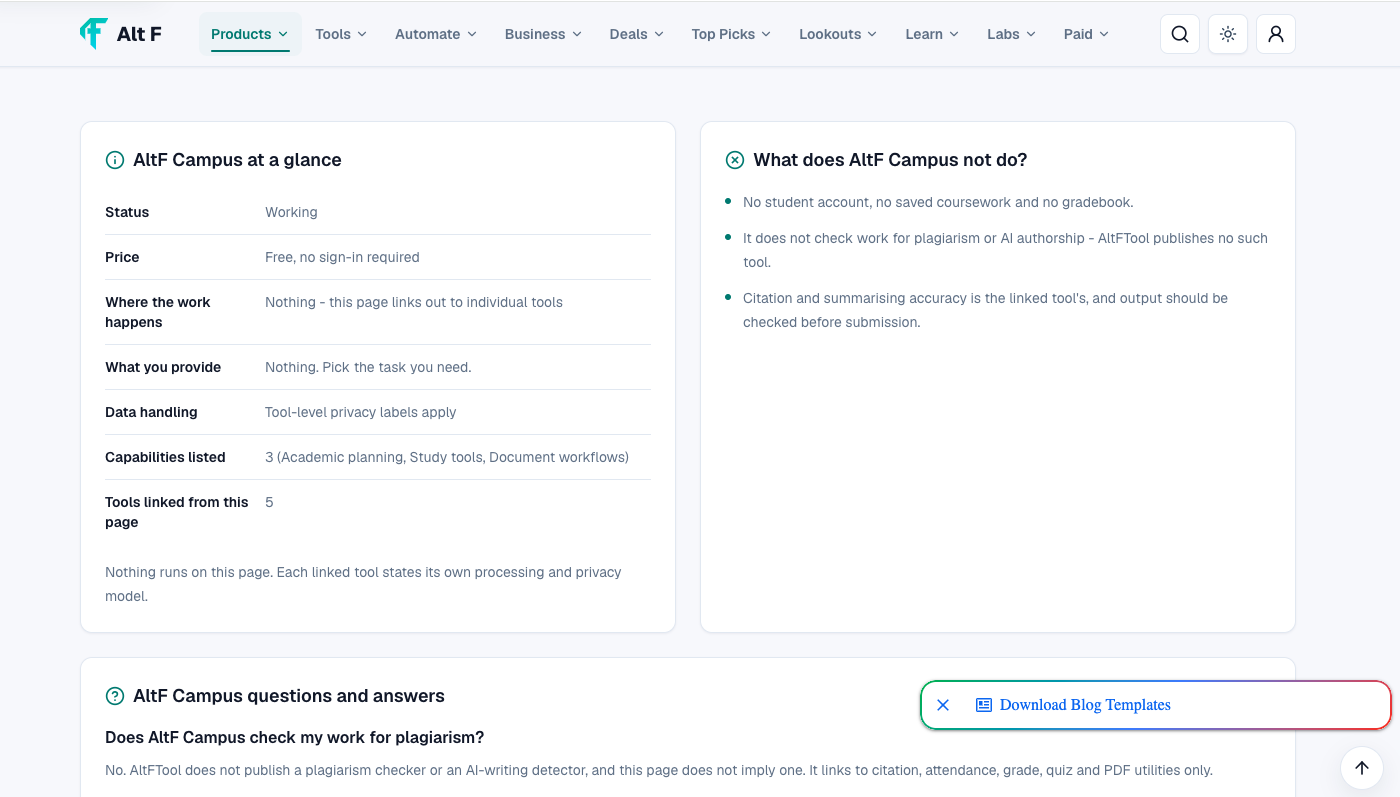
College students often deal with more independent work than they did in school.
There may be fewer reminders about deadlines, more project-based learning, internships, presentations, group assignments, and self-directed study.
This makes organization especially important.
AltF Campus can be useful as a starting point for discovering tools related to:
Academic calculations
Study planning
Productivity
Presentations
Writing
Research
Project work
Everyday student tasks
The right combination depends on the student's course, workload, and personal study style.
AI Tools and Student Work
Artificial intelligence has become increasingly common in education and academic workflows.
AI-powered tools can help students brainstorm ideas, explain difficult concepts, summarize information, generate practice questions, improve drafts, and organize information.
But responsible use matters.
Students should understand their institution's rules regarding AI-assisted work. If an assignment requires independent writing or original analysis, simply generating an answer with AI may not meet the academic requirements.
A better approach is to use AI as a learning assistant.
For example, you can ask for:
An explanation of a difficult concept
Practice questions
A simpler explanation of a topic
Feedback on your draft
Ideas for further research
Then use your own understanding to complete the academic work.
How Students Can Build a Digital Study Toolkit
You do not need dozens of apps.
A simple student toolkit may include tools for a few essential areas.
Area | Purpose |
|---|---|
Study | Learning and revision |
Planning | Managing deadlines |
Grades | Checking academic calculations |
Writing | Drafting and editing |
Research | Finding and organizing information |
Design | Creating presentations |
Productivity | Managing tasks |
Storage | Keeping files organized |
The best toolkit is the one you can actually use consistently.
Important Pointer: Avoid downloading or signing up for a new tool every time you encounter a small problem. First identify the task, then choose the simplest tool that solves it.
Tips for Using Student Tools Effectively
1. Start With the Problem
Do not begin by asking, “Which app should I use?”
Instead ask:
“What am I trying to accomplish?”
Once the task is clear, finding the appropriate tool becomes easier.
2. Keep Your Workflow Simple
If you need five different apps to complete a basic task, your process may be unnecessarily complicated.
3. Check Your Work
Digital tools can make mistakes. Always review important calculations, written assignments, citations, and submitted work.
4. Protect Your Academic Data
Avoid entering sensitive personal information into unknown websites. Pay attention to privacy policies and understand what information a tool requires.
5. Use Tools for Learning
The strongest academic use of technology is not simply finishing assignments faster. It is understanding concepts more clearly and developing better study habits.
Free Student Tools vs Paid Tools
Students often have limited budgets, which makes free online resources especially valuable.
Free tools can handle many everyday requirements, while paid platforms may provide advanced features, higher usage limits, premium templates, or additional functionality.
Free Tools | Paid Tools |
|---|---|
Useful for everyday tasks | Useful for advanced requirements |
Budget-friendly | More premium features |
Good for beginners | Often suited to heavier workloads |
Easy to experiment with | May include additional support |
Often enough for simple tasks | Useful for specialized workflows |
Before paying for a tool, check whether the free version already solves your problem.
AltF Campus for Everyday Student Tasks
The value of a student tool collection is convenience.
Students do not always know what type of digital resource they need. They simply know they have a problem to solve.
Maybe they need to calculate a grade, organize study work, prepare a presentation, or manage an academic task.
A student-focused collection can make discovery easier by bringing relevant categories together.
AltF Campus can therefore act as a starting point for exploring digital resources that support different parts of student life.
Creating a Better Student Workflow
A simple academic workflow can help students stay organized throughout the semester.
Step 1: List Your Responsibilities
Write down classes, assignments, projects, exams, and important deadlines.
Step 2: Prioritize
Identify tasks that are urgent and those that require more preparation time.
Step 3: Choose Your Tools
Use appropriate tools for planning, calculations, writing, research, and design.
Step 4: Create Smaller Tasks
Instead of writing “Complete project,” divide it into research, outline, first draft, editing, design, and final review.
Step 5: Review Progress
At the end of each week, check what has been completed and what needs attention.
This approach can make academic work feel less overwhelming.
Common Mistakes Students Should Avoid
Digital tools are helpful, but they can also become distractions.
Using Too Many Tools
Switching between multiple platforms can create more work instead of reducing it.
Depending Completely on Automation
Students still need to understand their subjects and develop their own skills.
Ignoring Deadlines
A productivity app cannot help if tasks are never reviewed.
Skipping Verification
Always check important information, calculations, and academic content before submitting work.
Choosing Features Over Simplicity
A tool with hundreds of features is not necessarily better for a simple task.
How AltF Campus Fits Into Modern Student Life
Today's students are expected to manage both academic and digital responsibilities. From online classes and electronic submissions to presentations and collaborative projects, technology has become part of everyday education.
The challenge is making technology work for you, rather than allowing it to create additional complexity.
AltF Campus provides a student-focused starting point for exploring tools related to study, grades, planning, productivity, and academic work.
Whether you are preparing for exams, working on a college project, checking grades, or simply trying to organize your semester, the right digital tools can make individual tasks easier to manage.
Quick checklist
Confirm the main goal for altf campus 2026: free student tools for study, grades..
Compare the available options before choosing one workflow.
Use the related AltFTool utilities to finish the task faster.
Who should use Education
AltF Campus 2026: Free Student Tools for Study, Grades. is built for readers who want a faster way to finish everyday web tasks. The main goal is shorter workflows, clearer outputs, and reusable tool habits, so the guide focuses on practical choices instead of broad theory.
Use it when you need one of these outcomes:
- testing a task before choosing a heavier app
- saving time on a repeated browser workflow
- combining a guide with a related AltFTool utility
How to get a better result
- Read the core use case and decide what output you need.
- Open the related AltFTool utility and test it with a small sample.
- Review the result, adjust settings, and repeat only if needed.
- Continue with related tools or guides for the next step in the workflow.
Start small, check the first output, and only then repeat the workflow with the full file, text, media, or game session. That gives you a quick quality check before you spend more time.
Quality checks before you trust the output
- the input is clean before running the tool
- the output matches the format you need
- private details are removed before sharing or downloading
Do not overcomplicate a simple task. Start with the smallest sample that proves the workflow, then scale up once the output looks right.
Continue your workflow
If you want to try the workflow now, open the related AltFTool tool area. For more reading, continue through the Education archive or the AltFTool tools directory.
This creates a cleaner path from explanation to action: read the guide, test the tool, compare the output, and move into the next related AltFTool resource only when it helps the task.
Reader questions
Quick answers
What does "AltF Campus 2026: Free Student Tools for Study, Grades." cover?
Use this how-to guide to understand altf campus 2026: free student tools for study, grades., compare practical options, avoid common mistakes, and move to the
When should I use Education?
Use Education when you need testing a task before choosing a heavier app or saving time on a repeated browser workflow. It is best for shorter workflows, clearer outputs, and reusable tool habits.
How do I get better results from Education?
Start with a small sample, then check that the input is clean before running the tool and the output matches the format you need. Review the output before using it in a final workflow.
Where can I find more Education guides?
Use the AltFTool blog archive, AltFTool tools directory, and related links on this page to explore more Education tutorials, tool workflows, and practical recommendations.
Sources and review notes
References used to check facts, freshness, and reader-safe recommendations in this guide.
Information is based on publicly available details from the official AltFTool AltF Campus page. Features, tools, availability, and usage options may change over time, so users should check the latest product information before use.
- 1AltFTool
altftool.com
Discussion
0 comments
No comments yet
Discussion will appear here once it loads.