Sometimes, the most entertaining online tools are the ones that do not require a complicated setup. You open a webpage, press a few keys, and something interesting happens. A Patatap-style keyboard tool follows exactly this idea by turning your keyboard into an interactive collection of sounds and animations.
Instead of typing a normal message, each keyboard press can trigger a different audio effect and visual response. The experience feels more like playing with a digital instrument than using a traditional website.
Whether you are looking for a quick creative break, experimenting with sound, or simply curious about interactive web tools, this type of keyboard experience offers an easy way to explore audio and animation directly from your browser.
What Is a Patatap-Style Keyboard?
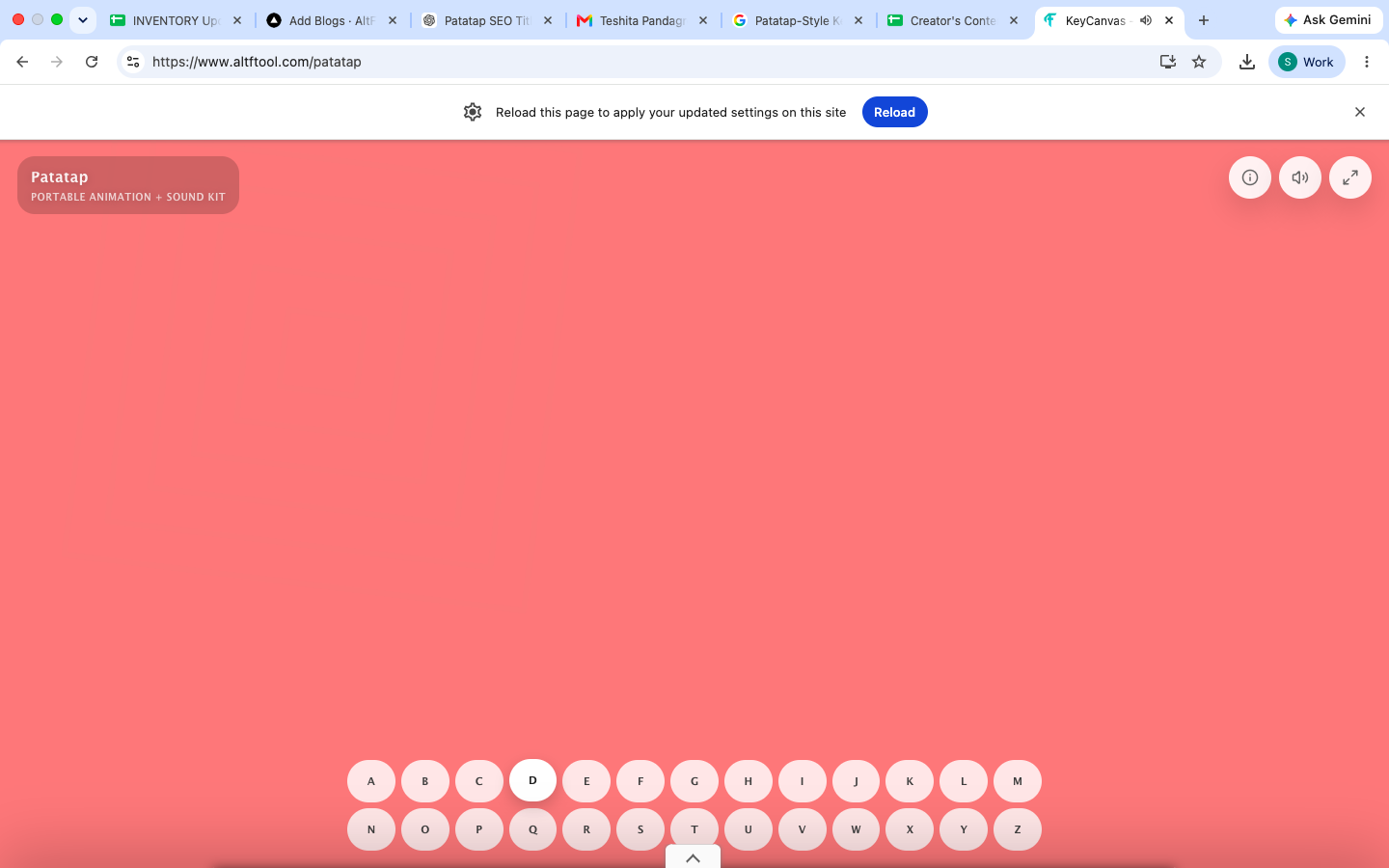
A Patatap-style keyboard is an interactive web-based tool that connects keyboard inputs with sounds and visual animations. When you press different letter keys, the page responds with an audio effect, animation, or combination of both.
The concept is intentionally simple. There is usually no complicated dashboard, editing timeline, or technical setup. The keyboard itself becomes the main control.
This makes the tool easy to explore even if you have never worked with music software, animation programs, or creative coding tools.
How Does It Work?
The basic interaction is straightforward.
Open the tool in your web browser and start pressing the available keyboard keys. Different keys can produce different responses, allowing you to create combinations of sounds and visual effects.
The experience generally follows three simple steps:
Open the interactive keyboard tool in your browser.
Press different keyboard keys to trigger sounds and animations.
Experiment with combinations to discover different audio-visual effects.
There is no need to install traditional desktop software for a quick experiment. The browser handles the interactive experience, making it accessible from a computer with a keyboard.
Why Is It Fun to Use?
The appeal comes from its simplicity. You do not need to understand music production or animation to start experimenting.
Every key press can create an immediate response, which makes the experience feel interactive rather than passive. You can try random keys, repeat sounds, or create your own sequence simply by using the keyboard.
It is also the kind of tool that can be introduced to someone in a few seconds. Instead of explaining complicated controls, you can simply say, "Press a key and see what happens."
Key Features of a Patatap-Style Keyboard
Interactive Keyboard Controls
The keyboard is the main interface. Instead of clicking through multiple menus, users can interact with the experience directly through their computer keyboard.
Sound Effects
Different keys can trigger different sounds. This turns an ordinary keyboard into a simple interactive soundboard.
Visual Animations
Sound is paired with visual movement and effects, giving the experience an additional creative layer. The animations make each interaction more noticeable and engaging.
Browser-Based Experience
A browser-based tool can be accessed quickly without requiring a traditional software installation. This makes it convenient when you want to experiment for a few minutes.
Simple Learning Curve
There are no complicated production controls to learn before getting started. Users can simply press keys and explore the available effects.
Who Can Use This Tool?
A Patatap-style keyboard can appeal to several types of users.
Students can use it as a fun example of how keyboard interaction, sound, and animation can work together on the web.
Content creators may find it useful for exploring creative ideas or understanding how simple interactive experiences can capture attention.
Design and technology enthusiasts can use it as an example of playful web interaction.
Casual users can simply enjoy it as a quick browser-based activity when they want something different from conventional websites.
Patatap-Style Keyboard: Create Sounds & Animations Online is easier when the workflow is broken into clear steps. This guide explains what to check first, how to avoid common mistakes, and where AltFTool can speed up the task.
Before you start
Define the result you want from patatap-style keyboard: create sounds & animations online.
Collect the files, links, or details you need before using a tool.
Check the final output before downloading, sharing, or publishing it.
Step-by-step workflow
Choose the right method. Match the tool or process to the exact task.
Review the settings. Look for quality, format, privacy, and output options.
Save the result. Keep the final file or link in a place you can find later.
Final thoughts
Use this process when you need a fast but careful way to handle patatap-style keyboard: create sounds & animations online. Keep the steps simple, check the source details, and use related AltFTool resources when the task needs a dedicated utility.
Patatap-Style Keyboard for Creative Exploration
Creative tools do not always have to produce a finished product. Sometimes, experimenting is the purpose.
A keyboard sound-and-animation tool gives users a small digital playground where they can test different inputs and immediately see the results. This type of interaction can also help people appreciate how different elements of a website—keyboard events, audio, animation, and visual feedback—can work together.
For beginners, it provides an approachable introduction to interactive digital experiences without requiring knowledge of advanced software.
Can You Use It Without Music Experience?
Yes. You do not need previous music experience to explore a Patatap-style keyboard.
Unlike professional music production software, the experience does not require you to understand musical notation, audio mixing, instruments, or recording techniques. The controls are designed around simple keyboard interactions.
That makes it suitable for someone who simply wants to experiment with sounds without committing to a full music application.
Patatap-Style Keyboard vs. Traditional Music Software
Traditional music software is designed for more detailed work. It can include tracks, instruments, effects, recording controls, editing tools, and mixing features.
A Patatap-style keyboard has a much narrower purpose. It focuses on immediate interaction.
Feature | Patatap-Style Keyboard | Traditional Music Software |
|---|---|---|
Setup | Quick browser access | Usually requires more setup |
Controls | Simple keyboard interaction | Multiple editing controls |
Main focus | Interactive sounds and animations | Music creation and production |
Learning curve | Beginner-friendly | Can require practice |
Visual effects | Interactive animations | Depends on the software |
Best for | Experimentation and fun | Detailed music projects |
The two types of tools are therefore useful for different purposes. A keyboard-based experience is more about immediate interaction, while professional music software is built for creating and editing complete audio projects.
Ways to Experiment With the Tool
The easiest way to explore the tool is to avoid overthinking it.
Start by pressing individual keys and noticing how the sounds and animations change. Then try pressing several keys in sequence. You may discover combinations that create interesting patterns.
You can also experiment with rhythm. Pressing keys at different speeds can change how the experience feels, even when the individual sounds remain the same.
Another simple approach is to let someone else choose the keys. This can turn a basic interactive tool into a small group activity.
Why Interactive Web Tools Are Popular
Interactive websites are different from traditional informational pages because the user becomes part of the experience.
Instead of simply reading text or watching an animation, the visitor provides an input and receives an immediate response. This can make a website feel more memorable.
Keyboard-based interactions are especially convenient because the input device is already available to most desktop users. There is no need to learn a new control system before trying the experience.
Things to Keep in Mind
The experience is primarily designed for interaction and experimentation rather than professional audio production.
If you need advanced recording, multi-track editing, sound mixing, or detailed audio controls, dedicated music software will provide more functionality.
The browser and device you use can also affect how smoothly interactive audio and animations perform. A keyboard-based experience is generally most convenient on a computer rather than a touchscreen-only device.
Quick checklist
Confirm the main goal for patatap-style keyboard: create sounds & animations online.
Compare the available options before choosing one workflow.
Use the related AltFTool utilities to finish the task faster.
The interactive experience can generally be explored directly through a web browser without needing traditional music-production software.
No traditional desktop music application is required for the basic browser-based experience.
Yes. The simple keyboard controls make it accessible to users without previous experience in music or animation.
You can experiment with combinations of keyboard-triggered sounds and visual animations. It is intended more for interactive exploration and entertainment than for producing a complete professional music track.
Who should use Tools
Patatap-Style Keyboard: Create Sounds & Animations Online is built for creators, students, marketers, and support teams preparing visuals quickly. The main goal is cleaner media files, faster publishing, and fewer repeated editing steps, so the guide focuses on practical choices instead of broad theory.
Use it when you need one of these outcomes:
- resizing or compressing files before upload
- cleaning visuals for thumbnails, documents, and social posts
- checking output quality before sharing media publicly
How to get a better result
- Start with the highest-quality original file available.
- Choose the output size, format, or effect based on where the file will be used.
- Preview the result at normal viewing size before downloading.
- Keep the original file until the edited version is approved.
Start small, check the first output, and only then repeat the workflow with the full file, text, media, or game session. That gives you a quick quality check before you spend more time.
Quality checks before you trust the output
- the output dimensions match the platform you plan to use
- text and faces remain sharp after compression or resizing
- private or sensitive media is reviewed before upload
Avoid compressing the same image again and again. Repeated edits can soften details, blur text, and make thumbnails look less trustworthy.
Continue your workflow
If you want to try the workflow now, open the related AltFTool tool area. For more reading, continue through the Tools archive or the AltFTool image and video guides.
This creates a cleaner path from explanation to action: read the guide, test the tool, compare the output, and move into the next related AltFTool resource only when it helps the task.
Sources and review notes
References used to check facts, freshness, and reader-safe recommendations in this guide.
Information for this article is based on the official Patatap-Style Keyboard tool page and publicly available details about its interactive sound and animation features.
- 1AltFTool
altftool.com
Discussion
0 comments
No comments yet
Discussion will appear here once it loads.