Making videos has become a normal part of online life. Some people create Instagram Reels in their free time, while others run YouTube channels, share product reviews, or make videos for their business. Whatever the reason, one thing makes a big difference: good editing. Think about a video where the music is too loud, random clips keep popping up, and the transitions feel awkward. Even if the recording is great, bad editing can make it hard to enjoy. On the other hand, a few simple tweaks can make an ordinary clip look far more polished. That’s the real power of editing, and it doesn’t have to be complicated.
This is why choosing the right video editing tool matters. In 2026, there are plenty of options for both beginners and experienced creators. Some apps let you edit right on your smartphone. Others give you advanced controls for professional projects. With so many choices, it’s easy to feel a bit lost.
But which one should you pick? It depends on what you want to create, how much experience you have, and what your device can handle. Let’s look at what to consider before choosing the best video editing tool in 2026.
Understand What You Actually Need From a Video Editing Tool
Before downloading an app, take a moment to think about your content. There’s no reason to pay for advanced software if you only want to make short videos for social media.
For example, someone making daily Instagram Reels may only need simple trimming, text, music, filters, and transitions. A person making cooking tutorials might need voice recording, subtitles, and the ability to combine several clips.
Things change when you start making longer YouTube videos or professional promotional content.
For Instagram Reels and Short Videos
Short videos usually need quick editing. You may want to cut extra footage, add trending music, insert captions, and switch to a vertical format.
Choose an editor with ready-made templates, easy text placement, transitions, and quick exporting. Mobile apps can be especially handy because you can record, edit, and publish from the same device.
For YouTube Videos
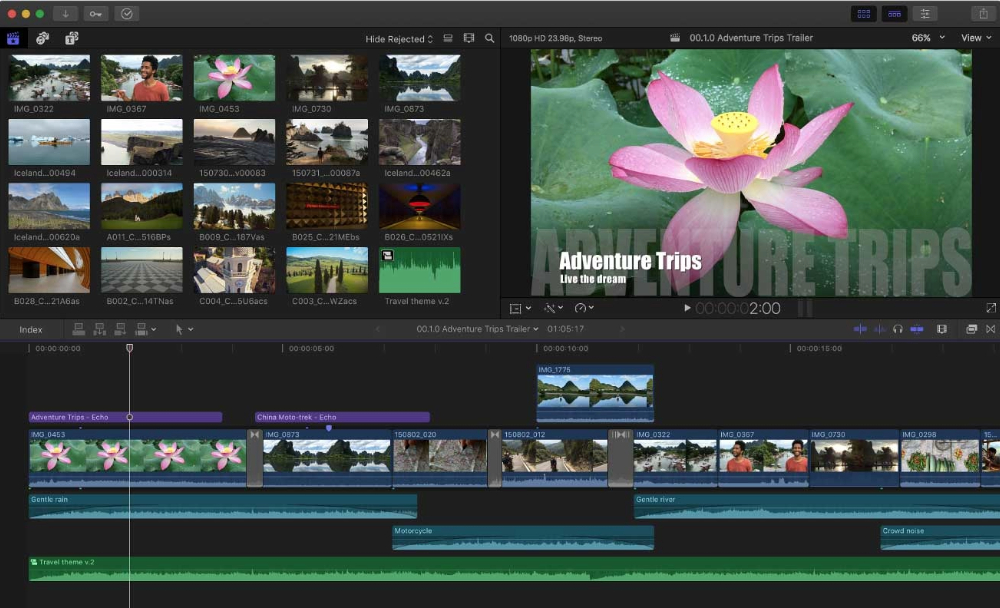
YouTube content often involves more than joining a few clips. You might need to remove pauses, add an intro, adjust voice levels, include images, and create an opening that grabs attention.
Look for software with a flexible timeline, multiple audio tracks, subtitle support, and good export settings.
For Professional Video Projects
If you plan to edit advertisements, business presentations, interviews, or longer productions, advanced features become more important.
Colour correction, audio mixing, motion graphics, and visual effects can help you get the result you need. In this case, desktop software may give you more flexibility than a basic mobile app.
Look for Features That Make Editing Easier
A good editing app should make everyday tasks simple. You don’t need hundreds of complicated features, but a few important tools can save you a lot of time.
Basic Cutting and Trimming
Cutting and trimming are among the first things beginners learn. They help you remove unwanted parts, shorten long recordings, and keep the video focused.
For example, imagine recording a five-minute product demo. You may notice awkward pauses or repeated sentences. A trimming tool lets you remove those parts without recording everything again.
Transitions, Filters, and Effects
Transitions connect one scene to the next. Simple fades, dissolves, and slides can make a video feel smoother.
Filters can also improve how your footage looks, especially when different clips have slightly different lighting.
But using every effect available isn’t a good idea. A simple transition often looks better than a fancy animation between every two clips.
Audio Editing Options
Good sound makes a video easier to watch. Background noise, uneven volume, or music that drowns out the speaker can quickly become annoying.
Choose software that lets you adjust audio levels, remove unwanted sounds, add background music, and improve voice clarity.
These features are useful for interviews, tutorials, cooking videos, and product reviews.
Export Quality
Before choosing an editor, check its export options.
For most creators, 1080p is enough for everyday online content. If you work with high-resolution footage, 4K export may be worth considering.
Also check the supported video formats and whether the free version adds a watermark. These small details can be really frustrating when you’re ready to publish.
Explore Popular Video Editing Tools in 2026
There are several video editing apps worth exploring. Each has its own strengths, and the right choice depends on your experience and the kind of projects you handle.
CapCut
CapCut is a convenient option if you enjoy making short videos. It offers trimming, transitions, text overlays, filters, templates, and automatic captions.
Beginners can explore the interface without needing much editing knowledge. It works especially well for Instagram Reels, YouTube Shorts, and other social media content.
One thing to check is feature availability. Some options and pricing may differ depending on your device and region.
Adobe Premiere Pro
Adobe Premiere Pro is made for people who want more control over their projects.
It offers detailed timeline editing, audio adjustments, colour correction, visual effects, and integration with other Adobe creative apps.
It’s a good option for professional creators, but beginners may need some time to understand the interface. The subscription cost is also something to think about before you buy.
DaVinci Resolve
DaVinci Resolve is known for its colour grading and professional editing abilities.
It brings editing, visual effects, colour correction, and audio post-production together in one app. Its free version has many useful tools, which makes it attractive if you want to improve your editing skills.
That said, it has a learning curve. Check your computer’s specifications before installing it, especially if you plan to edit high-resolution footage.
iMovie
iMovie is a straightforward choice for people who use Apple devices.
It offers basic editing, titles, transitions, music, and video adjustments. You can use it for family videos, travel memories, school assignments, and simple social media projects.
It’s easy to get started with, though creators working on complicated productions may eventually need more advanced software.
Should You Choose Free or Paid Video Editing Software?
This is one of the most common questions beginners ask. Spending money on software doesn’t automatically make your videos look better.
Free apps can handle many everyday editing needs. Paid software usually offers more features, greater flexibility, and sometimes better support.
Features | Free Tools | Paid Tools |
|---|---|---|
Basic editing | Available | Available |
Transitions | Basic options | More choices |
Templates | Often limited | Often more options |
Advanced effects | May be limited | More extensive |
Export options | May have restrictions | Often more flexible |
Customer support | Varies | Often additional support |
When Free Tools Are Enough
If you’re just starting out, free software is a sensible place to begin.
You can practise joining clips, adding subtitles, adjusting music, and making short videos without worrying about monthly payments.
For instance, a college student preparing a presentation or someone making their first YouTube video can often finish the project with free features.
When Paid Tools Make Sense
Paid software becomes useful when you regularly work on complicated projects or need specific professional features.
Before buying, compare subscription plans and check whether the features you need are included. Look at renewal charges, free trial conditions, and cancellation policies too.
There’s no need to pay for features you’re unlikely to use.
Check Whether the Software Works With Your Device
A video editor may look impressive, but it doesn’t help much if it keeps freezing on your computer or phone.
Before installing anything, check the minimum system requirements. Processor, RAM, graphics support, operating system, and available storage can all affect performance.
Editing Videos on a Smartphone
Mobile editing is great when you like working on the go. It’s convenient for short videos, daily content, and quick social media updates.
Choose an app with simple controls, easy file importing, and suitable export options. Remember that longer videos and high-resolution recordings can take up a lot of storage.
Editing Videos on a Laptop or Desktop
A computer gives you more screen space, which makes working with several clips easier.
If you often edit longer videos, look for software that supports multiple tracks and runs comfortably on your hardware.
Keeping enough free storage is also important. Video projects, exported files, and original recordings can fill up a drive quickly.
See How AI Features Can Help With Video Editing
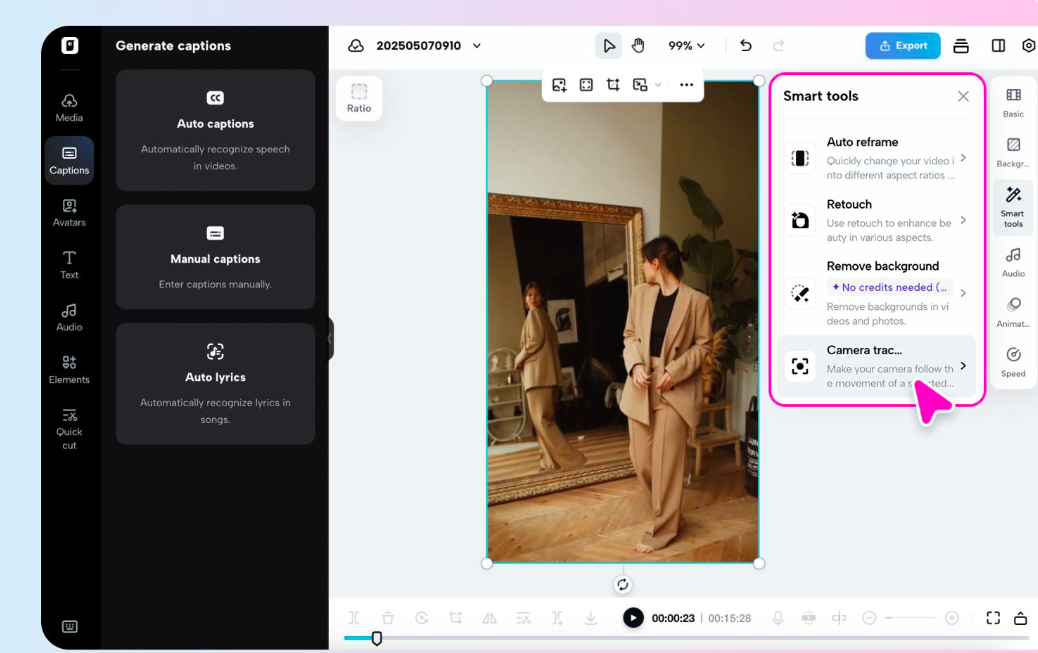
AI video editing tools have made some tasks much easier. Instead of spending time on every small adjustment, you can let automated features handle the repetitive work.
Automatic Captions
Adding subtitles by hand can take a long time, especially when a video has several minutes of conversation.
Automatic caption tools can create subtitles from spoken words. This is useful for social media videos, interviews, and educational content.
Still, don’t publish captions without checking them. Names, unusual words, and Indian regional accents may sometimes be picked up wrong.
Background Removal
Some AI-powered apps can remove or replace video backgrounds.
This can be helpful for product demos, online lessons, and promotional videos, without needing a complicated background setup.
Audio Enhancement
Recording outdoors or in a busy room doesn’t always give clean sound. AI audio tools can help reduce background noise and make speech clearer.
These features are useful, but they shouldn’t replace checking the final audio yourself.
Don’t Ignore Ease of Use and Learning Support
An editing app should feel manageable, especially while you’re still learning.
Look for a clean interface, clearly labelled tools, helpful tutorials, and simple controls. You should be able to find basic functions without digging through endless menus.
A practical way to test software is to make a short video with five or six clips. Add a title, include background music, remove extra footage, and export the result.
This small exercise will tell you more about the software than just reading its feature list.
If the process feels comfortable, you can slowly explore the more advanced options.
Read Reviews Before Making Your Final Choice
Software descriptions usually highlight the best features, but real users can tell you about everyday problems.
Before choosing a tool, read recent customer reviews. Pay attention to comments about performance, crashes, export restrictions, subscription costs, and customer support.
Also check whether the developer updates the app regularly. Updates can bring useful improvements and fix existing problems.
Try a free version or trial whenever you can. Spending a little time testing an app can save you from paying for software that doesn’t suit you.
Common Mistakes Beginners Should Avoid
Many beginners believe professional-looking videos need expensive software. In reality, learning the basics matters much more than buying a complicated app.
Don’t choose software just because it’s popular. Check whether it supports your device and has the features you actually need.
Another mistake is adding too many effects. Too many transitions, filters, and animations can make a video look messy. Clear footage, understandable sound, and a sensible sequence usually give a better viewing experience.
Finally, don’t forget to save your original recordings and project files. A backup can save you from losing hours of work if something goes wrong.
Final Thoughts
Finding the right video editing software takes a little time, but you don’t have to make it complicated. Start with your content needs, check your device compatibility, and compare the features of different apps.
CapCut and iMovie are worth exploring if you prefer simple editing. DaVinci Resolve offers more advanced creative controls, while Adobe Premiere Pro suits creators who need a professional editing environment.
My suggestion is to start with a free tool and make a few small projects before spending money. You’ll slowly understand which features are useful and where you need more control.
After all, the best video editing tool isn’t necessarily the one with the longest feature list. It’s the one that helps you turn your ideas into videos you’re happy to share.
Video editing tools help users cut, trim, arrange, and improve video clips.
CapCut, Clipchamp, and iMovie are beginner-friendly options.
Yes, many free tools offer useful editing features for everyday video projects.
Yes, beginners can create quality videos by learning basic editing techniques.
DaVinci Resolve, Adobe Premiere Pro, and Filmora are popular choices.
Sources and notes
Links the author listed for this post.
This article uses information from official software websites, product features, and trusted technology resources to explain video editing tools and their benefits for beginners.
- 1

Discussion
0 comments
No comments yet
Discussion will appear here once it loads.