Starting a business is exciting, but turning an idea into a proper online store can feel like a big task. There are products to manage, customers to reach, payments to handle, and orders to keep track of. For someone doing all of this for the first time, it can quickly become confusing.
This is where Shopify makes things easier.
Shopify is an e-commerce platform that helps people create online stores and manage their businesses from one place. Whether someone wants to sell handmade products, clothing, beauty items, electronics, or digital products, the platform provides tools to build a shopping website and handle important business activities.
What makes Shopify interesting is that it is not only designed for large companies. Small business owners, independent sellers, growing brands, and established retailers can all use its tools according to their needs.
Instead of spending too much time figuring out how to build an online store from scratch, business owners can focus more on their products, customers, and daily operations.
1. What Is Shopify and How Does It Work?

Shopify is a commerce platform that allows businesses to sell products online and in physical stores. It provides website-building tools, payment features, product management, order tracking, and other services that support everyday business activities.
Think of it as a digital shop where a business owner can display products, set prices, receive customer orders, and manage sales.
The basic process is quite simple:
Create an account and choose a suitable plan.
Select a website theme that matches the business.
Add products, photographs, prices, and descriptions.
Set up payment and shipping options.
Customise the store to match the brand.
Launch the website and start attracting customers.
The best part is that users do not necessarily need advanced coding knowledge to build a functional online store. Shopify provides ready-made themes and customisation tools to make the process more approachable.
2. Build an Online Store Without Making Things Complicated
Creating an online store can sound difficult, especially for someone who has never worked with website development. Shopify makes the process more manageable through its online store builder.
Users can choose a design, arrange different sections, upload product images, and customise the appearance of their website.
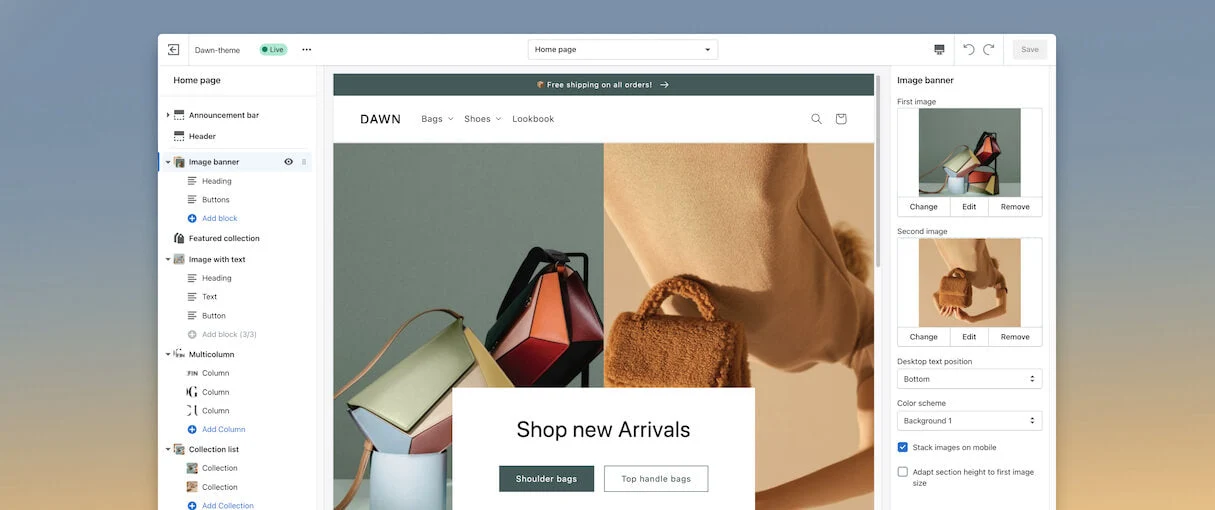
For example, someone starting a clothing business may want a clean website with large product photographs, easy category navigation, and a simple checkout experience. A bakery owner might prefer a colourful design that highlights cakes, pastries, and special offers.
Shopify gives businesses room to create a store that reflects their own identity.
Important Store-Building Features
Ready-made themes: Choose from available website designs.
Customisation options: Adjust colours, layouts, images, and sections.
Product pages: Display photographs, prices, descriptions, and product variations.
Mobile-friendly designs: Make shopping easier on smartphones and tablets.
Navigation menus: Help visitors find products without getting lost.
Custom domain support: Give the store a recognisable website address.
A well-organised website can make a customer's shopping experience smoother and help a new business look more professional.
3. Product Management: Keep Everything Organised
Imagine running a store with 100 different products. Each item may have different sizes, colours, prices, and stock quantities. Keeping track of everything manually can become tiring.
Shopify provides product management tools that help store owners organise their catalogue and maintain product information.
What Can Businesses Manage?
Product names and descriptions
Product photographs and videos
Prices and available stock
Sizes, colours, and other variations
Product categories and collections
Inventory quantities
Product availability across sales channels
For example, an online footwear store can list sneakers in different sizes and colours. Customers can select their preferred option while the seller manages the available stock.
Product Detail | How It Helps |
Product Name | Makes items easy to identify |
Product Images | Helps customers understand the product |
Price | Shows the cost clearly |
Product Variants | Organises sizes, colours, and styles |
Inventory | Helps monitor available stock |
Description | Explains features and product details |
Keeping product information accurate is important because customers want to know exactly what they are purchasing.
4. Payment Processing and a Smooth Checkout Experience
Imagine a customer spending ten minutes selecting products, adding them to the cart, and preparing to place an order. If the checkout process feels confusing, they may simply leave the website.
That is why payment and checkout features matter so much in online shopping.
Shopify provides checkout tools that help businesses accept customer payments through supported payment providers and available payment methods.
Depending on the country, plan, and payment provider, customers may be able to use options such as:
Credit and debit cards
Digital wallets
Supported online payment services
Other available local payment methods
Why Does Checkout Matter?
A good checkout experience should be:
Simple to understand
Easy to navigate
Clear about the total price
Convenient on mobile devices
Transparent about shipping and applicable charges
Shopify also offers Shopify Payments in supported countries. Where it is unavailable, merchants may need to connect an eligible third-party payment provider.
For Indian businesses, it is especially important to check payment gateway availability, supported currencies, transaction fees, and settlement conditions before choosing a setup.
5. Shopify Helps Businesses Sell Through Different Channels
Today's customers do not always shop from one place. Someone might discover a product on social media, visit the brand's website later, and eventually purchase it through another shopping channel.
Shopify supports businesses that want to reach customers through different selling channels.

Depending on the available integrations and account setup, businesses can connect their stores with:
Social media platforms
Online marketplaces
Their own e-commerce websites
Physical retail stores
Supported shopping and discovery channels
For example, a skincare business may display its products on its website while also promoting them through social media. This gives customers different ways to discover the same brand.
Online Selling vs In-Store Selling
Online Store | Physical Store |
Customers shop through a website | Customers visit the shop |
Orders arrive digitally | Sales happen at the counter |
Products are displayed online | Products are displayed physically |
Payments happen through online checkout | Payments happen through POS |
Orders can be shipped to customers | Products can be handed over directly |
With Shopify POS, businesses can also connect their physical retail operations with their online store.
6. Shopify Point of Sale (POS): Connecting Online and Offline Shopping
Not every business operates only through the internet. Many brands have physical shops, temporary stalls, showrooms, or retail outlets alongside their websites.
Shopify POS, also known as Point of Sale, helps businesses manage in-person sales while keeping their retail operations connected with their online store.
With Shopify POS, eligible businesses can manage activities such as:
Processing in-store purchases
Managing customer information
Checking product availability
Tracking orders and sales
Managing inventory across locations
Handling supported returns and exchanges
Reviewing sales reports
For example, imagine a clothing brand selling through its website and a physical shop. When a customer purchases a shirt in the store, the business can manage that sale through its POS system.
This makes it easier to keep online and offline activities connected rather than treating them as completely separate businesses.
7. Marketing Tools That Help Businesses Reach Customers
Building a beautiful online store is one thing. Getting people to visit it is another challenge.
Even a great product needs visibility. Customers must discover the brand, understand what it offers, and have a reason to explore its products.
Shopify offers different marketing tools that help business owners promote their stores and connect with potential customers.
Some Marketing Activities Businesses Can Explore
1. Email Marketing
Businesses can use email marketing to share product updates, promotional messages, announcements, and other information with customers.
2. Search Engine Optimisation (SEO)
SEO helps improve how a store's pages appear in search engines. Product titles, descriptions, page structure, and other website elements can support better search visibility.
3. Social Media Marketing
Businesses can connect their stores with supported social media channels and use those platforms to introduce products to a wider audience.
4. Discount Codes and Offers
Special discounts, seasonal promotions, and selected offers can encourage customers to explore products and complete purchases.
5. Customer Engagement
Businesses can use customer information and available marketing tools to create more relevant communication.
The important thing to remember is that marketing tools can support business growth, but results still depend on product quality, audience interest, pricing, competition, and marketing strategy.
8. Shopify App Store: Add More Features to Your Business
Every business has different requirements. A clothing store may need size and colour management, while a subscription business may need recurring billing features.
Shopify understands that one standard setup cannot cover every business requirement. That is why it offers an app ecosystem where merchants can explore additional tools.
The Shopify App Store includes apps for different business activities.
App Category | Purpose |
Marketing | Promote products and reach customers |
Customer Support | Manage customer questions and communication |
Store Design | Add extra design and customisation features |
Inventory | Support stock tracking and management |
Shipping | Help organise deliveries and fulfilment |
Reviews | Display customer feedback |
Subscriptions | Manage recurring product orders |
Analytics | Understand store performance |
Why Are Shopify Apps Useful?
They can add features that are not included in a basic store setup.
They help businesses organise specialised activities.
They can reduce repetitive manual work.
They allow store owners to customise their business operations.
However, not every app is necessary. Some apps have additional charges, so it is better to choose tools based on actual business needs rather than installing everything available.
9. Shopify Analytics: Understand What Is Happening in Your Store
Running an online store without checking its performance is a little like driving without looking at the road.
You may be getting visitors, but are they purchasing anything? Which products are selling well? Are customers returning? These are the kinds of questions business owners need to understand.
Shopify provides analytics and reporting features that help merchants review their store's performance.
Important Things to Monitor
Total sales: Understand how much revenue the store generates.
Orders: Track the number of purchases received.
Best-selling products: Identify items that customers purchase frequently.
Customer activity: Understand shopping patterns.
Conversion rate: See how many visitors complete a desired action.
Traffic sources: Learn where store visitors come from.
Inventory performance: Keep an eye on product availability.
For example, if a business notices that one product receives plenty of attention but very few purchases, it may need to review the price, product photographs, description, or checkout experience.
These insights can help business owners make more informed decisions instead of relying entirely on guesswork.
10. Shopify for Small Businesses, Startups and Growing Brands

One of Shopify's major strengths is that it serves businesses at different stages.
A person starting a small online business does not have the same requirements as an established company managing several retail locations. Shopify offers different plans, features, and integrations to support different business needs.
Here is how different types of businesses may use the platform:
Business Type | How Shopify Can Help |
Startups | Create a first online store |
Clothing Brands | Display fashion collections and sizes |
Beauty Businesses | Organise skincare and beauty products |
Handmade Sellers | Showcase unique handmade items |
Electronics Stores | Manage product listings and stock |
Established Retailers | Connect online and physical sales |
Growing Brands | Add tools and expand selling channels |
A Practical Example
Suppose someone wants to start selling handmade candles.
Initially, they may have only five or six products. They can create a simple online store, upload product photographs, write descriptions, and set prices.
As the business grows, they may want to introduce new fragrances, offer gift collections, run promotional campaigns, and manage more customer orders.
Shopify gives them a platform where they can develop their store as their business requirements change.
11. Shopify Pricing: What Should Business Owners Know?
Choosing an e-commerce platform is also a financial decision. Before starting, business owners should understand how much they may need to spend on the platform and its additional services.
Shopify offers different subscription plans designed for different business requirements.
The main plan options include:
Plan | Generally Designed For |
Basic | Individual entrepreneurs and new businesses |
Grow | Small teams and growing businesses |
Advanced | Businesses with more advanced operational needs |
Plus | Larger and more complex businesses |
The actual subscription price depends on the selected billing cycle, country, promotional offers, and plan availability.
Other Expenses to Consider
Apart from the subscription, businesses may also need to budget for:
Domain registration
Premium website themes
Paid applications
Payment processing charges
Shipping and packaging
Marketing and advertising
Custom website development, if required
It is worth remembering that choosing the most expensive plan does not automatically make a business successful.
A small store may be perfectly comfortable with a basic plan, while a larger business may require more advanced features.
The sensible approach is to understand current needs first and upgrade when there is a genuine reason.
12. Shopify and AI: Making Store Management Smarter
Artificial intelligence is becoming an important part of online business management. Shopify has also introduced AI-powered capabilities to support merchants with different store-related tasks.
One example is Shopify Sidekick, an AI-powered assistant designed to help merchants work with their Shopify business.
Depending on available features and access, AI tools can support activities such as:
Generating product descriptions
Creating marketing content
Understanding store information
Exploring business insights
Getting help with store management tasks
Finding ways to improve daily workflows
For someone managing several business activities alone, these features can save time on certain repetitive tasks.
However, AI-generated content and recommendations should always be reviewed before use. Product information, prices, policies, and customer-facing messages need to be accurate.
13. Advantages of Using Shopify
Every e-commerce platform has its own strengths, and Shopify offers several features that make it attractive to business owners.
Here are some important advantages:
Beginner-friendly setup: Ready-made themes and store-building tools make it easier to get started.
Multiple selling channels: Businesses can reach customers through supported online and physical sales channels.
Product management: Sellers can organise products, variations, and stock information.
Payment options: Businesses can connect supported payment solutions.
App integrations: Additional applications help customise store functionality.
Business insights: Analytics and reporting help merchants understand performance.
Room to grow: Different plans and features support businesses as their requirements change.
Retail support: Shopify POS connects eligible in-person sales with online business operations.
These features can make everyday store management more organised, particularly for businesses that want several commerce activities connected.
14. Things to Consider Before Choosing Shopify
Although Shopify offers plenty of useful features, it is important to understand that no platform is perfect for every business.
Before subscribing, business owners should consider a few practical points.
Monthly subscription: Choose a plan that fits your current budget.
Additional expenses: Paid themes and apps can increase the overall cost.
Payment availability: Check which payment providers work in your country.
Transaction charges: Understand applicable payment processing and third-party provider fees.
Customisation requirements: Advanced designs may require additional technical work.
App compatibility: Check whether the apps you need work with your store and plan.
Business policies: Understand your responsibilities for taxes, returns, shipping, and customer data.
A little research before starting can help avoid unexpected expenses later.
15. Is Shopify a Good Choice for Starting an Online Business?

For someone who wants to start selling online without building an entire e-commerce system from scratch, Shopify can be a useful option.
It brings website creation, product management, checkout, payments, marketing, and business reporting together. This can make the early stages of running an online store feel more manageable.
However, choosing the right platform depends on the type of business, available budget, expected sales, and required features.
Before making a decision, it is worth comparing the available plans and understanding the costs involved.
16. Building an Online Business with Shopify
Starting an online business takes more than simply putting products on a website. It requires planning, customer understanding, product management, marketing, and consistent effort.
Shopify brings many of these activities together through one commerce platform. From creating an online store and managing products to accepting payments and tracking sales, it provides tools that can support businesses at different stages.
What makes Shopify interesting is its flexibility. A beginner can start with a simple store, while an established retailer can explore more advanced features as its operations grow.
It is not a shortcut to business success, and simply opening a store does not guarantee sales. Product quality, customer service, pricing, and marketing still matter.
But for entrepreneurs and businesses looking for a structured way to sell online and in person, Shopify offers a practical starting point for building and managing a digital shopping experience.
Frequently Asked Questions
Shopify helps people create online stores, sell products, accept payments, and manage orders without building an entire website from scratch.
Yes, Shopify is beginner-friendly, with ready-made themes and simple store-building tools that make starting an online business easier.
Yes, businesses can sell internationally using supported markets, currencies, shipping options, and payment providers, depending on their setup.
Yes, Shopify offers different subscription plans, and the cost depends on the selected plan, billing cycle, and additional services.
Yes, Shopify provides tools for marketing, inventory, payments, and sales tracking that can support a business as it grows.
Sources and review notes
References used to check facts, freshness, and reader-safe recommendations in this guide.
This article is based on information from Shopify's official website, including its ecommerce features, online store creation tools, payment solutions, sales channels, and business management services.
- 1Shopify (opens in a new tab)
shopify.com
Discussion
0 comments
No comments yet
Discussion will appear here once it loads.